Overview
This page explains what the Profit/Loss number means on a project, and how to read it with confidence. It’s designed for quick decision-making: “Are we still on track?” and “If not, what is causing the problem?”
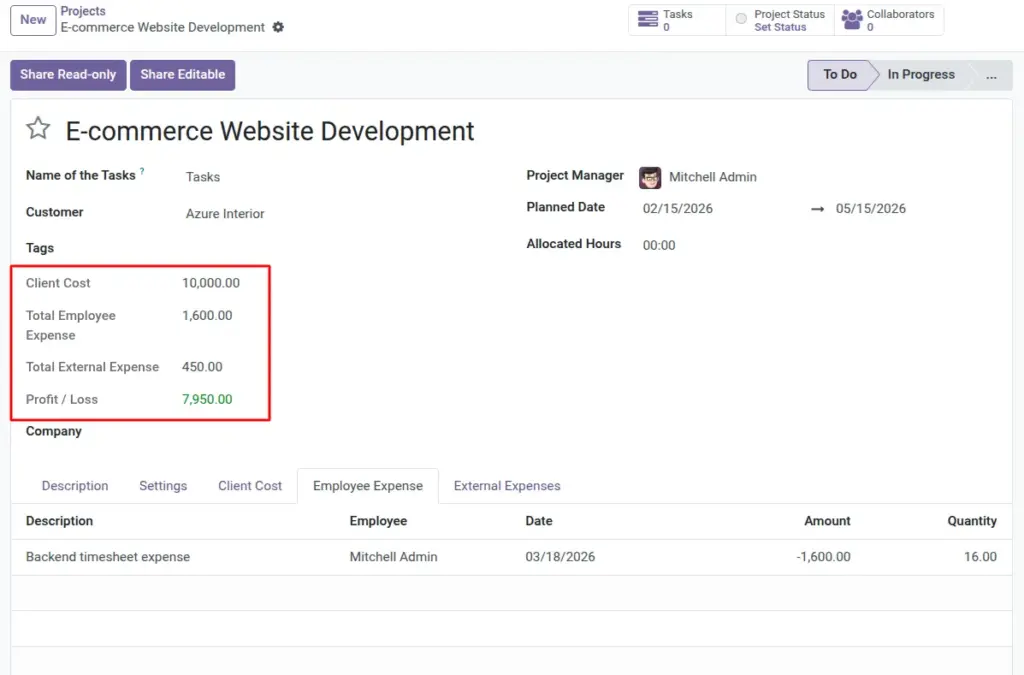
On a Project (usually for Administrators), the module shows totals that come from three places: paid client payments you record, employee time cost pulled from timesheets, and external expenses. The Profit/Loss result updates as these inputs change.
Real-life example: you receive a milestone payment but forget to mark it Paid—profit looks low. After you update the status, Profit/Loss reflects the true situation right away.
How it works
The calculation
Profit/Loss = Paid client payments − (employee time cost + external expenses).
What increases profit
- Paid client payments marked as “Paid” under Client Costs
What reduces profit
- Employee time cost pulled from timesheets
- External expenses linked to the project
Step-by-step guide
Open your project
Go to Projects and open the project you want to review.
Review the totals
Look for totals like Client Cost, Employee Expense, External Expense, and Profit/Loss.
Open the supporting tabs
Use the tabs inside the Project to confirm the supporting entries: Client Cost, Employee Expense, and External Expenses.
Decide what to do next
If profit is negative, check whether payments are still Unpaid, time cost has grown, or external expenses were added.
Fields table
| Field Name | Description | Example |
|---|---|---|
Paid client payments |
Total of Client Cost entries that are marked as “Paid”. |
Advance $5,000 + final $5,000 = $10,000 revenue |
Employee time cost |
Total cost pulled from timesheets for this project. |
Timesheet cost totals $2,250 |
External expenses total |
Sum of external expenses linked to the project. |
Hosting $150 + tools $300 = $450 |
Profit/Loss |
The result after subtracting time cost and external spend from paid client payments. |
$10,000 − ($2,250 + $450) = $7,300 profit |
Field name explanations
Paid client payments
This is your “money in”. If a payment is not marked as Paid yet, it won’t be counted here.
Employee time cost
This comes from timesheets. Missing timesheets usually make this number look smaller than reality.
External expenses total
This is everything you paid outside the team’s time: vendors, subscriptions, travel, and similar items.
Profit/Loss
Positive means you’re making money. Negative means costs have passed paid revenue (or revenue is still marked Unpaid).
Tips
- Review “Paid” status weekly: profit can look worse than reality if payments are logged but left as Unpaid.
- Use tabs as evidence: when someone asks “why is profit low?”, open the project tabs and point to the exact entries.
- Keep expenses linked correctly: one wrong project link can distort results.
Common mistakes
- Expecting unpaid payments to count: only Client Cost entries marked “Paid” are counted as revenue.
- Forgetting timesheets: missing timesheets make employee cost look too low.
- Recording unclear external expenses: later, you won’t know what the cost was for.
Image