Learn where everything lives inside the Advance Dashboard app.
Overview
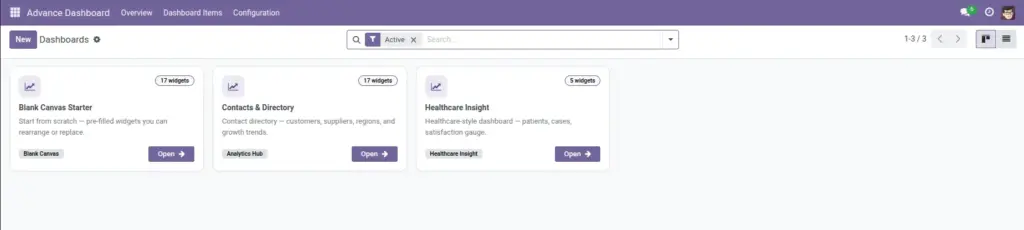
Once Advance Dashboard is installed, you will see a new app called Advance Dashboard on your Odoo home screen. This app is your central hub for viewing, building, and managing all your dashboards.
The app has three main areas: Overview (your dashboard list), Dashboard Items (individual widgets – managers only), and Configuration (import tools – managers only).
How It Works
Think of Advance Dashboard like a photo album app on your phone. The Overview screen shows all your albums (dashboards). When you open one, you see the photos inside (widgets – charts, numbers, and tables). Managers can also go to Dashboard Items to edit individual photos, or Configuration to import albums shared by others.
Step-by-Step Guide
Open the App
- From the Odoo home screen, click the Advance Dashboard icon.
Overview Screen
- You see a list of all dashboards you have access to. Each row shows the dashboard name, layout style, number of widgets, and default date period.
Open a Dashboard
- Click a dashboard row, then click the Open Dashboard button to see it live with charts and numbers.
Dashboard Items (Managers)
- From the left menu, click Dashboard Items to see every widget across all dashboards. Useful for finding and editing a specific chart.
Configuration (Managers)
- Click Configuration → Import Dashboard to upload a dashboard shared as a JSON file.
Menu & Screen Reference
| Menu / Screen | Description | Example |
|---|---|---|
Overview |
List of all dashboards you can open |
“Sales Performance”, “HR Overview” |
Open Dashboard |
Button that launches the live interactive view |
Click to see charts update in real time |
Dashboard Items |
List of all widgets (charts, tiles, tables) |
“Monthly Revenue” bar chart widget |
Import Dashboard |
Upload a shared dashboard file |
Import a JSON file from a colleague |
Print PDF |
Save the dashboard as a PDF document |
Email a monthly report to your boss |
Send Email |
Email the dashboard PDF directly from Odoo |
Send to the sales team every Monday |
Export JSON |
Download the dashboard layout as a file |
Share with another Odoo database |
Duplicate |
Create a copy of the dashboard to customise |
Copy “Sales” dashboard for the EU team |
Field Explanations
Overview
Your starting point. Shows every dashboard shared with you. Click any row to see details or open it.
Open Dashboard
The main action button. Opens the full-screen interactive dashboard where you can change date filters, click charts, and use TV mode.
Dashboard Items
A master list of widgets. Each widget belongs to one dashboard. Managers use this to find and edit widgets without opening each dashboard individually.
Import Dashboard
Lets managers upload a dashboard file (.json) that was exported from another Odoo system or shared by a colleague.
Print PDF
Creates a printable PDF snapshot of the dashboard. Great for reports, meetings, or archiving.
Send Email
Opens a wizard to email the dashboard PDF to one or more recipients directly from Odoo.
Export JSON
Downloads the dashboard structure (layout + widget settings) as a JSON file. Does not include your actual business data – only the dashboard design.
Duplicate
Creates an exact copy of the dashboard with all its widgets. Rename and customise the copy without affecting the original.
Tips
- Use the search bar on the Overview screen to quickly find a dashboard by name.
- Drag the handle on the left of each row to reorder dashboards in the list.
- If you only need to view dashboards, you only need the Overview screen – everything else is for managers.
Common Mistakes
- Looking for “Dashboard Items” when you only need to view – go to Overview and click Open Dashboard instead.
- Not seeing Configuration menu – this is only visible to users with Manager permission.
- Confusing “Export JSON” with “Print PDF” – JSON is for moving layouts between systems; PDF is for human-readable reports.
Image