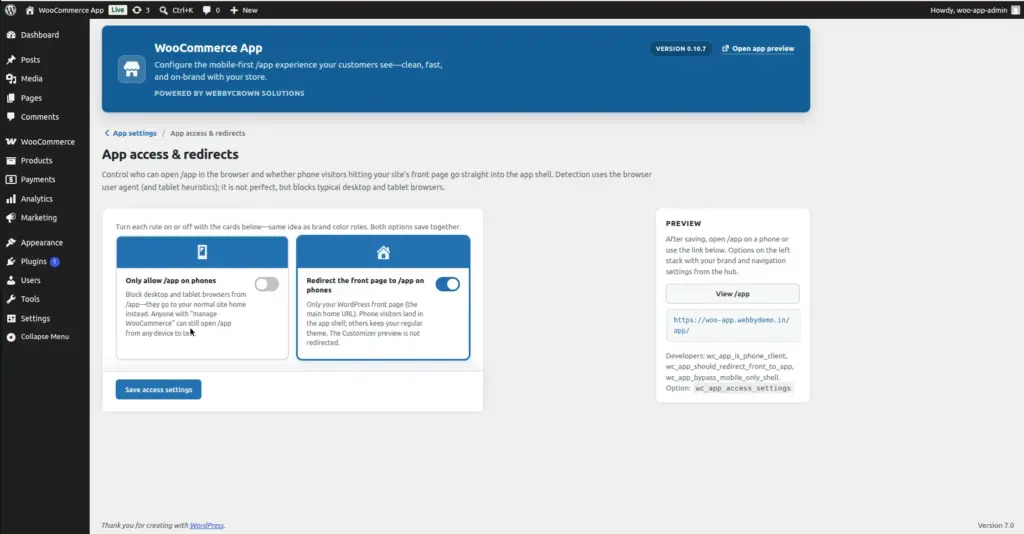
Control who can open your mobile store. You can restrict /app to mobile phones only, or automatically redirect mobile visitors from your homepage to /app.
Where to Find It
Location: Go to WooCommerce → App and click “Access” on the hub page. Or go to WooCommerce → App → Access directly.
All Access Settings Explained
| Setting | What It Does | Default |
|---|---|---|
Mobile-Only Mode |
When ON, only visitors on phones can access /app. Tablet and desktop users are redirected away. |
Off (everyone can access /app) |
Home Redirect |
When ON, mobile visitors who go to your homepage are automatically redirected to /app instead. |
Off (homepage stays as normal) |
Mobile-Only Mode
When Mobile-Only Mode is turned on, the plugin detects whether the visitor is on a phone (not a tablet or computer). If they are on a desktop or tablet, they will not be able to access /app – they are redirected away.
When to use Mobile-Only Mode
- If your /app experience is specifically designed for phones and looks odd on large screens
- If you want desktop users to always use your regular website instead of the /app version
Tablets are excluded from “phone” detection. Tablet users (iPad, Android tablet) are treated separately and are NOT considered phones – they will be redirected in Mobile-Only Mode.
1. Go to WooCommerce → App → Access
Open the Access settings page.
2. Turn on "Mobile-Only" toggle
Click the toggle to enable mobile-only access. It will turn green/active.
3. Save Settings
Click Save. From now on, only phone users can open /app.
Home Redirect
When Home Redirect is enabled, mobile visitors who go to your main website homepage (yoursite.com) are automatically sent to yoursite.com/app instead. Desktop visitors see the regular homepage as usual.
Real-world example: A customer types your website address on their phone. Instead of seeing your regular desktop-style homepage, they land directly on the clean mobile app experience. This creates a seamless, app-like feel from the very first visit.
Make sure your /app homepage is fully configured before enabling Home Redirect. If /app is not working correctly, mobile visitors who land on your homepage will see a broken experience.
Tips
- For most stores, leave all Access Settings at their default (off) – your /app is public and works for everyone, which is what you want.
- Enable Home Redirect only after your /app experience is fully designed and tested – it affects every mobile visitor to your homepage.
- Enable Mobile-Only Mode when your /app design is phone-specific and looks broken on tablets or desktops. Tablet users are not counted as phones and will also be redirected if this mode is on.
Image