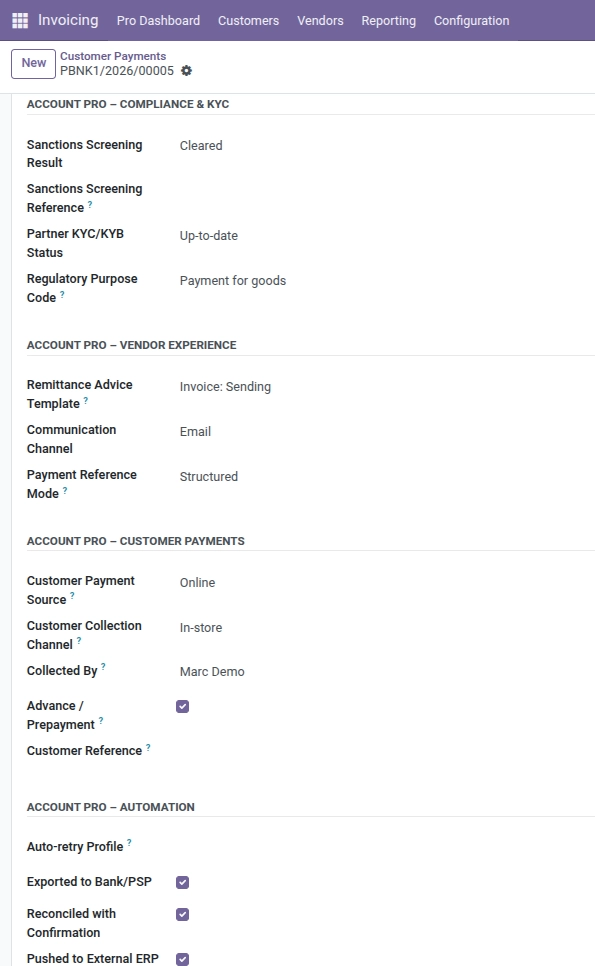
Store sanctions and KYC outcomes on outbound wires, tune remittance emails, and describe inbound customer money clearly.
Overview
This chapter covers three optional areas: Payment compliance & KYC, Vendor & customer experience, Customer payments, and Automation & integration. Together they close the loop between compliance, AR communication, and IT status.
How it works
Sanctions and KYC fields describe results already obtained from your screening tool or bank portal – Odoo stores the outcome for audit. Customer payment fields only matter for inbound receipts; automation flags help technical teams know whether a file was exported or reconciled with extra evidence.
Step-by-step guide
- After screening a beneficiary, set Sanctions screening result to Cleared, Hit, or Pending review.
- Store the vendor’s screening ticket in Sanctions screening reference.
- Update Partner KYC/KYB status when your onboarding file changes.
- Pick the correct Regulatory purpose code for cross-border wires (goods vs services, etc.).
- For vendor payments, choose Remittance advice template, Communication channel, and Payment reference mode (structured vs free text).
- For customer receipts, set Customer payment source (online, bank, cash, check, POS, other).
- Add Customer collection channel (store, ecommerce, subscription, marketplace, partner).
- Select the employee in Collected by when a rep brought in a check or cash.
- Tick Advance / prepayment when money arrives before an invoice exists.
- Capture the shopper’s reference in Customer reference.
- Use automation fields (Auto-retry profile, Exported to Bank/PSP, Reconciled with confirmation, Pushed to external ERP) exactly as your runbook defines.
Fields table
| Field name | Description | Example |
|---|---|---|
Sanctions screening result |
Outcome of watch-list screening. |
Pending review while compliance checks a near match. |
Sanctions screening reference |
Ticket or batch ID from the screening system. |
“SWIFT-SCR-889221.” |
Partner KYC/KYB status |
Whether the counterparty’s onboarding file is current. |
Expired – refresh before next large wire. |
Regulatory purpose code |
Standard code describing why money crosses borders. |
“Payment for services.” |
Remittance advice template |
Email/PDF template for supplier remittance notices. |
“Standard remittance with PO table.” |
Communication channel |
How the counterparty should receive remittance info. |
EDI to their treasury workstation. |
Payment reference mode |
Whether the bank reference must follow a structured format. |
Structured for SEPA QR bills. |
Customer payment source |
How the customer actually paid. |
Bank transfer. |
Customer collection channel |
Commercial channel generating the receipt. |
eCommerce checkout. |
Collected by |
Internal user who registered or collected the funds. |
Field sales agent Ana. |
Advance / prepayment |
Checkbox when cash is received before billing. |
Ticked for a 30% project deposit. |
Customer reference |
External reference from the payer (portal ID, order ID). |
“WEB-ORDER-55412.” |
Auto-retry profile |
Text code describing retry timing if a digital payment fails. |
“3x / 24h / escalate finance.” |
Exported to Bank/PSP |
Checkbox once a payment file or API call succeeded. |
Ticked after upload to corporate banking. |
Reconciled with confirmation |
Checkbox when reconciliation used an extra proof (signed PDF). |
Ticked after matching signed customer remittance. |
Pushed to external ERP |
Checkbox when another system received this payment. |
Ticked after successful SAP feed. |
Field explanations
Each item matches one row in the table above, in the same order.
Sanctions screening result
Cleared, Hit, or Pending review from your watch-list screening. Store the real outcome; do not guess, because auditors compare this to the screening provider’s log.
Sanctions screening reference
The ticket, batch, or case ID returned by the screening tool so anyone can trace the decision back to the vendor’s system.
Partner KYC/KYB status
Whether the counterparty’s know-your-customer file is up to date, expired, or still pending. Treasury may block wires when this says Expired.
Regulatory purpose code
The allowed reason code for cross-border payments (goods, services, payroll, etc.). Must match what your bank file format expects or the batch may reject.
Remittance advice template
Which email/PDF template Odoo should use when sending remittance details to the supplier so branding and tables stay consistent.
Communication channel
How remittance information should reach the counterparty (email, portal only, EDI, none). Align with what the beneficiary can actually receive.
Payment reference mode
Whether the payment reference must follow a structured format (e.g. SEPA) or can be free text, per the vendor’s bank instructions.
Customer payment source
The physical or logical channel the customer used (online, bank transfer, cash, check, POS, other). Helps AR explain inbound cash.
Customer collection channel
The commercial channel that produced the receipt (store, ecommerce, subscription, marketplace, partner). Helps marketing and finance without rebuilding data from web shops.
Collected by
The internal user who registered or physically collected the money (useful for cash, checks, or field sales).
Advance / prepayment
Tick when the customer paid before an invoice existed; helps downstream billing and revenue recognition discussions.
Customer reference
The payer’s own reference (portal payment ID, web order number, etc.) so automated matching to sales orders is easier.
Auto-retry profile
A short code naming your retry policy for failed digital collections (how many tries, spacing, escalation). Your IT or payments team defines what each code means.
Exported to Bank/PSP
Tick after the payment file or API call to the bank or PSP succeeded, so nobody double-sends the same instruction.
Reconciled with confirmation
Tick when reconciliation was done using an extra proof (signed PDF, email confirmation) beyond the normal bank feed match.
Pushed to external ERP
Tick when another system (SAP, NetSuite, etc.) has successfully received this payment record, for integration runbooks.
Tip: When Advance / prepayment is ticked, add the project or order name in Customer reference so billing later is painless.
Common mistake: Marking Sanctions screening result as Cleared without attaching or storing the reference – regulators expect a traceable ID.
Image