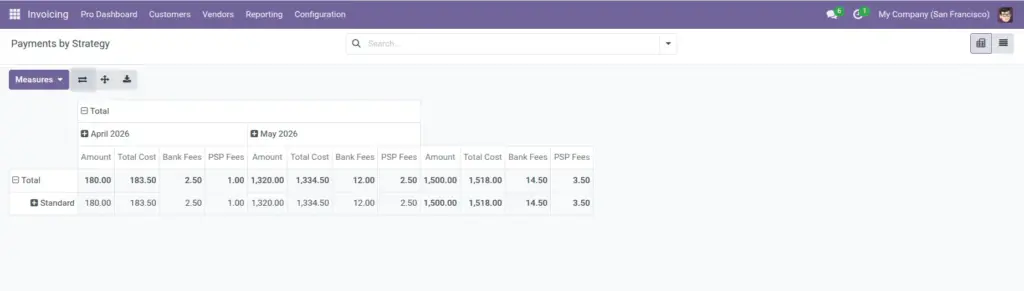
Use Accounting’s standard menus plus Accounting Pro shortcuts to slice invoices, payments, and bank accounts by the new fields.
Overview
Beyond the Pro Dashboard, the module adds pivot views and menu shortcuts (exact names depend on your localization). Typical examples: invoices grouped by Risk level, payments grouped by Treasury bucket, and bank accounts grouped by KYC status.
How it works
Pivot views let you drag dimensions such as month, partner, risk, or fulfillment priority and measure amounts still due, totals, or days overdue. Saved actions apply filters – for example “High-risk unpaid invoices” opens only posted, partially unpaid documents with risk High or Blocked.
Step-by-step guide
- From Accounting, locate the Reporting or Pro-specific submenu your consultant activated.
- Open a saved list such as Invoices by risk level or Payments by treasury bucket.
- Switch to Pivot view to compare months side by side.
- Use the search bar’s Group By options for credit-control status or fulfillment priority when enabled.
- Drill into a cell to open the underlying invoices or payments.
- Favorite useful combinations with Odoo’s star icon so your personal dashboard remembers them.
Fields table
Reports read the same fields documented elsewhere; below is how they behave inside analytics.
| Field / concept | Description in reporting | Example |
|---|---|---|
Risk level (invoice) |
Row or column dimension to count exposure by policy band. |
Pivot: unpaid amount by risk level for board pack. |
Credit-control status |
Groups invoices for weekly credit committee deck. |
List of all “Over limit” invoices still shipping. |
Fulfillment priority |
Shows whether rush invoices concentrate in one sales team. |
Pivot: rush vs normal by salesperson. |
Days overdue |
Measure column to highlight aging severity beyond simple due dates. |
Average days overdue for VIP customers. |
Treasury bucket (payment) |
Groups outbound/inbound flows for liquidity planning. |
Bar chart of payroll vs supplier spend. |
Payment strategy |
Compares spend under urgent vs low-cost strategies. |
80% of urgent payments happen in last week of month. |
Total cost (payment) |
Measures principal plus fees/landed cost for true cash impact. |
Compare total_cost vs amount to see fee drag. |
KYC status (bank) |
Lists partner banks needing renewal before next audit. |
Filter: Expired KYC this quarter. |
Field explanations
Each item matches one row in the table above, in the same order.
Risk level (invoice)
Lets pivots and lists slice open AR/AP by your policy bands (Low through Blocked). Requires users to maintain the field on invoices; empty risk collapses useful charts.
Credit-control status
Groups invoices by credit-team states (within limit, over limit, exception approved, etc.) for committee packs and exception tracking.
Fulfillment priority
Shows whether operational rush work concentrates on certain customers, products, or teams when used as a pivot dimension next to salesperson or product.
Days overdue
Stored numeric severity of lateness on each invoice. Lets you average or bucket overdue depth, not only count late bills.
Treasury bucket (payment)
Aggregates cash movements by the treasury pool labels you assigned on payments, for liquidity and forecast slides.
Payment strategy
Compares volume or value under each strategy (urgent vs low-cost, etc.) so you can see behaviour patterns across months.
Total cost (payment)
Uses amount plus landed cost or amount plus fee lines-one measure column for “true outflow” or margin drag in pivots and exports.
KYC status (bank)
Filters or groups partner bank cards by verification state so renewals and audit prep can list only Expired or Not started records.
Tip: Combine Pro pivots with Odoo’s spreadsheet export (if installed) to refresh CFO slides without manual copy/paste.
Common mistake: Expecting charts to show new dimensions when historical rows were never tagged – backfill important fields before presenting trends to management.
Image