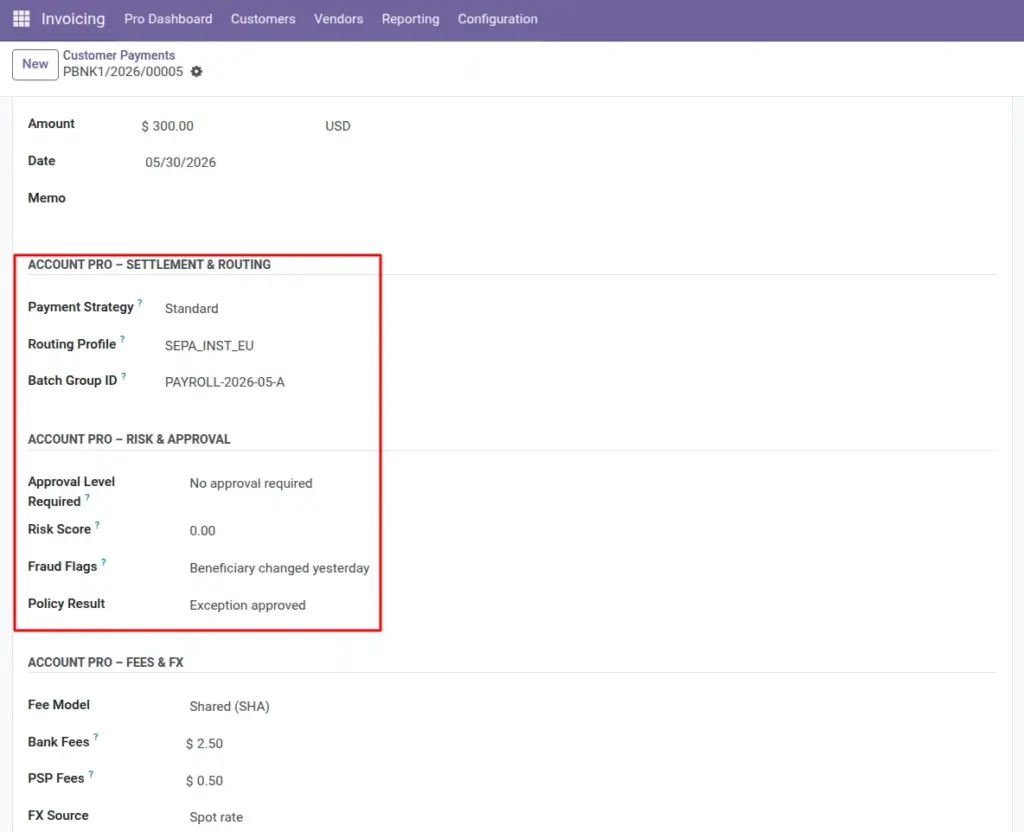
Describe the game plan for each payment – speed vs cost, which rail to use, batch grouping, and how far up the org chart approval must go.
Overview
With Settlement & routing and Risk & approval enabled, every customer receipt or supplier payment can carry structured metadata. Treasury teams use it to sort files sent to banks; auditors use it to prove controls existed before funds moved.
How it works
Payment strategy points to a company list (standard, low-cost, urgent, etc.). Routing profile is free text or a code your bank file generator understands. Approval level required links to thresholds your admin configured.
Step-by-step guide
- Create or open a payment in Accounting.
- Choose the Payment strategy that matches today’s goal (example: lowest fee vs same-day).
- Type the Routing profile code your bank integration expects (SEPA, SWIFT, local ACH, etc.).
- If this payment belongs to a payroll or tax run, enter the shared Batch group ID.
- Set Approval level required based on amount and policy (your rules decide which level).
- Enter or confirm the Risk score if your process computes one externally.
- Use Fraud flags for short reminders (“new IBAN”, “split payment pattern”).
- Record the outcome in Policy result once compliance signs off.
Fields table
| Field name | Description | Example |
|---|---|---|
Payment strategy |
Company-defined approach for processing this payment. |
“Urgent same-day” for a critical supplier. |
Routing profile |
Code or label describing which path or rule-set picks the bank account or PSP. |
“SEPA_INST_EU”. |
Batch group ID |
Shared text linking many payments exported together. |
“PAYROLL-2026-05-A”. |
Approval level required |
Minimum approval step required before release. |
“CFO” level for payments over €100k. |
Risk score |
Numeric score from your risk engine or manual assessment. |
7.2 on a 0–10 scale. |
Fraud flags |
Short text or comma-separated keywords highlighting concerns. |
“Beneficiary changed yesterday.” |
Policy result |
Structured outcome of your payment policy checklist. |
“Cleared after dual control.” |
Field explanations
Each item matches one row in the table above, in the same order.
Payment strategy
Chooses a company-defined strategy (standard processing, low cost, urgent, scheduled, etc.). Treasury or AP uses it to decide how aggressively to route or time the payment.
Routing profile
A code or label your bank file or workstation uses to pick rails, beneficiary format, or bank account. It does not send the wire by itself; it tells automation or humans which template applies. Keep codes short and documented.
Batch group ID
Shared text across many payments that belong in one export file or one approval packet (payroll run, tax batch, supplier campaign). Makes searching and support easier.
Approval level required
The minimum approval step (from your list) that policy says this payment needs before release. Often tied to amount, country, or vendor risk in your internal rules.
Risk score
A number from your risk engine or a manual judgment. The field only stores the value-it does not calculate it unless another system feeds it in.
Fraud flags
Short keywords or phrases about concerns (new IBAN, split pattern, high-risk country). Intended for quick scanning in list views, not long narratives.
Policy result
The final outcome of your payment policy checklist (cleared, rejected, needs more documents, etc.). Should reflect the completed decision, not the initial request.
Tip: Re-use the same Batch group ID prefix each month (e.g. TAX-Q1-2026) so support can search all related payments quickly.
Common mistake: Copying free-text essays into Fraud flags – keep it to a few keywords your monitoring tool or humans can scan in a list view.
Image