Decide how you speak with each customer, how strongly you chase payment, and when automatic reminders should skip an invoice.
Overview
When your administrator enables Customer & communication in Accounting Pro settings, customer invoices and vendor bills gain extra fields about payment chasing and contact style. This helps accounts receivable treat each customer consistently without keeping notes in spreadsheets.
How it works
You fill these fields on the invoice form (usually under Other info or a dedicated Accounting Pro tab, depending on your screen layout). Collection strategy reads from a maintained list (for example Standard, Soft dunning, Strict dunning). Odoo can still send standard emails; these fields describe your policy for humans and connected apps.
Step-by-step guide
- Open a customer invoice that is still relevant for payment chasing.
- Choose a Communication profile that matches how formal or multi-channel your outreach is.
- Set the Preferred communication channel your customer actually reads (email, portal, SMS, or a combination).
- Pick a Collection strategy agreed with your credit manager.
- If legal or relationship reasons require manual follow-up only, tick Exclude from auto-reminders.
- Use Collection notes for short internal sentences (“Call CFO before second reminder”).
- Optionally capture a Customer PO / contract bundle reference when one invoice covers several purchase orders.
- Save the invoice.
Fields table
| Field name | Description | Example |
|---|---|---|
Communication profile |
High-level style for how this invoice should be handled in customer contact (standard vs portal vs SMS mix). |
“Email + Portal + SMS” for a digitally savvy buyer. |
Preferred communication channel |
The channel your team should try first when sending documents or reminders. |
Portal only for a customer who ignores email. |
Collection strategy |
Link to your company’s predefined dunning style for this invoice. |
“Strict dunning” after two late payments. |
Exclude from auto-reminders |
Checkbox: when ticked, automated reminder batches should skip this invoice (manual handling). |
Ticked during a goodwill dispute on one line item. |
Collection notes |
Free text instructions visible to finance and sales support. |
“Customer pays on 45-day terms by exception – see credit letter 12/2025.” |
Customer PO / contract bundle |
One reference that groups several PO numbers or framework agreements. |
“FRAME-2026-A + PO 441–448.” |
Field explanations
Each item matches one row in the table above, in the same order.
Communication profile
Describes the overall package of how you talk to this customer (standard vs portal vs SMS combinations). It is broader than a single channel: it signals the whole pattern your team should follow.
Preferred communication channel
The first channel to try for this invoice (email, portal, SMS, or combined). Use it together with the profile when policy says, for example, “portal first, then SMS after 48 hours.”
Collection strategy
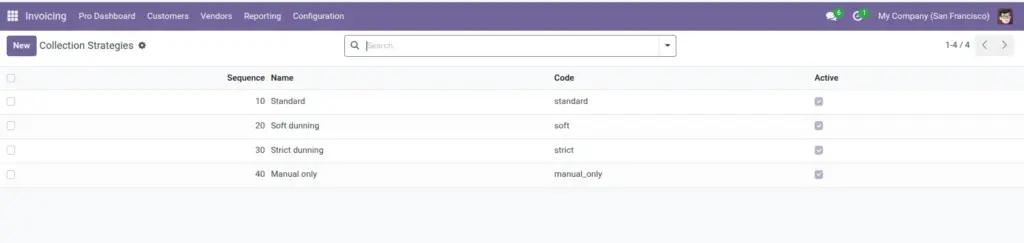
Points to a list your administrator maintains (soft dunning, strict dunning, manual only, etc.). Pick the closest standard option so reporting stays consistent instead of writing free text each time.
Exclude from auto-reminders
When ticked, automated reminder batches should skip this invoice. It also feeds dashboard-style counts of “excluded” documents so managers see how many exceptions exist.
Collection notes
Short internal instructions for AR (“call before second letter”, “legal hold on line 2”). Keep them brief so mobile users and new staff can act on them quickly.
Customer PO / contract bundle
One text field to reference several customer PO numbers or a framework agreement that this single invoice covers, so matching and disputes are easier later.
Tip: For government or hospital customers, combine “Manual only” strategy with “Exclude from auto-reminders” so polite legal review happens before any automated ping.
Common mistake: Writing long essays in Collection notes. Keep 1–3 short sentences so mobile users can read them quickly.
Image