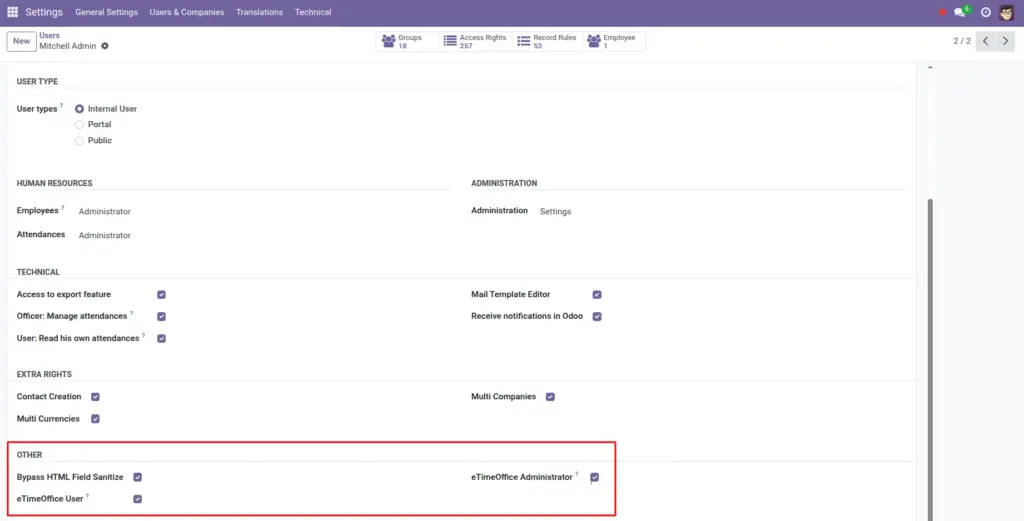
Treat Corporate ID, username, and password like keys to your building-not like a normal app preference.
Overview
The eTimeOffice fields on Odoo’s settings screen are the same credentials eTimeOffice gave you so automated systems can download punch data. Anyone who can change them can also break sync for the whole company or, in the worst case, misuse access if they copied the values outside Odoo.
How it works
Only people in the eTimeOffice Administrator group should open the integration block routinely. Odoo stores the values as system parameters; they are not meant to be emailed around in spreadsheets. When someone with HR admin rights leaves the company, rotate the eTimeOffice API password with your vendor, then update Odoo the same day.
Step-by-step guide
- Decide exactly two or three named roles (for example “HR Systems Owner”) who may know the live API password.
- Enter credentials only while logged in as a trusted administrator; avoid shared generic logins if your policy allows named accounts.
- After any staff change who had access, change the eTimeOffice password at the vendor, then update Odoo and run Test Connection.
- Never put Corporate ID or password into ticket emails or chat; send “we rotated the password” and update Odoo yourself.
- Audit once a quarter: open Settings → Users and confirm only expected people still carry eTimeOffice Administrator.
Fields table
| Field name | Description | Example |
|---|---|---|
Corporate ID |
Public-looking label that still identifies your tenant to eTimeOffice-protect it like a username. |
Stored only in Odoo settings, not in email |
Username |
API user issued by eTimeOffice; often not the same as a person’s daily web login. |
One service-style user per company |
Password |
Secret paired with the API user; changing it requires updating Odoo the same hour. |
Rotated when an admin leaves |
Active (integration) |
Turning this off stops sync but does not erase stored secrets-still limit who can open the form. |
Off during vendor pen-tests |
Field explanations
Corporate ID
Not a “display only” field; it is part of what proves who you are to the API. Store it only in Odoo and your secure password manager, not in chat logs.
Username
Prefer a dedicated API user from eTimeOffice instead of a person’s daily web login, so you can rotate or disable it without locking someone out of their mailbox.
Password
The secret for that API user. Changing it at eTimeOffice without updating Odoo breaks every sync until both sides match again.
Active (integration)
Stops scheduled and manual pulls from running, but does not erase saved credentials-anyone with settings access can still read them, so group membership still matters.
Watch out: Screen sharing or training recordings: blur the eTimeOffice block before recording, because passwords can appear in replay even if typed quickly.
Common mistakes
- Giving eTimeOffice Administrator to many people “just in case”-it widens who can export or screenshot credentials.
- Leaving the same API password for years because “it still works”-rotation after role changes is cheap insurance.
Image