Break big tasks into smaller pieces and schedule each sub-task on the Gantt chart.
Overview
Large tasks are easier to manage when split into sub-tasks. Each sub-task can have its own assignee, dates, and bar on the Gantt chart. This chapter explains how parent and child tasks appear on the timeline, how to open a sub-task Gantt, and how to group work by parent task.
How It Works
In Odoo Project, a parent task can have multiple sub-tasks linked under it. On the Gantt:
- Each sub-task needs its own Planned Start and Planned End to show as its own bar.
- The main Tasks Gantt shows tasks where Display in Project is enabled – some sub-tasks may be hidden from the main project list by design.
- From a parent task, you can open a Sub-tasks view that includes the Gantt mode – showing only that parent’s children.
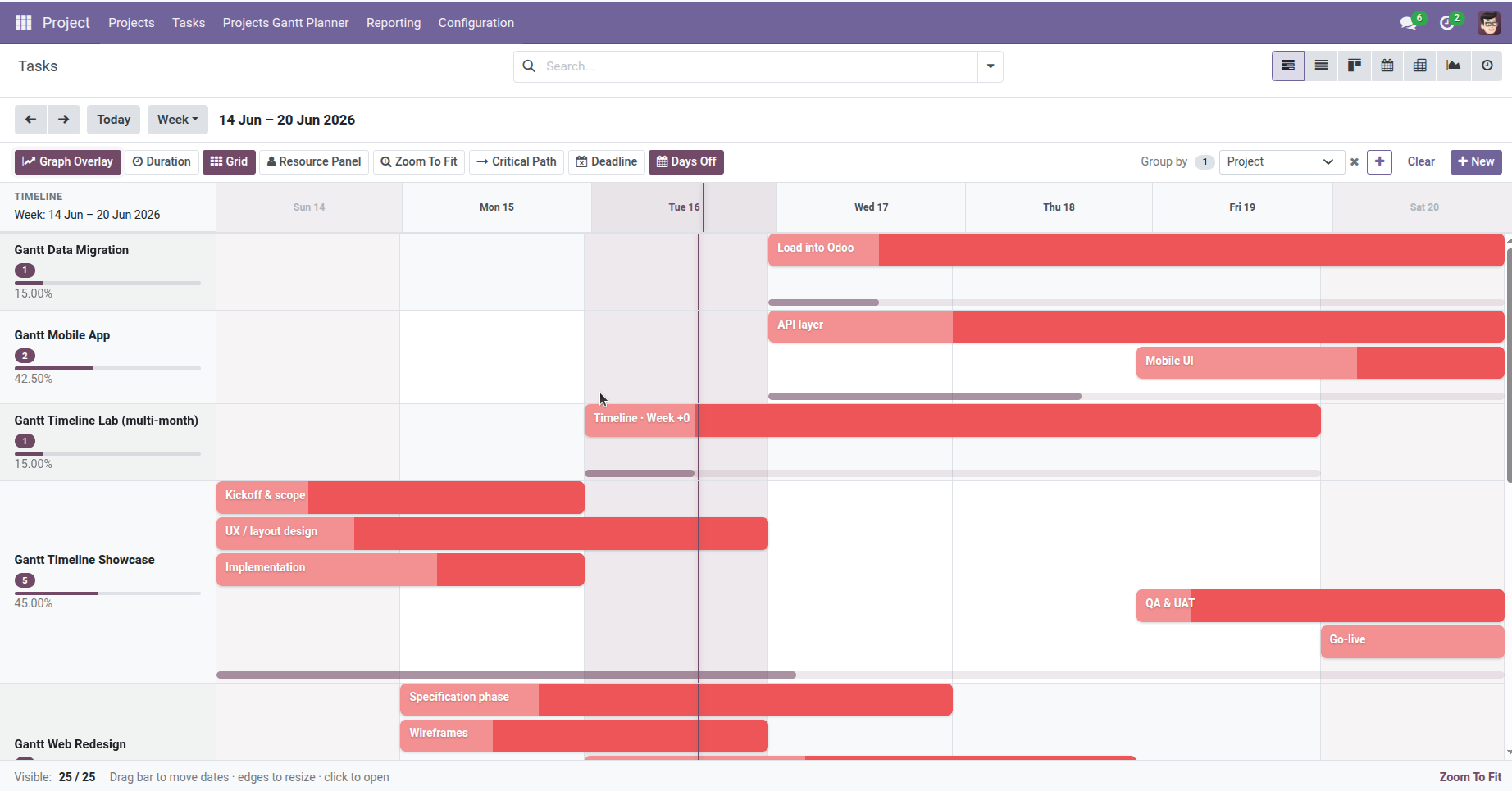
- Use Group by → Parent Task on the main Gantt to nest sub-tasks visually under their parent rows.
- Dependencies (Blocked by) work between sub-tasks and parent tasks the same as normal tasks.
Opening sub-tasks from a parent uses the standard Project Sub-tasks smart button or action. The Gantt view is available there alongside List and Kanban.
Step-by-Step Guide
Create sub-tasks under a parent
- Open a task that represents a phase or summary – for example, Website Launch.
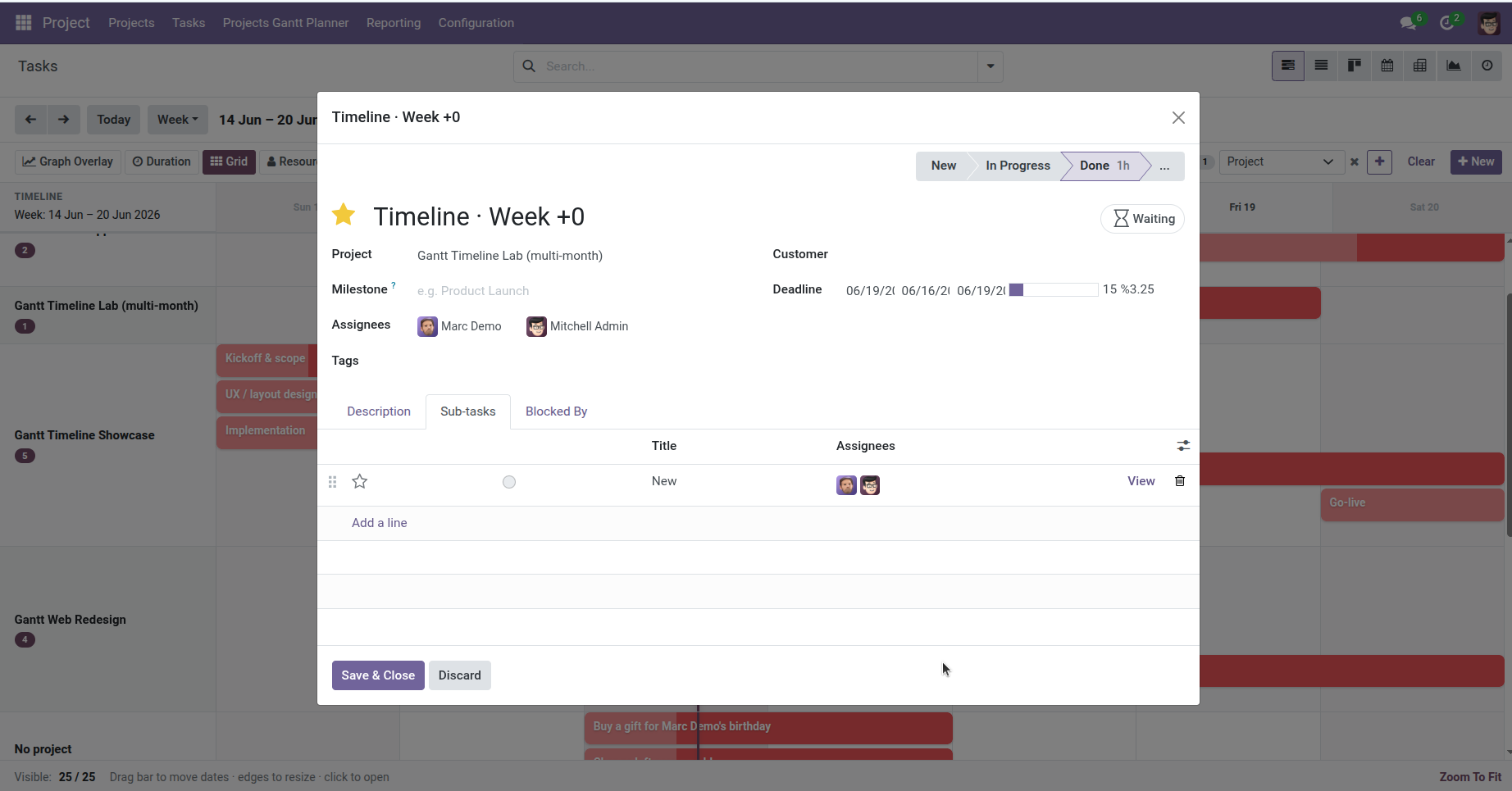
- On the task form, find the Sub-tasks tab or section.
- Add sub-tasks such as Design mockups, Build pages, and QA testing.
- On each sub-task, set Planned Start and Planned End (or deadline and allocated hours for auto-fill).
- Assign team members to individual sub-tasks if needed.
Open the sub-task Gantt from a parent
- Open the parent task form.
- Click the Sub-tasks smart button (shows the count of children).
- In the view switcher at the top right, click the Gantt icon.
- You now see a timeline of only that parent’s sub-tasks – ideal for detailed planning.
- Drag bars to reschedule sub-tasks without noise from the rest of the project.
See sub-tasks on the main project Gantt
- Open Project → Projects Gantt Planner → Tasks.
- Filter to your project using the search bar.
- Confirm each sub-task has Display in Project checked if you want it on the main chart.
- In the toolbar Group by panel, set Level 1 to Parent Task.
- Sub-tasks appear grouped under their parent task name on the left sidebar.
Link sub-tasks in order
- Open the second sub-task (e.g., Build pages).
- In Blocked by, add the previous sub-task (Design mockups).
- Repeat for the chain – design → build → QA.
- On the Gantt, enable dependency arrows in Settings and turn on Critical Path in the toolbar to validate the sequence.
Fields Table
| Field Name | Description | Example |
|---|---|---|
Parent Task |
The main task this sub-task belongs to |
Website Launch |
Sub-tasks |
Child tasks listed under the parent |
Design, Build, QA |
Display in Project |
Whether the sub-task appears on the main project Gantt |
Checked / Unchecked |
Planned Start |
When the sub-task bar begins on the Gantt |
Tue 10 Jun, 09:00 |
Planned End |
When the sub-task bar ends on the Gantt |
Thu 12 Jun, 17:00 |
Group by Parent Task |
Toolbar grouping to nest sub-tasks under parents |
Level 1 = Parent Task |
Blocked by |
Another task (or sub-task) that must finish first |
Design mockups |
Sub-tasks Gantt view |
Gantt opened from the parent’s Sub-tasks action |
Gantt icon selected |
Field Explanations
Parent Task
The summary or container task. It may have its own dates on the Gantt, but detailed scheduling usually happens on sub-tasks beneath it.
Sub-tasks
The breakdown of work. Each one is a full task record with its own assignee, dates, and status.
Display in Project
Controls visibility on the main project task list and Gantt. Uncheck for internal sub-steps you only want to see inside the parent’s sub-task view.
Planned Start / Planned End
Every sub-task needs its own date range to appear as a bar. The parent task’s dates do not automatically copy to children.
Group by Parent Task
Organizes the chart so all children sit under the parent’s row label – useful for work-breakdown views on the full project Gantt.
Blocked by
Chains sub-tasks in order. Arrows on the Gantt show the handoff from one sub-task to the next.
Sub-tasks Gantt view
A focused timeline for one parent’s children. Best for planning a single phase without distractions from other projects.
Tips
- Keep the parent task for summary tracking; put real dates and assignees on sub-tasks for day-to-day planning.
- Use Group by Parent Task in status meetings to walk through each work package in order.
- Open the sub-task Gantt from the parent before a sprint planning session – it loads only relevant bars.
Common Mistakes
- Only dating the parent task Sub-tasks won’t show bars unless they have their own planned dates.
- Sub-task not visible on main Gantt Check Display in Project – hidden sub-tasks only appear in the parent’s sub-task view.
- Expecting automatic date roll-up Parent progress on the project Gantt averages child task states, but each child still needs individual scheduling.
- Overlapping sub-tasks on the same row When many sub-tasks overlap in time, bars stack in lanes – zoom to week view or use the sub-task Gantt for clarity.
Image