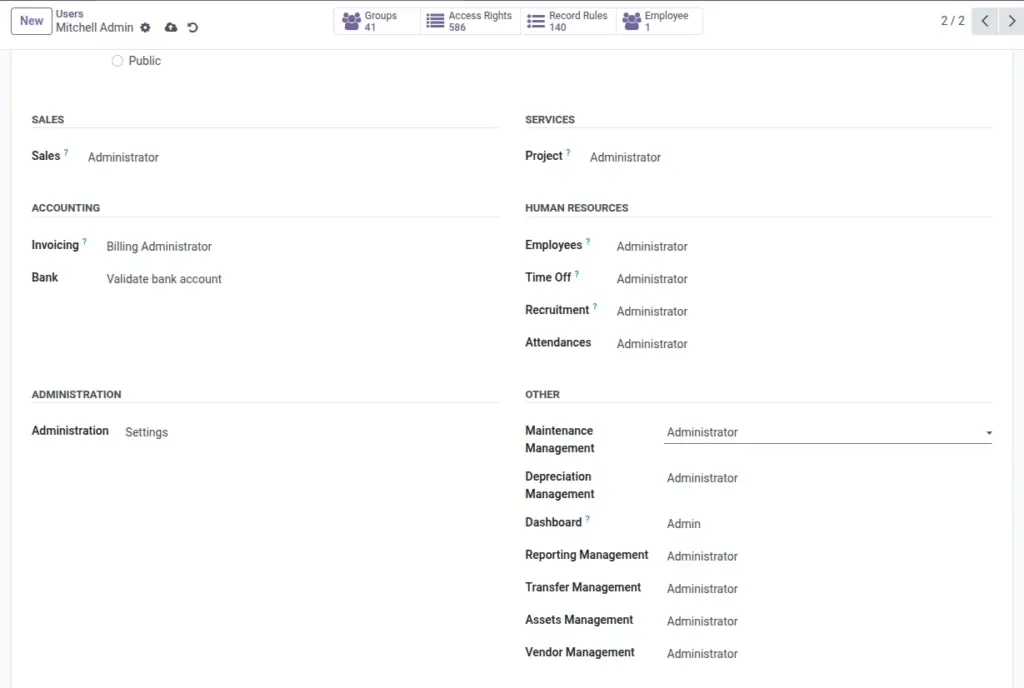
This chapter explains why different users see different menus, what each role can do, and what to ask your administrator when access is missing.
Overview
Asset Management uses roles to protect sensitive actions and keep data clean. Example: most users can work with assets and their own entries, while administrators can see all records and access reporting dashboards.
How it works
- Groups control menus: if you don’t have the group, the menu may be hidden.
- Rules control visibility: in some areas, users can only see records they created.
- Administrator access usually means seeing all records and reporting.
Real-life example: If you create a transfer entry, you may be able to see and edit it, but not see transfers created by others (depending on your role).
Step-by-step guide
Confirm you are in the right app
Use the Odoo app switcher and open Asset.
Check if only some menus are missing
Example: you can see Assets but not Reporting — this usually indicates group access differences.
Ask your admin for the exact role
Tell them which menu you need (e.g., “Asset → Reporting” or “Asset → Maintenance / Repair”).
Fields table
| Role / Area | What you can do | Example |
|---|---|---|
Assets (User) |
Create and manage assets you create, print labels, use stock movements. |
Create an asset for a laptop purchase |
Assets (Administrator) |
See and manage all assets across the company. |
Audit the full asset register |
Transfer (User) |
Create/read/update transfers you created (typical setup). |
Assign monitors to a new joiner |
Transfer (Administrator) |
See and manage all transfer entries. |
Review all assignments done by IT team |
Maintenance (User) |
Create/read/update maintenance entries you created (typical setup). |
Upload repair invoice for a vehicle |
Maintenance (Administrator) |
See and manage all maintenance entries. |
Compare total maintenance cost across vendors |
Depreciation (User) |
View and create depreciation entries (as allowed by your company policy). |
Review depreciation entry list |
Depreciation (Administrator) |
See and manage all depreciation entries. |
Monthly depreciation review |
Vendors (User) |
Create and update vendors (if granted). |
Add a new repair vendor contact |
Reporting (Administrator) |
Access charts and dashboards. |
See asset status distribution chart |
Field explanations
| Field Name | Explanation |
|---|---|
User |
Usually for day-to-day operations; may be limited to records they create in certain menus. |
Administrator |
Usually broader visibility and control (company-wide records, reporting dashboards). |
Record visibility rule |
A setting that can restrict what you see (example: only your own transfers). |
Tips
- Be specific when requesting access: mention the exact menu name.
- Keep ownership clear: agree internally who should create transfers and maintenance records.
- Use Reporting for summaries: ask for admin access if you need charts regularly.
Common mistakes
- Assuming the app is broken: missing menus are often permissions, not an error.
- Sharing logins: it breaks accountability (“Done By” becomes meaningless).
- Creating entries under the wrong user: some menus may only show records created by you.
Image placeholder