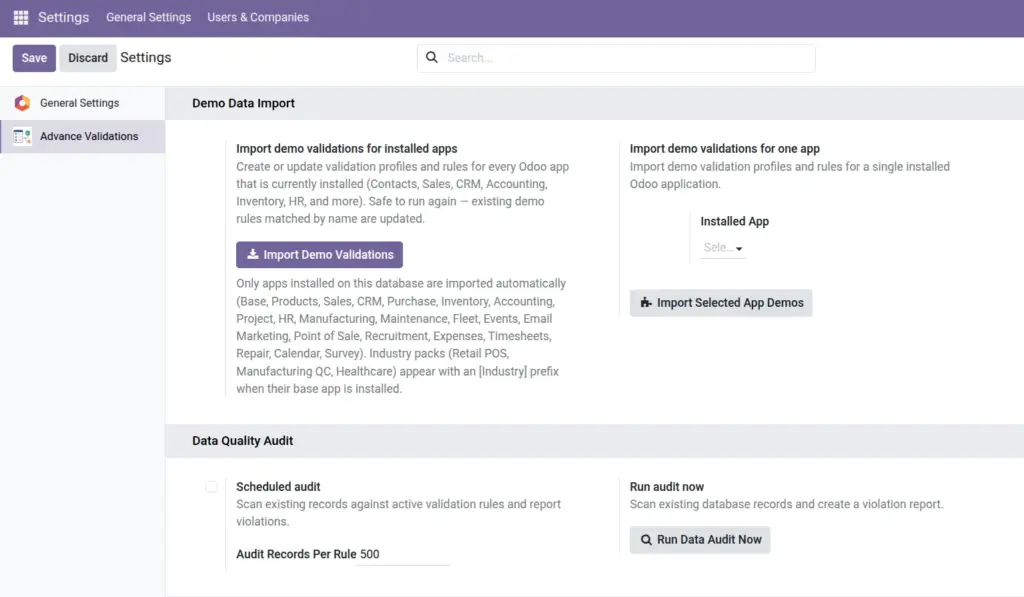
Configure demo data, email alerts, form hints, rule approval, and scheduled audits from one central settings page.
Overview
Most Advance Validations options live in Settings → Advance Validations. Here you can import sample data, turn on email notifications, enable real-time form hints, require manager approval for new block rules, and schedule automatic data audits.
How It Works
Settings apply globally to your entire Odoo database. Changes take effect immediately after saving. Some features (like scheduled audits and digest emails) use background jobs that run automatically once enabled.
Step-by-Step Guide
Accessing Settings
- Go to Settings (gear icon).
- Scroll down or search for Advance Validations.
- Configure the options below, then click Save.
Importing Demo Data
- In the Demo Data section, choose an import option:
- Import Demo Validations (All) – sample profiles and rules for every installed Odoo app
- Import Selected App Demos – pick one app (Contacts, Sales, etc.) or an industry pack (Retail POS, Manufacturing QC, Healthcare)
- Import Demo Logs & Reports – sample log entries for testing reports (requires rules to exist first)
- Click the import button and wait for confirmation.
- Explore the imported rules under Validation Profiles and Validation Rules.
Configuring Email Alerts
- Enable Critical Rule Alerts to send immediate emails when a critical block rule fires.
- Enable Digest Emails for daily or weekly summaries when block counts exceed a threshold.
- Add Alert Recipients – select which managers should receive these emails.
- Mark individual rules as Critical on the rule form to trigger immediate alerts.
Settings Fields
| Field Name | Description | Example |
|---|---|---|
Import Demo Validations (All) |
Load sample profiles and rules for all installed apps |
Click to import |
Import Selected App Demos |
Load demos for one specific app or industry pack |
Contacts, Retail POS |
Import Demo Logs |
Load sample log entries for report testing |
Click to import |
Enable Form Validation Hints |
Show real-time soft feedback while editing forms |
Checked (enabled) |
Require Block Rule Approval |
New/changed block rules need manager approval before going live |
Checked |
Enable Critical Alerts |
Send email immediately when a critical rule blocks a save |
Checked |
Enable Digest Emails |
Send daily/weekly summary of block activity |
Unchecked (disabled by default) |
Digest Frequency |
How often digest emails are sent |
Daily |
Digest Threshold |
Minimum blocks before a digest is sent |
5 blocks |
Alert Recipients |
Users who receive alert and digest emails |
Data Quality Manager |
Enable Scheduled Audit |
Automatically run data audits on a schedule |
Unchecked (disabled by default) |
Field Explanations
Form Validation Hints
When enabled, users see gentle reminders while typing – before they click Save. Works for regex, length, compare, and range rules. Helps users fix problems early without waiting for a block error.
Require Block Rule Approval
When enabled, any new or changed block rule stays inactive until a manager approves it. Prevents accidental deployment of rules that could lock out an entire team.
Critical Rule Alerts
Only rules marked as “Critical” on their form trigger immediate emails. Use this for high-risk checks like financial limits or compliance requirements.
Digest Emails
A summary email sent on a schedule when block activity exceeds your threshold. Useful for managers who want awareness without being notified on every single block.
Industry Demo Packs
Pre-built rule sets for specific industries: Retail POS (cash limits, customer checks), Manufacturing QC (lot traceability, quantities), Healthcare (patient identifiers, privacy checks).
Tips
- Import demo data on a test database first – study the examples before deploying to production.
- Enable form hints for a better user experience – they reduce surprise block errors.
- Turn on rule approval if multiple managers create rules – it adds a safety check.
- Start with critical alerts only for your most important rules; too many alerts become noise.
Common Mistakes
- Importing demo data on a production system – demo rules may conflict with your real rules. Use a test environment first.
- Enabling all alerts at once – managers get overwhelmed. Start with critical alerts only.
- Forgetting to add alert recipients – alerts are enabled but nobody receives them.
- Not enabling scheduled audits – without them, legacy data problems go undetected until a user hits a block.
Image