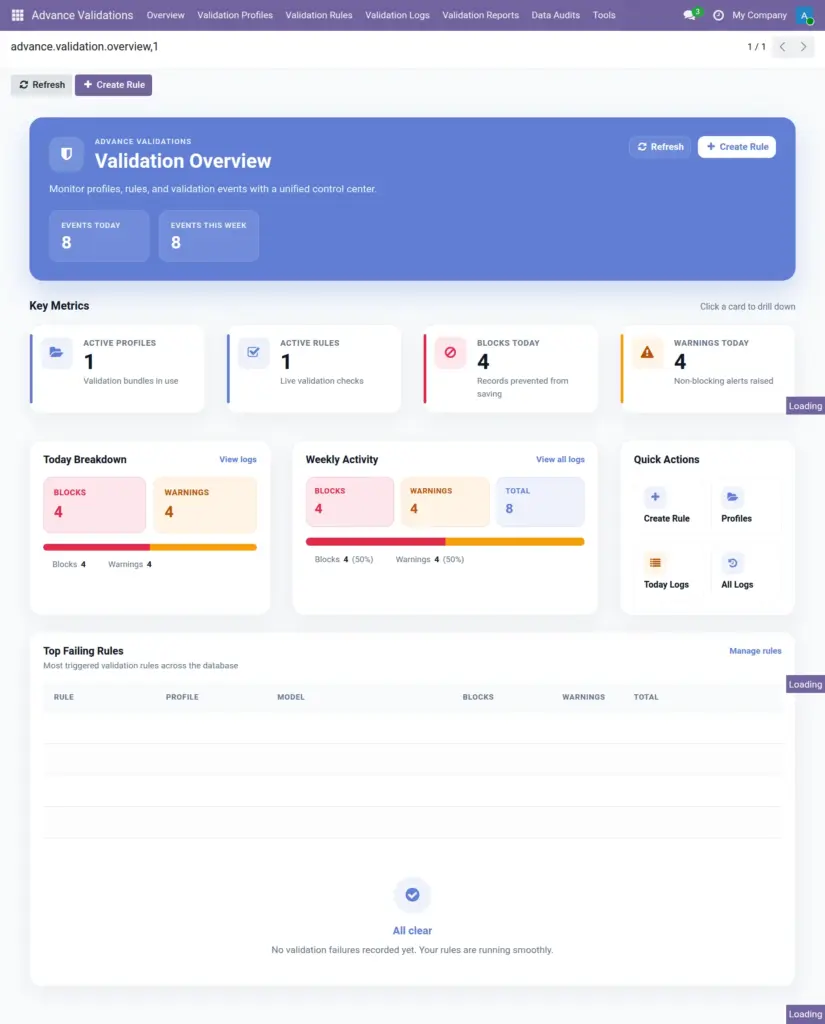
Your command centre for monitoring validation health – see active rules, today’s activity, and which rules fail most often.
Overview
The Overview Dashboard is the first screen managers see when they open Advance Validations. It gives a quick snapshot of how your validation rules are performing across the entire system.
Think of it as a health check for your data quality rules – you can spot problems before they become habits.
How It Works
When you open Advance Validations → Overview, Odoo loads a personalised dashboard showing:
- How many profiles and rules are currently active
- How many saves were blocked or warned today and this week
- Visual charts comparing blocks vs. warnings
- The top 10 rules that fail most frequently
Each number is clickable – you can drill down to the related profiles, rules, or filtered log entries.
Step-by-Step Guide
- Open the Advance Validations app from your Odoo menu.
- Click Overview (this is the default landing page for managers).
- Review the summary cards at the top – active profiles, active rules, blocks today, warnings today.
- Check the weekly charts to see trends – are blocks increasing? Are warnings being ignored?
- Scroll to Top Failing Rules to identify which rules cause the most friction.
- Click any rule name to open it and review whether the error message is clear enough.
- Use the Refresh button to update the numbers with the latest data.
- Click Create Rule to quickly add a new rule if you spot a gap.
Dashboard Elements
| Element | Description | Example |
|---|---|---|
Active Profiles |
Number of validation profiles currently turned on |
5 profiles active |
Active Rules |
Total rules that are active across all profiles |
23 rules active |
Blocks Today |
Saves rejected by block rules since midnight |
12 blocks today |
Warnings Today |
Saves allowed with a warning logged since midnight |
8 warnings today |
Blocks This Week |
Total blocks over the past 7 days |
45 blocks this week |
Warnings This Week |
Total warnings over the past 7 days |
31 warnings this week |
Top Failing Rules |
Rules ranked by how often they fail |
“Phone Required on Contacts” – 15 times |
Field Explanations
Active Profiles
Profiles marked as active. Inactive profiles and their rules are ignored completely.
Blocks Today
Each time a user tries to save and a block rule stops them, one block is counted. High numbers may mean rules are too strict or users need training.
Warnings Today
Warnings allow the save but record the event. Many warnings on the same rule may signal users are ignoring soft reminders.
Top Failing Rules
Helps you prioritise which rules to review, reword, or adjust. A rule that fails 50 times a day probably needs a clearer error message or a process change.
Tips
- Check the dashboard every Monday morning to spot trends from the previous week.
- If one rule dominates the “top failing” list, consider whether it should be a warning instead of a block.
- Click through to filtered logs from the dashboard to see exactly which users are affected.
Common Mistakes
- Ignoring high block counts – frequent blocks frustrate users and may mean the rule needs adjustment.
- Not checking after deploying new rules – always review the dashboard for a few days after activating new rules.
- Expecting non-managers to see Overview – only users with Manager access can open this screen.
Image