Summarize This Article With AI
Online marketplaces have changed the way businesses sell products, with platforms like Amazon showing us the power of having multiple sellers under one digital roof. The global multi vendor marketplaces sector is growing and businesses are looking for platforms that can scale efficiently while having control over operations.
An odoo multi vendor marketplace turns your single e-commerce store into a thriving ecosystem where multiple sellers can showcase their products under your brand. Unlike traditional e-commerce platforms, the Odoo marketplace module leverages the broader ERP ecosystem, integrates marketplace management with inventory, accounting, CRM and other business functions.
Businesses choose Odoo for marketplace development because of its modular architecture, open-source foundation and high customizability. Businesses can work more efficiently when their marketplace is integrated with existing workflows, from vendor onboarding to customer service and financial reporting.
This guide covers everything you need to know about building and managing a multi vendor marketplace with Odoo in 2025, from module selection to performance optimization.
What is Odoo Multi Vendor Marketplace?
A multi vendor marketplace is an online platform that allows multiple independent sellers to offer their products or services to customers through a single, unified storefront. The marketplace owner oversees overall operations, establishes policies, and typically earns commissions on sales, while only approved sellers manage their individual product listings and handle order fulfillment.
The marketplace owner oversees overall operations, establishes policies, and typically earns commissions on sales, while only approved sellers manage their individual product listings and handle order fulfillment. The marketplace owner manages overall operations, sets policies, and typically earns commissions on sales transactions, while approved sellers handle their individual product listings and order fulfillment.
The odoo multivendor marketplace module works by defining three principal roles within the system:
Admin Role: The admin configures marketplace settings, manages seller registration and approval processes, sets commission management rules, and monitors overall platform activity. Admins receive mail notifications for key activities like vendor registrations, product approval requests, and inventory updates. They control which seller information appears on the storefront and can decide whether to allow only approved sellers or enable automatic approval.
Vendor Role: Sellers register through the seller registration process and await approval. Once approved, vendors access their seller dashboard to manage shop description, add marketplace products, handle sales order processing, and view analytics. Product uploads and policy changes may require admin approval depending on marketplace settings.
Customer Role: Customers experience a unified storefront where they can browse products from multiple sellers, compare prices, read seller ratings and reviews, and complete purchases through a seamless checkout process. The platform provides transparency through seller profiles and customer interaction features.
The odoo website integration ensures your marketplace has a consistent branding while allowing individual sellers to customize their shop pages within set boundaries. This gives a professional one stop shop experience to the buyers and gives sellers the tools to manage their business.
How Odoo Multi Vendor Marketplace Works
The Odoo marketplace module starts with seller onboarding. When new vendors register, the admin gets mail notifications and can review applications through the backend system. This approval process ensures only approved sellers can list marketplace products and maintain quality control across your platform.
Admin Responsibilities and Control
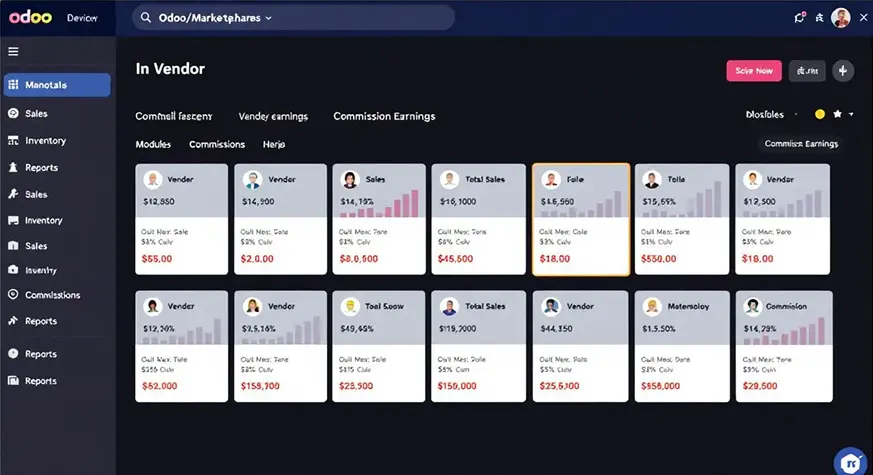
Marketplace administrators manage the entire ecosystem through centralized control panels. Both admin and vendor dashboards have real time access to sales trends, product count and performance metrics. Admins can set global commission rates or customize commission management for individual sellers or specific product categories.
The admin interface has complete control over marketplace settings including approval workflows, notification preferences and vendor permissions. License fees for the platform can be one time or recurring depending on the module provider.
Vendor Dashboard and Management
The seller dashboard has all the tools for vendors to manage their online marketplace presence. Sellers can upload product images, set prices, track inventory and monitor sales through intuitive interfaces. The system supports product approval requests when admin oversight is required.
Vendors get automated mail notifications for new orders, low stock alerts and policy updates. The platform tracks seller ratings based on customer feedback to maintain marketplace quality and provide sellers with performance insights to improve their service.
Customer Experience and Interaction
Customers interact with your marketplace through a unified shopping experience that shows products from all approved sellers. Advanced search and filtering helps buyers to find specific products and comparison features helps in informed buying.
The platform has direct customer interaction with sellers through messaging system or contact forms and overall marketplace oversight. Customer reviews and ratings provides feedback to both seller and buyer.
Key Features of Odoo Marketplace Module
Vendor Dashboard Overview
The seller dashboard is the central hub for vendor operations, where they can access business management tools. Vendors can manage their product catalog, track sales order status, inventory levels and marketplace performance analytics.
Key dashboard features include real-time stock management, low-inventory alerts, sales trend reporting. The interface supports bulk product upload, category assignment and pricing management across multiple product variants.
Odoo Marketplace Commission Management
Commission management is one of Odoo’s strongest feature for marketplace operators. The system supports global commission rates, vendor specific percentages or product category based calculations. This allows marketplace owners to incentivize certain sellers or product types while remaining profitable.
The automated commission calculation system pays sellers accurately, deducts marketplace fees and handles tax. Both admin and vendors get detailed reports of commission breakdown, payment schedule and revenue share calculation.
Seller Storefront & Product Listings
Each approved seller gets a customizable shop page where they can showcase their brand, products and policies. The seller storefront allows vendors to upload logos, write shop description and organize products into categories that help customers navigate their offerings.
Product listing features include multiple images, detailed description, variant management (size, color, etc.) and competitive pricing. The system has product approval workflow when required and supports bulk operations for efficiency.
Shipping Management
Marketplace level shipping management coordinates logistics across multiple sellers while keeping customer satisfaction. The platform supports multiple shipping methods from individual seller fulfillment to centralized warehouse operation.
Integration with major shipping carriers enables automated rate calculation, label generation and tracking update. Customers get unified shipping notification regardless of which seller fulfills their order, keeping marketplace branding throughout the fulfillment process.
Ratings & Reviews
The seller rating system builds trust and accountability within your marketplace. Customers can rate individual sellers and products, creating a feedback loop that encourages good service and helps other buyers make informed decisions.
Review management tool allows admin to moderate content while sellers can respond to customer feedback professionally. The platform aggregates ratings to create overall seller score that affects search ranking and buyer confidence.
Odoo Marketplace Module Options (Odoo 16/17/18)
Different Odoo versions have different level of marketplace functionality, newer versions have more features and better performance.
Odoo 16 Multi Vendor Capabilities
Odoo 16 has improved marketplace modules with better mobile responsiveness and payment gateways integration. It has advanced inventory management features and reporting for admin and vendor users.
Key improvements are approval workflow, email notification system and security features to protect seller and customer data.
Odoo 17 Advanced Features
Odoo 17 has more marketplace functionality with deeper ERP integration and better API for third-party connections. New features are advanced analytics dashboard, automated marketing tools and customer interaction.
Performance optimization in Odoo 17 can handle large product catalog and high volume transaction, suitable for enterprise level marketplace.
Odoo 18 Latest Innovations
Odoo 18 is the latest of marketplace technology, with AI features for demand forecasting, automated pricing and inventory optimization. It has mobile app and progressive web app.
Latest version focus on user experience with faster loading time, intuitive interface and full customization to allow marketplace owner to create their own branded experience.
Best Odoo Marketplace Module
Choosing the right marketplace module provider is crucial to your platform’s success and long term viability. Leading providers offer different strengths in terms of features, support and pricing.
WebKul Multi Vendor Marketplace
WebKul is the market leader for Odoo marketplace solutions, offering full featured modules with high customization options. Their marketplace solution includes multi warehouse support, advanced commission management and robust reporting.
WebKul’s modules support complex business scenarios like B2B marketplaces, subscription based selling and digital product distribution. Their support team helps with customization and troubleshooting, making them suitable for enterprise implementations.
Odoo Multivendor vs Other Platforms
Odoo Multivendor vs CS-Cart
CS-Cart specializes exclusively in marketplace functionality, offering native multi-vendor features without requiring ERP integration. However, this specialization limits its ability to support complex business processes that extend beyond e-commerce operations.
Odoo’s integrated approach provides superior inventory management, accounting integration, and customer relationship management capabilities. Businesses already using Odoo ERP gain significant advantages from unified data management and streamlined workflows.
Cost considerations favor Odoo for businesses requiring comprehensive business management, while CS-Cart may be more suitable for pure marketplace operations with minimal backend integration needs.
Odoo Multi Vendor vs Magento Marketplace
Magento offers powerful e-commerce capabilities with extensive third-party marketplace extensions, but requires significant technical expertise and infrastructure investment for optimal performance. The platform excels in customization flexibility but demands ongoing developer involvement.
Odoo provides more integrated business management capabilities while maintaining easier administration for non-technical users. The unified platform approach reduces complexity and total cost of ownership compared to Magento’s multi-component architecture.
Scalability considerations depend on specific requirements, with Magento handling very large catalogs efficiently while Odoo excels in business process integration and operational efficiency.
How to Build a Marketplace with Odoo
Building a marketplace requires planning and execution across multiple stages. This step by step approach ensures all parts work together.
Step 1: Install Odoo Marketplace Module
Choose and install your marketplace module from Odoo Apps store or your provider. Check compatibility with your Odoo version and make sure all dependencies install correctly.
The installation process will update the database, add new menu items and new configuration options that will be available after restart.
Step 2: Configure Commission Rules
Set up commission management rules according to your business model and competition. Different rates for different product categories, new vs established sellers, or promotional periods.
Configure payment schedules, minimum payout threshold and tax handling according to regulations and seller satisfaction.
Step 3: Design Vendor Onboarding Process
Create clear seller registration workflows that collect business information while keeping the application process user friendly. Design approval criteria that maintain marketplace quality without blocking legitimate sellers.
Create onboarding documentation that explains marketplace policies, commission rules and operational procedures to set clear expectations for new vendors.
Step 4: Customize Storefront Templates
Design marketplace interfaces that reflect your brand while keeping it intuitive for customers. Customize seller pages to balance vendor branding with marketplace presentation.
Implement responsive design to ensure performance on desktop, tablet and mobile where customers shop more and more.
Step 5: Integrate Payment and Shipping
Connect payment gateways that support marketplace transactions, commission splitting and seller payments. Test all payment flows to ensure smooth customer experience and accurate financial processing.
Configure shipping options that work with multiple vendors, individual seller fulfillment or coordinated logistics.
Step 6: Launch and Monitor
Launch with a soft launch with selected sellers and limited customer access to identify and fix operational issues before full marketplace opening. Monitor seller satisfaction, customer experience metrics and technical performance.
Establish ongoing optimization process based on user feedback and operational data to improve marketplace performance.
How to Set Up Odoo Multi-Vendor Marketplace (Detailed)
Marketplace Workflow Configuration
A successful marketplace runs on well designed workflows that automate routine tasks and flag exceptions for manual review. Configure approval processes that balance quality control with operational efficiency.
Set up automated notifications that inform all stakeholders about relevant activities without overwhelming users with unnecessary communications. Design escalation procedures for disputes, refunds and other customer service issues.
Vendor Role Management
Define clear role hierarchies that give vendors access to their own data while protecting sensitive marketplace information. Configure permission levels that allow sellers to manage their products and orders without seeing competitive information.
Implement security measures that protect vendor accounts and customer data while maintaining administrative oversight for marketplace management.
Approval Workflows
Design product approval processes that maintain marketplace quality standards while minimising delays for regular listings. Consider automated approval for established sellers with good performance record while manual review for new vendors or unusual products.
Configure inventory approval workflows that prevent overselling while allowing vendors to manage stock levels efficiently. Balance automation with human oversight based on marketplace size and complexity.
Email Communication Systems
Set up comprehensive mail notifications that inform vendors and customers about order status, inventory changes and policy updates. Design email templates that look professional while providing necessary information clearly.
Configure notification frequency and content to avoid overwhelming users while ensuring critical information reaches recipients on time. Include unsubscribe options and preference management to comply with email regulations.
Security Implementation
Implement robust security measures that protect sensitive financial and personal information throughout the marketplace ecosystem. Configure access controls that prevent unauthorized data access while supporting business operations.
Regular security audits and updates keep you protected against evolving threats while complying with data protection regulations.
Odoo Marketplace App Install + Pricing
Installation
Installing marketplace modules requires attention to compatibility and dependencies. Download modules from trusted sources and verify digital signatures when available to ensure security and authenticity.
The installation process involves:
- Backing up data before making changes to the system
- Installing required dependencies and supporting modules
- Configuring basic marketplace settings during initial setup
- Testing all functionality before going live
Pricing Models
Marketplace module prices vary greatly based on feature complexity, vendor support levels and licensing terms. One time license fees range from free community modules to several thousand dollars for enterprise solutions.
Consider total cost of ownership including:
- One time module license fees
- Implementation and customization costs
- Ongoing support and maintenance expenses
- Server infrastructure and hosting costs
- Training and user adoption costs
Free vs Premium
Free community modules provide basic marketplace functionality for simple implementations with few vendors. Premium modules offer advanced features, professional support and guaranteed updates for complex marketplaces.
Evaluate long term requirements carefully when choosing between free and paid options, consider growth, feature needs and technical expertise for ongoing maintenance.
Odoo Marketplace Customization Tips
Extending Vendor Dashboard
Customize the seller dashboard to include industry specific features that improve vendor productivity and satisfaction. Add widgets for tracking KPIs, managing promotional campaigns or coordinating with external services.
Consider integrating third party tools that vendors use, such as inventory management systems, accounting software or marketing automation platforms. These integrations reduce vendor workload while improving data accuracy.
UI/UX Customization
Design marketplace interfaces that reflect your brand while maintaining intuitive navigation for all user types. Focus on mobile since more and more vendors and customers are accessing marketplaces through mobile devices.
Implement progressive web app features that provide app like experience without requiring separate mobile apps. Consider accessibility requirements to ensure your marketplace is serving users with different abilities.
Advanced Reporting
Develop custom reports that provide insights beyond standard marketplace analytics. Create dashboards that show market trends, vendor performance comparisons and customer behavior patterns that inform business decisions.
Implement automated report generation and distribution to keep stakeholders informed about marketplace performance without manual intervention.
Workflow Automation
Identify repetitive tasks that can be automated to reduce administrative overhead and improve operational efficiency. Common automation opportunities are inventory alerts, commission calculations and customer service responses.
Design automated workflows that handle routine decisions while escalating complex situations to human operators. This way you maintain service quality while reducing operational costs.
Odoo Multivendor Performance Optimization
Database and Server Configuration
Optimize your database with indexing, query optimization and regular maintenance. Big marketplaces generate a lot of data and need proper database management for performance.
Configure your server resources for expected traffic, taking into account peak shopping periods and seasonal fluctuations. Implement monitoring systems that alert admins before performance issues affect user experience.
Caching Implementation
Deploy full caching strategies that reduce server load while keeping data accurate. Cache static content like product images and descriptions and make sure dynamic content like inventory levels are up to date.
Consider content delivery networks (CDNs) for serving images and static content to customers globally, reducing load times and improving user experience no matter where they are.
Scaling Strategies
Plan for marketplace growth by implementing scalable architecture that can handle more vendors, products and customers. Consider horizontal scaling that distributes load across multiple servers.
Monitor your key performance metrics regularly and set scaling triggers to ensure you have enough resources during growth periods or traffic spikes.
Multi-Warehouse Support
Configure your inventory management system to support multiple warehouses or fulfillment centers. This becomes critical as marketplaces grow and vendors need distributed inventory management.
Implement automated inventory allocation and transfer procedures that optimize fulfillment costs while maintaining customer service levels across all marketplace vendors.
Odoo Marketplace Integrations & Connectors
WooCommerce Connector
If you are moving from WooCommerce or running a hybrid marketplace, connector modules allow data synchronization between platforms. These integrations support phased migration while keeping operations running.
Configure data mapping carefully to transfer product information, customer data and order history between systems. Test synchronization before going live.
Payment Gateways
Modern marketplaces need multiple payment options to accommodate different customer preferences and international transactions. Integrate popular gateways like PayPal, Stripe and regional payment providers to increase conversions.
Configure commission splitting to automatically pay vendors while keeping marketplace fees. Make sure all payment processing is compliant with financial regulations and security standards.
Shipping and Logistics
Connect with major shipping carriers to get accurate rate calculations, label printing and tracking updates for marketplace orders. These integrations improve customer experience and reduce vendor workload.
Configure shipping rules to optimize costs across multiple vendors, potentially consolidating orders when possible while keeping delivery times fast.
ERP and Business System
Use Odoo’s native ERP to integrate marketplace with your business systems. This integration gives you full visibility on financials, inventory and customer relationships.
Configure data flows that support business intelligence without creating operational bottlenecks or data inconsistencies.
Marketplace Use-Cases
Retail and Consumer Goods
Traditional retail marketplaces connect consumers with multiple brands and product categories under one roof. These platforms have search, review and promotional tools to engage customers.
Success factors are vendor curation, competitive commission structure and strong customer service to maintain trust across multiple seller relationships.
B2B and Wholesale Operations
Business to business marketplaces require different functionality like bulk pricing, credit terms management and integration with procurement systems. These platforms handle larger transaction volumes with longer sales cycles.
Configure approval workflows to accommodate business purchasing procedures while maintaining operational efficiency for routine transactions.
Digital Products and Services
Marketplaces for digital products like software, media or online services require different fulfillment processes and licensing management. Consider automated delivery systems and digital rights management for these markets.
Implement secure download systems and license key management to protect intellectual property while giving access to legitimate customers.
Dropshipping and Fulfillment
Dropshipping marketplaces coordinate between retailers and suppliers without requiring inventory investment from marketplace operators. These models require robust supplier integration and quality control systems.
Configure inventory synchronization and order routing systems to maintain accuracy while supporting rapid scaling across multiple supplier relationships.
Who Should Build Your Marketplace?
In-House Development
Companies with technical teams may choose in-house development for maximum control over customization and maintenance. This works well for companies with unique requirements or specific integrations.
Consider total cost of internal development including opportunity costs, training requirements and ongoing support responsibilities when evaluating this option.
Outsourcing and Partner Selection
Many companies benefit from working with experienced Odoo marketplace development partners who bring specialized expertise and proven implementation methodologies. These partnerships can speed up time-to-market while reducing implementation risks.
Evaluate partners based on relevant experience, technical capabilities and ongoing support offerings rather than initial development costs.
Hybrid Approaches
Some companies combine internal oversight with external expertise, keeping strategic control while leveraging specialized skills for technical implementation. This can optimize both cost and quality.
Define clear responsibility boundaries and communication procedures when implementing hybrid development approaches to ensure project success.
Odoo Multi Vendor Marketplace SEO Best Practices
Seller Page Optimization
Configure seller pages with unique, search friendly URLs that include relevant keywords and business identifiers. Each seller should be able to customize meta descriptions and page titles that represent their offerings.
Implement structured data markup for seller information to help search engines understand and display marketplace content in search results.
Product Metadata Management
Standardize product titles, descriptions and categorization to improve search visibility and consistency across vendors. Provide guidelines for sellers to create SEO friendly content.
Configure automated systems to generate meta tags and structured data for product pages to reduce vendor workload.
Technical SEO Implementation
Implement proper URL structures, sitemap generation and robots.txt configuration to help search engines crawl and index marketplace content efficiently. Monitor page load speeds and implement optimization strategies to improve search rankings.
Configure canonical URL management to prevent duplicate content issues when products are in multiple categories or seller pages.
FAQs
Does Odoo support multi vendor marketplace?
Yes, Odoo supports multi vendor marketplace through various modules available in Odoo Apps Store and from third-party providers. These modules transform standard Odoo e-commerce into comprehensive marketplace that supports multiple sellers, commission management and unified customer experience.
How does commission work in Odoo marketplace?
Commission management in Odoo marketplace modules supports global rates, vendor specific percentages and product category based calculations. The system calculates commission on completed sales, handles seller payments and provides detailed reporting for admin and vendors.
Can vendors manage orders in Odoo?
Yes, approved sellers can access their seller dashboard to view and manage orders, update shipping information and communicate with customers. The system maintains clear separation between vendor access and administrative functions while giving vendors necessary tools to manage orders.
Is there a free Odoo marketplace module?
Free marketplace modules are available in community and some providers, but they are basic compared to premium ones. These free options work for simple marketplace but may require development for advanced features or customization.
Conclusion and Next Steps
Odoo multi vendor marketplace is a powerful solution for businesses to create scalable and integrated marketplace in 2026. The platform’s deep ERP integration, flexible commission management and feature set gives significant advantages over standalone marketplace solutions.
Success with Odoo marketplace development depends on careful planning, module selection and implementation that covers both technical and business requirements. The platform is flexible to support different marketplace models from simple retail to complex B2B.
Whether you choose community modules for cost effectiveness or premium for advanced features, Odoo provides a solid foundation for marketplace growth. The integrated approach reduces operational complexity while supporting complex business processes that gives competitive advantage. Begin with vendor research, business model and timelines.