Summarize This Article With AI
The Odoo 19 module Document Management System – File Manager & Cloud Sync is built to centralize those habits into a single, structured experience inside Odoo, which is why businesses often combine it with professional Odoo development services for a cleaner document workflow rollout.
It provides a Windows Explorer-style interface, a nested folder tree, drag-and-drop operations, bulk actions, tags, advanced search and filtering, role-based permissions, secure sharing links with expiration, file versioning, file locking, activity tracking and audit logs, and a complete REST API for integrations. It also supports synchronizing documents with Google Drive, Dropbox, OneDrive, Box, and AWS S3, with flexible sync directions and schedules so you can decide exactly how documents should flow between Odoo and your cloud storage.
This article explains how to implement the module in a practical, production-friendly way—how to set up two-way (bidirectional) sync where collaboration demands it, how to use Odoo→cloud only sync where tighter control is required, and how to use the module’s built-in controls (permissions, sharing, locks, versions, audit logs) to keep sensitive documents safer.
Why teams choose a file manager inside Odoo (instead of “attachments everywhere”)
When documents are scattered, problems tend to compound:
- A file exists in cloud storage, but the Odoo record doesn’t reference it—so work slows down.
- A file exists on the record, but nobody knows whether it’s the latest version.
- A file gets shared externally without expiry—so access lingers longer than intended.
- Multiple people edit the same file at once—so conflicts overwrite work.
This module addresses those issues by turning documents into an operational system rather than an unstructured pile. The Explorer-style interface is designed for speed: a folder tree you can expand/collapse, breadcrumb navigation for context, and familiar actions like create, rename, move, copy, delete, and drag-and-drop upload. Bulk operations help when teams need to move or tag many documents at once. Tags and advanced search reduce “where did we put it?” moments, while structured access controls reduce the risk of over-sharing.
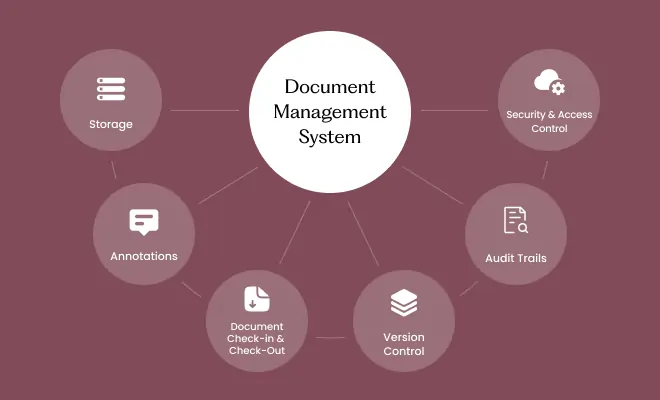
Odoo document management system
A strong document experience is not just a UI—it’s how documents connect to real business records and stay searchable and controlled. This module is described as a comprehensive document management system for Odoo with key capabilities across management, collaboration, cloud sync, and integration:

Explorer-style navigation and folder structure
The interface is built around a familiar tree view with hierarchical folders and parent-child relationships. Folders can be organized in deep structures with consistent naming and predictable placement. The goal is to keep business documents arranged the way teams expect: by department, by workflow, or by record type.

Fast file operations and bulk actions
The module supports common file operations—upload, move, copy, rename, delete—along with bulk actions for handling many files at once (for example, tagging or moving batches of documents into a new folder).

Advanced search, filtering, and tags
It includes full-text search and advanced filtering across criteria such as tags, file types, folders, owners, and date ranges. Real-time results and multi-criteria filters support fast retrieval when document libraries grow.

Sharing, permissions, and access control
The module includes role-based access control (RBAC) with configurable permissions at folder and file levels. It also supports secure sharing links that can be configured with permissions and expiration dates, helping teams share documents without leaving long-lived access open.

Versioning and locking for collaboration integrity
Version history supports restoring prior versions, while file locking prevents simultaneous edits from colliding. When a file is locked, other users can see lock details, and locks can auto-expire based on a configured timeout. Lock history tracking supports accountability.

Activity tracking and audit logs
The system tracks document activity such as views, downloads, edits, moves, shares, tag actions, favorites, and comments. Audit history can be filtered by user, action type, and date range, and exported (CSV) for reporting.

REST API for integrations
A complete REST API is included with authentication options and endpoints for CRUD operations on files, folders, tags, and sharing. It supports upload/download, bulk operations, and advanced search with filtering—useful for external systems, automation workflows, or custom apps.
Cloud sync overview: providers, directions, and schedules
Cloud sync is one of the module’s most valuable capabilities because it reduces duplication between “where teams collaborate” and “where business records live,” especially in projects that also require Odoo integration services to connect document flows across systems.
Supported cloud providers
The module supports synchronization with:
- Google Drive
- Dropbox
- OneDrive
- Box
- AWS S3
Sync directions (per folder)
Each folder can be configured with a sync direction:
- Upload (Odoo→cloud only)
- Download (cloud→Odoo only)
- Bidirectional (two-way)
This folder-by-folder approach is important. It means your Accounting folder can remain tightly controlled with Odoo→cloud replication, while a Projects folder can run bidirectional sync for active collaboration.
Sync frequency options
You can choose sync frequency based on business needs:
- Manual
- Real-time
- Hourly
- Daily
This lets teams match sync intensity to operational risk and performance expectations.
Two-way sync vs Odoo→cloud only: selecting the right flow by folder
A practical implementation usually combines both strategies, because not all documents deserve the same level of inbound flexibility.
Use bidirectional sync for collaboration-heavy work
Bidirectional sync fits best where files are actively edited outside Odoo and need to stay aligned with Odoo’s workspace structure. Examples include:
- Project documentation and deliverables
- Creative and marketing assets
- Shared customer deliverables where cloud editing is normal
To keep collaboration safe and predictable, pair bidirectional sync folders with:
- File locking to reduce simultaneous edits
- Version history to restore prior versions when needed
- Activity tracking to maintain accountability
Use Odoo→cloud only for sensitive or controlled records
Upload-only sync is a strong default when you want Odoo to remain the operational source of truth and the cloud to act as a controlled mirror. Examples include:
- Invoices, vendor bills, and accounting records
- Contracts and legal files
- HR and employee documents
- Policies and internal compliance artifacts
Upload-only sync reduces the chance that an external change in cloud storage silently becomes an operational change inside Odoo. This approach is especially useful when teams want cloud availability without introducing inbound modification risk.
Authentication and connection approach (OAuth 2.0)
The module uses OAuth 2.0 for secure access to cloud providers and supports token management (including refresh) and connection testing. This matters because cloud sync is only as reliable as the credentials behind it. A stable OAuth-based connection reduces repeated logins and helps maintain continuous sync behavior.
Once authenticated, the sync configuration ties a chosen Odoo folder (or set of folders) to a cloud location so documents can move according to the direction and schedule you set.
Model document settings: linking documents to business records automatically
A document system becomes significantly more useful when it connects to the records teams already use daily. The module supports Model Document Settings, allowing you to configure document management by Odoo model—such as Sale Orders, Projects, Invoices, CRM Leads, and custom models.
Model-level configuration to keep documents organized consistently
- Automatic folder creation for business records
- Configurable naming patterns using placeholders like {model}, {year}, {id}, {record}
- Root folder assignment per model type
- Model-level configuration to keep documents organized consistently
This capability reduces manual folder creation and inconsistent naming, and helps ensure that documents remain discoverable in the exact place users expect: on the record that created the document in the first place.
Governance features for sensitive documents
Document systems often contain financial and legal artifacts (invoices, contracts) and sometimes personnel files. The module includes features that support safer handling and oversight without relying on external tools:
Role-based access control (RBAC)
Permissions can be configured at both folder and file levels, so users can access only what they are allowed to view. This supports segmented access across departments and reduces accidental exposure.
Secure sharing links with expiration
Sharing links can be configured with permissions and expiration dates. This helps teams share externally while reducing long-lived exposure. It also aligns better with controlled collaboration practices, especially when sensitive files must be shared for a limited time.
Audit logs and activity history
Activity tracking provides an evidence trail of actions like viewing, downloading, editing, moving, and sharing. Filtering and export support reporting needs and internal reviews.
File locking and version history
Locking helps prevent conflicting edits, and versioning supports recovery if a file is overwritten or updated incorrectly. Together, they improve integrity in shared folders—especially those configured for bidirectional sync.
Search and organization: keeping large libraries usable
As document collections grow, organization and retrieval become the real test. This module supports:
- Full-text search across file names, descriptions, and content
- Filtering by file type, date range, owner, folder, tags, and combinations of criteria
- Tag-based organization for grouping documents across folders
- The ability to use search as an operational tool rather than a last resort
This is particularly important in multi-department environments where the same document type may appear across different workflows.
REST API: integration-ready document control
For teams that want to extend document workflows beyond the UI, the module provides a REST API designed for external integrations and automation. It includes:
- CRUD operations for files, folders, tags, and sharing
- File upload and download endpoints
- Bulk operations
- Advanced search with filtering and sorting
- Authentication options described as OAuth or API keys
This makes it possible to connect document workflows to other systems, build lightweight internal tools, or automate repeatable document tasks while keeping Odoo as the central control plane through structured Odoo API integration.
Conclusion: building a reliable document workflow with cloud sync
A document system succeeds when it reduces friction without reducing control. This module combines a familiar file manager interface with enterprise-ready controls: permissions, secure sharing links with expiry, audit logs, version history, file locking, advanced search, and cloud sync across major providers including Google Drive, Dropbox, OneDrive, Box, and AWS S3. With folder-level sync direction and configurable schedules, teams can confidently run two-way sync where collaboration is necessary and Odoo→cloud only where tighter operational control is required.
Used well, it turns scattered storage habits into a structured, searchable, auditable document workflow inside Odoo—without forcing teams to abandon the cloud tools they already rely on.
Get help implementing this in Odoo 19
If you want a clean rollout of cloud sync in Odoo 19—folder structure, sync direction planning (two-way vs Odoo→cloud), permissions, sharing controls, audit logs, and record-based folder automation—WebbyCrown Solutions can help you implement and configure the module in a production-ready way.
- Sales: +91 (942) 867-7503
- Email: [email protected]
- Support: [email protected]