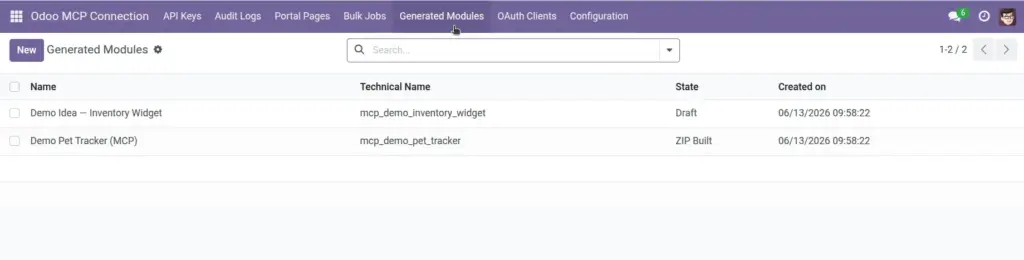
Review, download, and install custom Odoo apps that AI creates through the MCP connector.
Overview
One of the advanced features of Odoo MCP Connection is the ability for AI to design and build new Odoo apps – complete with data types, fields, and menus – based on your instructions. These appear as Generated Modules in Odoo.
Think of it as AI drafting a custom app for you. You always review the package before installing it, just like you would with any new software. A demo “Pet Tracker” module is included when you install the connector so you can see how the process works.
How It Works
- You ask AI (via MCP) to build a custom Odoo app – e.g. “Create a pet tracker with name, species, and age fields.”
- AI sends a module specification to Odoo.
- Odoo builds a ZIP package and saves a Generated Module record.
- You review the specification, download the ZIP, and decide whether to install.
- Installation adds the new app to your Odoo Apps list like any other module.
Each generated module tracks its state: Draft, ZIP Built, Installed, or Failed.
Step-by-Step Guide
Go to Odoo MCP Connection → Generated Modules.
Find the module AI created (or open the demo “Demo Pet Tracker”).
Read the Module Spec to understand what fields and menus it will add.
Confirm State shows “ZIP Built” – meaning the package is ready.
Click Download ZIP to save a copy for your records.
To install: go to Apps → Import Module (requires the Base Import Module app) and upload the ZIP.
Alternatively, click Install Module on the generated module form if your system supports direct import.
After successful installation, state changes to Installed and the new app appears in your Apps menu.
Fields Table
| Field Name | Description | Example |
|---|---|---|
Name |
Human-friendly title of the generated app |
Demo Pet Tracker |
Technical Name |
Internal module identifier used by Odoo |
mcp_demo_pet_tracker |
API Key |
Which key requested the module build |
Claude – Developer Key |
Module Spec |
Full definition: models, fields, menus, dependencies |
Pet model with name, species, age fields |
State |
Where the module is in the build/install process |
ZIP Built |
ZIP File |
Downloadable package ready for installation |
mcp_demo_pet_tracker.zip |
ZIP Filename |
Name of the downloaded file |
mcp_demo_pet_tracker.zip |
Error Message |
Details if build or install failed |
Install the Base Import Module app first |
Installed Module |
Link to the app in Odoo after installation |
Demo Pet Tracker (installed) |
Field Explanations
Name
The title you and your team will recognize. AI usually suggests this based on your request.
Technical Name
Odoo’s internal name for the module. Used in file names and code. Cannot conflict with existing modules.
Module Spec
The complete blueprint: what data types to create, which fields they have, what menus to add, and which existing Odoo apps it depends on.
State
Draft = spec only, not yet built. ZIP Built = package ready to download. Installed = live in your Odoo. Failed = something went wrong.
ZIP File & Filename
The installable package. Always download and keep a backup before installing on production.
Error Message
Explains build or install failures. Common issue: missing “Base Import Module” app for ZIP installation.
Installed Module
After installation, links to the real Odoo app record so you can manage upgrades and uninstallation.
Embed Token
Optional extra security for embedding the page in other websites. Most internal dashboards do not need this.
Tips
- Test AI-generated modules on a staging/copy database first – not directly on production.
- Open the demo Pet Tracker module to see a working example of what AI can build before requesting your own.
- Install the “Base Import Module” app from Odoo Apps before trying to import generated ZIP files.
Common Mistakes
- Installing without reviewing the spec: AI may include fields or menus you did not intend. Always read the Module Spec first.
- Missing Base Import Module: Without this Odoo app, ZIP installation will not work. Install it from Apps first.
- Installing duplicate technical names: If a module with the same technical name already exists, installation may fail or conflict.
Image