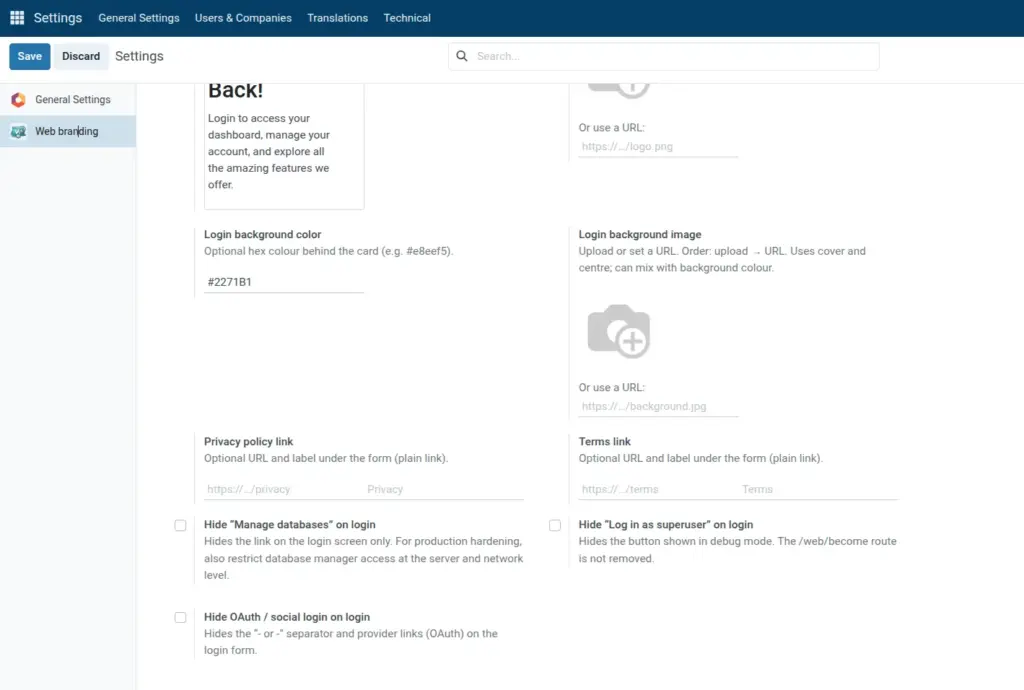
Add legal links and replace the Powered by Odoo line.
Overview
You can show optional Privacy and Terms links under the login form, each with its own URL and label. You can also replace the default Powered by Odoo footer line with your own plain-text message (for example copyright or company legal name).
These options help meet basic compliance expectations for public-facing portals while keeping the login screen on-brand.
Links are intended for external policy pages that guests can open without being logged in. The footer field accepts plain text only, not HTML.
How It Works
When a policy URL is empty, that link is not rendered. When a URL is set, the label shown uses your text or sensible defaults (Privacy / Terms) when the label field is left empty, per the module template.
Links typically open in a new browser tab so users do not lose the login form context. The footer replaces the default Odoo attribution line whenever you provide non-empty text.
Login screen footer is stored with other Web branding settings; change it anytime and save to update the live login page.
Step-by-Step Guide
- Enter Privacy policy URL and label (optional).
- Enter Terms URL and label (optional).
- Set Login screen footer under Backend and login.
- Save and verify on the login page.
Fields Table
| Field Name | Description | Example |
|---|---|---|
Login privacy policy URL |
Privacy link; empty hides it |
https://mysite.com/privacy |
Login privacy link label |
Text for privacy link |
Privacy Policy |
Login terms URL |
Terms link |
https://mysite.com/terms |
Login terms link label |
Text for terms link |
Terms of Use |
Login screen footer |
Replaces Powered by Odoo |
(c) 2026 Acme Ltd |
Field Explanations
Login privacy policy URL
Destination for the privacy link. When empty, the privacy link is hidden from the login page.
Login privacy link label
Clickable text for the privacy URL. If empty, the module uses the default label Privacy (see the field help in Odoo).
Login terms URL
Destination for the terms link. When empty, the terms link is not shown.
Login terms link label
Clickable text for the terms URL. If empty, the module uses the default label Terms (see the field help in Odoo).
Login screen footer
Plain text line at the bottom of the login screen, replacing “Powered by Odoo” when filled. No HTML; use a short copyright or company line. Leave empty to keep the default Odoo footer text.
Tips
- Tip: Host policies on stable URLs (not rotating campaign links) so printed employee handbooks stay valid.
- Tip: Match label wording to your legal team’s vocabulary, for example “Privacy Policy” vs “Data Privacy”.
- Tip: Keep the footer to one line; long disclaimers belong on a linked policy page.
Common Mistakes
- Mistake: Pasting HTML or markdown into Login screen footer-only plain text is supported and tags may show literally.
- Mistake: Using intranet-only URLs that guests cannot resolve on the public internet.
- Mistake: Entering a URL but forgetting to click Save, then assuming the module is broken when links do not appear.
Image