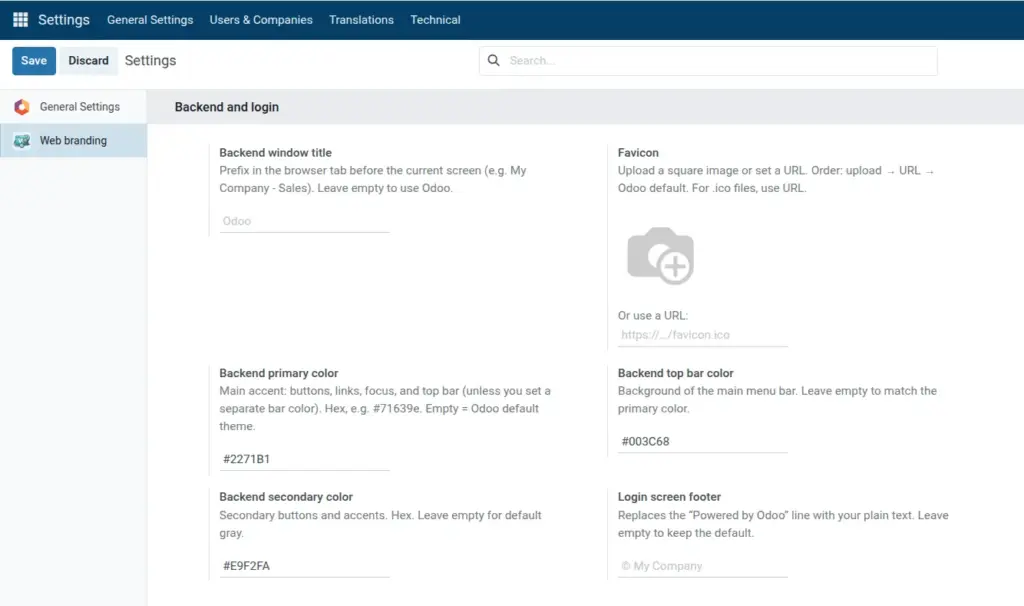
Make Odoo match your company colors and show your name in the browser tab.
Overview
This chapter covers the Backend and login section fields that control how Odoo looks after users sign in: the text prefix in the browser tab and the main UI colors (primary accent, top menu bar, and secondary accent).
Branding here helps staff immediately recognize your instance and aligns the interface with your corporate palette. It does not change accounting logic, security rules, or record data-only presentation for the web client.
If you leave Backend primary color empty, Odoo keeps its default purple theme for primary buttons and links. Use that when you only want a custom tab title or bar color without changing the core accent.
How It Works
Web Brand injects your color values and title into the web client theme. Values are saved on the settings record and applied when each user loads or refreshes Odoo in the browser.
The Backend window title is combined with the current screen name in the tab, for example Acme Corp – Sales. Long titles may be truncated by the browser; keep the prefix short and distinctive.
Backend primary color drives the main accent (primary buttons, links, and much of the chrome). Backend top bar color targets the main navigation bar background. Backend secondary color is used for less prominent actions so the UI stays visually balanced.
Step-by-Step Guide
- Open Settings → Web branding.
- Set Backend window title.
- Enter Backend primary color as hex (e.g. #1a73e8), or leave empty for default theme.
- Optionally set top bar and secondary colors.
- Click Save and refresh Odoo.
Fields Table
| Field Name | Description | Example |
|---|---|---|
Backend window title |
Prefix in browser tab for logged-in users |
Acme ERP |
Backend primary color |
Main accent: buttons, links, menu bar |
#71639e |
Backend top bar color |
Main menu bar background |
#1e3a5f |
Backend secondary color |
Secondary buttons and accents |
#6c757d |
Field Explanations
Backend window title
Prefix shown in the browser tab for logged-in users (often combined with the current screen name). Helps staff recognize your instance.
Backend primary color
Main brand accent for primary buttons, links, and key UI chrome. Leave empty to keep Odoo’s default purple theme.
Backend top bar color
Background of the main menu bar at the top. Optional; leave empty to follow or align with the primary color treatment.
Backend secondary color
Used for secondary actions and subtle accents so the interface stays balanced next to the primary color.
Tips
- Tip: Copy hex codes in
#RRGGBBformat from your brand guidelines or a design tool so values match your website and PDFs. - Tip: Set primary first, save, refresh, then tune the top bar and secondary colors against real screens (Discuss, Contacts, a form view) so contrast looks good on your monitors.
- Tip: If text or icons on the top bar become hard to read, lighten or darken the bar color until WCAG-style contrast is acceptable for your policy.
Common Mistakes
- Mistake: Entering color names (
blue) or RGB without a hash-the fields expect#hex values. - Mistake: Forgetting to click Save on the settings form, then wondering why a new tab still shows old colors (cached CSS can also require a hard refresh).
- Mistake: Setting all three colors to very similar values so buttons and links disappear against backgrounds; keep enough difference between primary and secondary usage.
Image