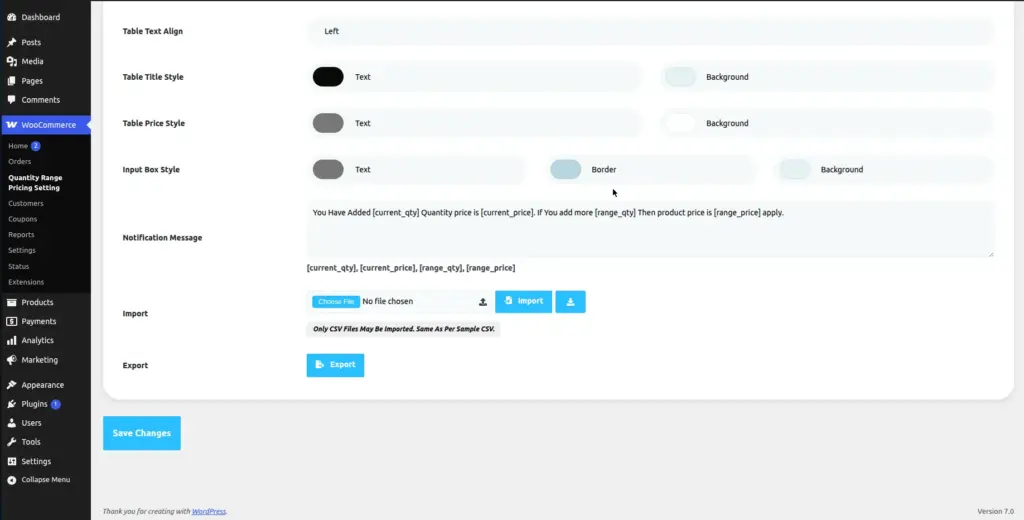
The Import & Export feature lets you manage pricing rules in bulk using a spreadsheet (CSV) file. Instead of editing each product one by one, you can add or update hundreds of pricing rules at once by uploading a single file.
Overview
Think of Import & Export like a spreadsheet shortcut. You export your current pricing rules to an Excel-compatible CSV file, edit it on your computer, then import it back to update everything at once. This is especially useful when:
- You are setting up pricing on a brand new store with many products
- You need to run a seasonal sale and want to change many discounts quickly
- You want to back up your current pricing rules before making changes
- You received a pricing list from your supplier and want to upload it directly
Exporting Your Current Rules
Export creates a CSV file containing all the current pricing rules for a product (or globally). Use this to back up your data or to edit rules in bulk.
Go to the product or the Import/Export section
For a single product: edit the product and go to the Quantity Range Pricing tab → Import & Export sub-tab.
For global export: go to Quantity Range Pricing → Import/Export in the admin sidebar.
Click "Export"
Click the Export button. Your browser will automatically download a CSV file named something like pricing-rules-[product-id].csv.
Open the file in Excel or Google Sheets
Open the CSV file using Microsoft Excel, Google Sheets, or any spreadsheet software. You will see all your pricing rows as rows in the spreadsheet.
Understanding the CSV File Format
The exported CSV contains columns that match the pricing row fields. Here is what each column means:
| CSV Column | What to Put Here | Example |
|---|---|---|
user_role |
WordPress role slug. Leave blank for all users. |
|
countries |
Country code(s), comma-separated. Leave blank for all. |
|
min_qty |
Minimum quantity for this tier |
10 |
max_qty |
Maximum quantity. Use |
|
price_type |
One of: |
percentage |
price |
The discount value (percentage number or amount) |
20 |
Importing Rules from a CSV
- Prepare your CSV file Start with an exported file as a template, or create a new CSV file with the column headers listed above. Fill in your pricing rules as rows in the spreadsheet.
- Save the file as CSV In Excel: File → Save As → choose “CSV (Comma delimited)” format. In Google Sheets: File → Download → Comma Separated Values (.csv).
- Go to the Import section On the product edit page, go to the Quantity Range Pricing → Import & Export tab. Or use the global Import/Export menu.
- Click “Choose File” and select your CSV Use the file chooser to select your prepared CSV file from your computer.
- Click “Import” The plugin reads your file and creates or updates all the pricing rules. You will see a success message when it completes.
- Verify the imported rules After importing, check the Price tab on the product to confirm all rows have been imported correctly with the right values.
Important: Importing a CSV file will replace any existing pricing rules on that product. Always export first to back up your current rules before importing.
Tips
- Always start from an exported file to get the correct column headers – never guess the format.
- Export before you import – this creates a backup you can restore from if something goes wrong.
- Use Google Sheets for easy editing – it handles CSV format cleanly and lets you share the file with your team.
- For Max Qty, always use the number
-1(not “unlimited” or “∞”) – the plugin requires this exact value. - Country codes must be 2-letter ISO codes (e.g. US, GB, IN, DE) – not the full country name.
Common Mistakes
- Opening the CSV in Notepad instead of Excel. This makes the columns unreadable. Always open CSV files in spreadsheet software.
- Saving as .xlsx instead of .csv. The plugin cannot read Excel format – it must be saved as a .csv file.
- Using full country names instead of codes. Use “US” not “United States”. Check ISO 3166-1 alpha-2 codes if unsure.
- Leaving out required columns. All six column headers must be present in your CSV, even if some values are blank.
Image