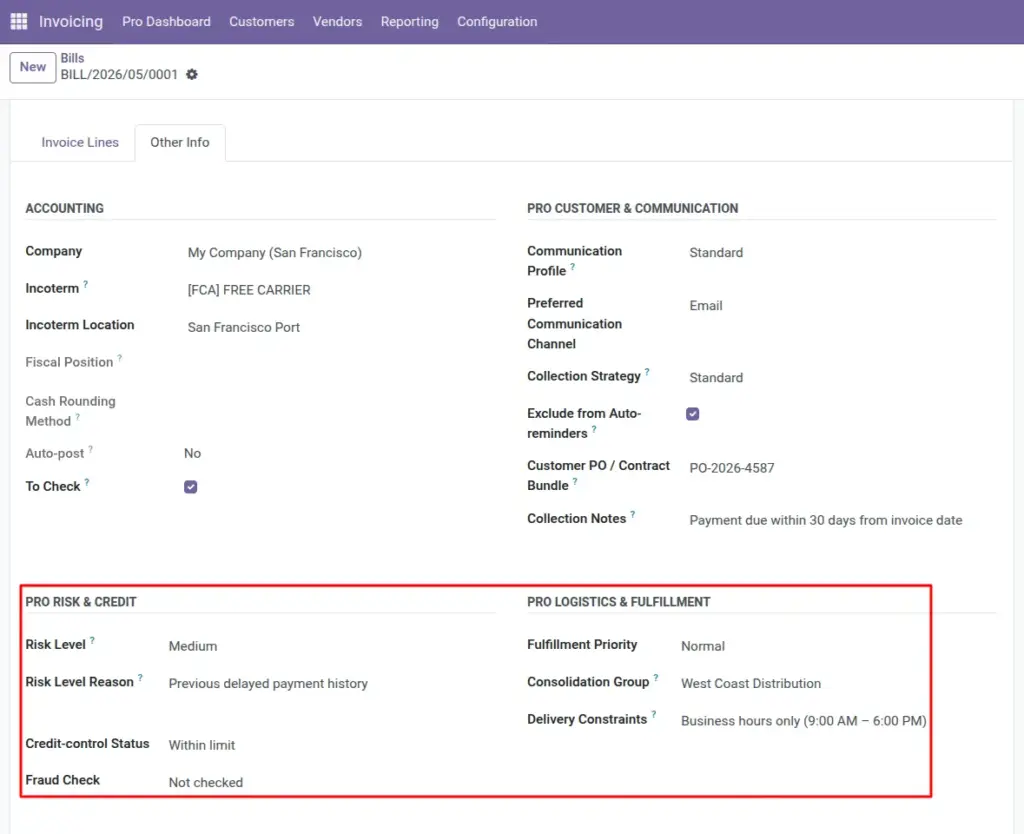
Show credit decisions, fraud review outcomes, and how urgently operations must ship – directly on the invoice everyone already uses.
Overview
Two switches control this area: Risk & credit and Logistics & fulfillment. Together they give finance, compliance, and warehouse teams a shared snapshot on each posted or draft invoice.
How it works
Risk level is a simple four-step scale (Low → Blocked). It feeds analytics such as “high-risk unpaid” on the Pro Dashboard. Credit-control status and Fraud check link to lists your administrator maintains so wording stays consistent across the company.
Step-by-step guide
- After credit approves a large order, open the invoice and set Risk level to match the approval (often Low or Medium).
- If conditions change – shipment delayed, partial down payment missed – raise the risk or move status to Blocked and explain why in Risk level reason.
- Set Credit-control status to the closest standard status (“Within limit”, “Over limit”, “Exception approved”, etc.).
- Record the outcome of your fraud or KYC review using Fraud check.
- For operations, pick Fulfillment priority (Normal, Rush, VIP presets supplied by your admin).
- If several invoices must ship together, type the same Consolidation group code on each invoice.
- List any special rules in Delivery constraints (time windows, alternate dock, Incoterm nuance).
Fields table
| Field name | Description | Example |
|---|---|---|
Risk level |
Quick signal: Low, Medium, High, or Blocked for this invoice at issue time. |
High for a new distributor with short payment history. |
Risk level reason |
Short justification teammates can read later. |
“Parent company guarantee not yet on file.” |
Credit-control status |
Structured status from your credit team’s list. |
“Exception approved” for temporary limit increase. |
Fraud check |
Result category from your fraud checklist (cleared, needs review, etc.). |
“Requires manual review” while waiting on bank callback. |
Fulfillment priority |
Tells warehouse how urgently to pick/pack relative to other orders. |
VIP for a strategic account’s first shipment. |
Consolidation group |
Text code linking invoices that must ship or bill together. |
“SHIP-BATCH-17MAR” on three invoices to the same site. |
Delivery constraints |
Free-text operational instructions beyond standard Incoterms. |
“Deliver between 09:00–11:00; call site mobile on arrival.” |
Field explanations
Each item matches one row in the table above, in the same order.
Risk level
A simple business label (Low / Medium / High / Blocked) for this invoice at issue time. It is not a legal credit score; your company defines what each level means.
Risk level reason
Free text explaining why that risk level was chosen. Always fill it for High or Blocked so future readers (audit, new manager) understand the decision.
Credit-control status
A value from your credit team’s list (within limit, over limit, exception approved, etc.). It should mirror the same categories you use in credit meetings.
Fraud check
A structured flag from your fraud or compliance checklist (not checked, cleared, requires review, etc.). It records the outcome of a review, not the raw investigation file.
Fulfillment priority
Tells warehouse and logistics how urgent this invoice’s shipment is compared with others (Normal, Rush, VIP presets). Independent from financial risk: a low-risk VIP can still need rush handling.
Consolidation group
A short shared code on several invoices that must ship or be billed together. Agree naming rules so planners can search one code and see the full batch.
Delivery constraints
Free text for anything that standard shipping fields do not capture: time windows, dock rules, Incoterm nuances, or “call 30 minutes before arrival.”
Coverage (Min/Target/Max)
Policy thresholds per site for reordering and caps.
Current Qty
Live on‑hand quantity aggregated from configured locations.
Has Expiring Lots
True when any lot expires within the next 30 days.
Tip: Align Risk level labels with your credit policy document. That way training is one page instead of two systems.
Common mistake: Leaving Risk level empty on every invoice – analytics and dashboards will then treat all unpaid balances as “unknown,” hiding true concentration risk.
Image