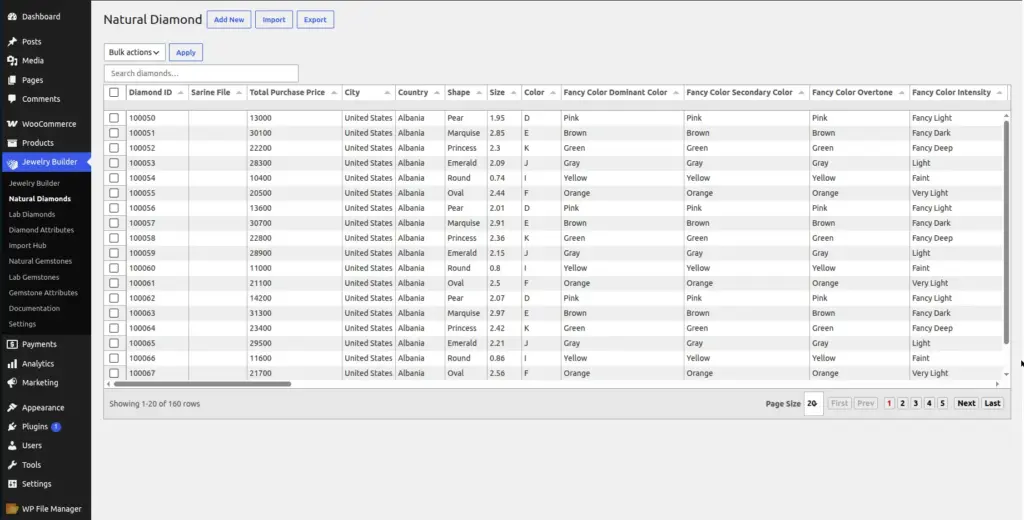
The Natural Diamonds section is your inventory management area for natural mined diamonds. Each diamond record stores detailed grading information that customers use to filter and compare stones in the ring builder.
Location: Go to Jewelry Builder → Natural Diamonds in your WordPress admin.
Overview of the Natural Diamonds Page
The Natural Diamonds page shows all your natural mined diamonds in a searchable, sortable table. At the top of the page you will find action buttons:
| Button | What It Does |
|---|---|
Add New |
Opens a form to manually add a single diamond record by filling in all the fields. |
Import |
Takes you to the Import Hub to bulk-import diamonds from a CSV file – the fastest way to add many diamonds at once. |
Export |
Downloads all your natural diamonds as a CSV file. Useful for backups or for editing data in a spreadsheet before re-importing. |
Bulk actions → Delete |
Select multiple diamond records using the checkboxes, then delete them all at once. |
Search bar |
Type a diamond ID, shape, color, or other keyword to instantly filter the table results. |
Diamond Fields – Full Reference
Each diamond record stores the following information. Fields marked Required must be filled in – the others are optional but recommended for better customer filtering.
| Field Name | Required | Description | Example |
|---|---|---|---|
Diamond ID |
Yes |
A unique identifier for this diamond in your inventory. It must be unique – no two diamonds can have the same ID. Usually comes from your supplier’s stock number. |
ND-12345 |
Shape |
Yes |
The cut shape of the diamond. This is one of the most important filter fields – customers almost always filter by shape first. |
Round, Princess, Oval, Cushion, Pear, Emerald, Marquise, Heart, Radiant, Asscher |
Size (Carat) |
Yes |
The weight of the diamond in carats. A carat is 0.2 grams. Customers use a carat range slider to filter. Enter the value as a decimal number. |
|
Color |
Yes |
The color grade of the diamond on the GIA D–Z scale. D is colorless (most valuable). Z is heavily tinted yellow. Customers filter by color range. |
D, E, F, G, H, I, J, K, L…Z |
Clarity |
Yes |
The clarity grade – how many visible inclusions (tiny internal flaws) the diamond has. FL (Flawless) is the best. SI2 and I1 are lower grades with visible inclusions. |
FL, IF, VVS1, VVS2, VS1, VS2, SI1, SI2, I1, I2, I3 |
Cut |
Yes |
How well the diamond has been cut and polished. Cut affects sparkle more than any other grade. Customers filter by cut quality. |
Excellent, Very Good, Good, Fair, Poor |
Total Purchase Price |
Yes |
The cost price you paid for this diamond (what you paid your supplier). This is your private cost – it is never shown to customers. The plugin uses this plus your commission to calculate the customer-facing price. |
2500.00 |
Total Sales Price |
No |
The price shown to customers. If left empty, the plugin automatically calculates this from the Purchase Price plus your commission setting. |
3200.00 |
Lab |
No |
The name of the gemological lab that graded and certified this diamond. Customers sometimes filter by lab. |
GIA, AGS, IGI, HRD, EGL |
Certificate Number |
No |
The unique certificate or report number issued by the grading lab. Customers can use this to look up the diamond’s full grading report on the lab’s website. |
2141234567 |
Field Explanations
Diamond ID
This is simply a label you give to each diamond so you can identify it. Think of it like a product SKU number. When a customer wants to ask about a specific diamond, they reference this ID. Your supplier’s stock number or internal inventory number works perfectly here. It must be unique – the system will reject duplicate IDs during import.
Shape
The shape of a diamond refers to the outline of the stone when viewed from above. Round is the most popular shape for engagement rings. Princess (square) is the second most popular. Each shape has a different visual character – Oval looks elongating, Cushion has soft rounded corners, Pear looks like a teardrop. Customers filter by shape first because it is the most personal choice.
Size (Carat Weight)
Carat weight measures how heavy the diamond is – not how big it looks. A 1.00 carat round diamond is typically about 6.5mm in diameter. Two diamonds can weigh the same but look different sizes depending on their cut. Always enter carat weight as a decimal (e.g. 1.05, not “1 carat 5 points”).
Color Grade
GIA (the main diamond grading lab) grades diamond color from D (completely colorless) to Z (noticeably yellow). In the filter, customers set a range like “G–I” to see diamonds in their preferred color zone. D–F is considered colorless, G–J near-colorless, K–M faint yellow. Most engagement rings use G–I color as a sweet spot between quality and price.
Clarity Grade
Clarity describes how clean the inside of the diamond is. FL (Flawless) means no inclusions visible even under 10× magnification – very rare and expensive. SI1 and SI2 (Slightly Included) have inclusions that are visible under magnification but usually not to the naked eye. Most customers buying for appearance choose VS1 to SI1 as the best value range.
Cut Grade
Cut is the most important factor affecting how sparkly a diamond looks. An Excellent cut diamond reflects light beautifully. A Poor cut diamond looks dull even if it has great color and clarity. Cut only applies to round brilliant diamonds officially – for fancy shapes, the “Cut” field often stores Polish or Symmetry grades instead.
Purchase Price vs Sales Price
The Purchase Price is your cost – what you paid. The Sales Price is what customers pay. If you leave Sales Price empty, the plugin calculates it automatically: Sales Price = Purchase Price + commission. For example, if a diamond cost you $2,000 and your commission is 20%, the customer sees $2,400. If you want to manually override the price for a specific diamond, enter the Sales Price directly.
How to Add a Diamond Manually
- Click “Add New” at the top of the Natural Diamonds page A form will slide open or a new row will appear for data entry.
- Fill in the required fields At minimum: Diamond ID, Shape, Size, Color, Clarity, Cut, and Total Purchase Price. Add Lab and Certificate Number if you have them.
- Save the record Click Save or the tick/checkmark button to commit the row. The diamond appears in the table and is immediately available in the ring builder for customers to browse.
- For adding more than a few diamonds at once, use the Import Hub with a CSV file. Adding hundreds of diamonds manually one by one would take a very long time – CSV import is far more efficient.
Tips & Common Mistakes
Tips for managing your diamond inventory
- Always use thesame ID formatas your supplier so you can cross-reference records easily.
- Export your diamonds regularly as a CSV backup – especially before doing a bulk delete or re-import.
- Avoid duplicate Diamond IDs – the import will fail or overwrite records if two diamonds share the same ID.
- Do not leave thePurchase Priceat 0 unless the diamond is truly free – a $0 price will show to customers and look like an error.
- Use thesearch barto quickly find a specific diamond by ID when a customer calls to ask about it.
Image