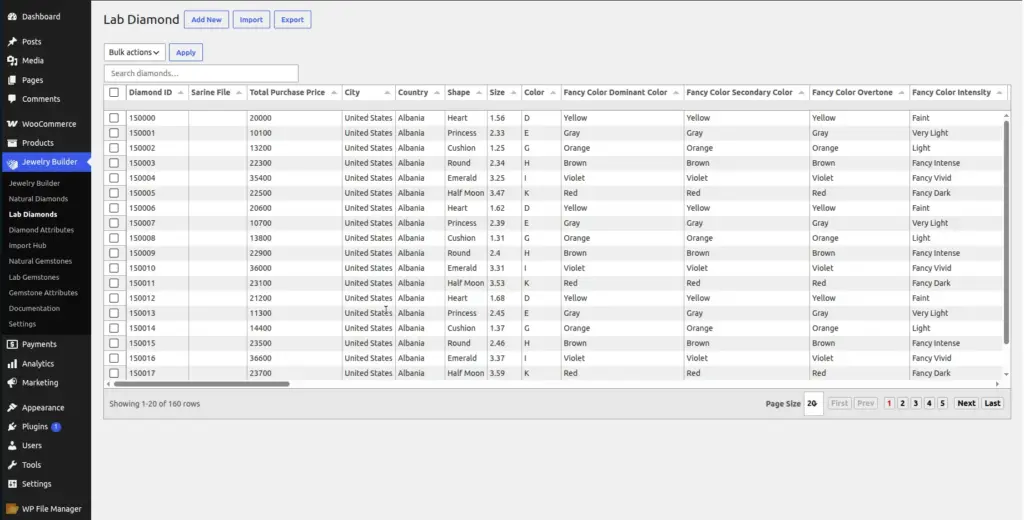
Lab-grown diamonds are real diamonds created in a controlled laboratory environment rather than mined from the earth. The Jewelry Builder keeps them in a completely separate catalog from natural diamonds so customers and store managers can tell them apart easily.
Location: Go to Jewelry Builder → Lab Diamonds in your WordPress admin.
What Are Lab Diamonds?
Lab-grown diamonds are chemically, physically, and optically identical to natural mined diamonds. The only difference is their origin – they are grown in a laboratory using either the HPHT (High Pressure High Temperature) or CVD (Chemical Vapor Deposition) process. They are graded by the same labs (GIA, IGI, etc.) using the same 4Cs system: Cut, Color, Clarity, Carat.
Lab diamonds typically cost 50–80% less than equivalent natural diamonds. Many customers actively prefer them for ethical and environmental reasons. Having a dedicated lab diamond section on your store makes it easy for these customers to find what they want.
Lab Diamonds vs Natural Diamonds – Key Differences in the Plugin
| Aspect | Natural Diamonds | Lab Diamonds |
|---|---|---|
Database table |
wp_diamonds |
wp_lab_diamonds |
Admin menu |
Jewelry Builder → Natural Diamonds |
Jewelry Builder → Lab Diamonds |
Fields |
Same core fields |
Same core fields – identical structure |
Builder display |
Shown under “Natural Diamonds” tab in the builder |
Shown under “Lab Diamonds” tab in the builder |
CSV import type |
Select “Natural Diamonds” in Import Hub |
Select “Lab Diamonds” in Import Hub |
Both catalogs use the same 10 core fields (Diamond ID, Shape, Size, Color, Clarity, Cut, Purchase Price, Sales Price, Lab, Certificate Number). All the instructions in Natural Diamonds apply equally to Lab Diamonds. The only differences are which admin menu you use and which CSV import type you select.
Lab Diamond Fields
Lab diamonds use exactly the same fields as natural diamonds. Refer to the Natural Diamonds field reference for the full description of each field. Here is a quick summary:
| Field Name | Required | Typical Value for Lab Diamonds |
|---|---|---|
Diamond ID |
Yes |
Use a consistent prefix like |
Shape |
Yes |
Same shapes as natural: Round, Oval, Princess, Cushion, etc. |
Size (Carat) |
Yes |
Decimal number, e.g. |
Color |
Yes |
D–Z scale, same as natural. Lab diamonds are often D–F (near-colorless) at lower prices. |
Clarity |
Yes |
FL–I3 scale, same as natural. Lab diamonds frequently score VVS1–VS2. |
Cut |
Yes |
Excellent, Very Good, Good – same grading as natural |
Total Purchase Price |
Yes |
Your wholesale cost for the lab diamond |
Total Sales Price |
No |
Leave blank to auto-calculate with commission, or enter manually |
Lab |
No |
IGI and GCAL are most common for lab diamonds. GIA also grades lab diamonds. |
Certificate Number |
No |
Lab certificate number from IGI, GIA, or GCAL |
Importing Lab Diamonds via CSV
Go to Jewelry Builder → Import Hub
The Import Hub is the recommended way to bulk-upload lab diamonds.
Upload your CSV file
Click “Choose CSV File” and select your lab diamonds CSV. The file must have a header row with column names.
Select "Lab Diamonds" as the CSV File Type
In the “CSV File Type” dropdown, choose Lab Diamonds. This tells the plugin to import into the lab diamonds database table, not the natural diamonds table.
Map columns and import
The column mapping screen appears. Match your CSV columns to the database fields. Mandatory fields (Diamond ID, Total Purchase Price) are highlighted. Click Import to begin.
Tips for Lab Diamonds
- Use a naming convention for Diamond IDs (e.g., prefix all lab diamonds with
LG-) so you can instantly recognize them in reports and exports. - Lab diamonds from IGI certificates often have longer certificate numbers – that is normal.
- Since lab diamonds cost less, you may want to set a different commission percentage for lab vs natural. The plugin’s commission setting is global – if you need different margins per stone, set the Sales Price manually for those records.
- Do not import lab diamonds using the “Natural Diamonds” type – they will end up in the wrong catalog and appear incorrectly in the builder
Image