


Quantity pricing rules are configured in Admin, but customers see the results on your storefront, cart, and checkout. This chapter explains what to build and what customers should experience.
Note The plugin does not automatically change cart line items. Your storefront or custom cart workflow must call the Store API and apply the returned unit_price.
Product detail page
What customers should see
| Element | Purpose |
|---|---|
Tier table |
|
Dynamic price |
Updates when quantity changes |
Active tier highlight |
Show which row applies |
Savings message |
“You save $X at this quantity” (optional) |
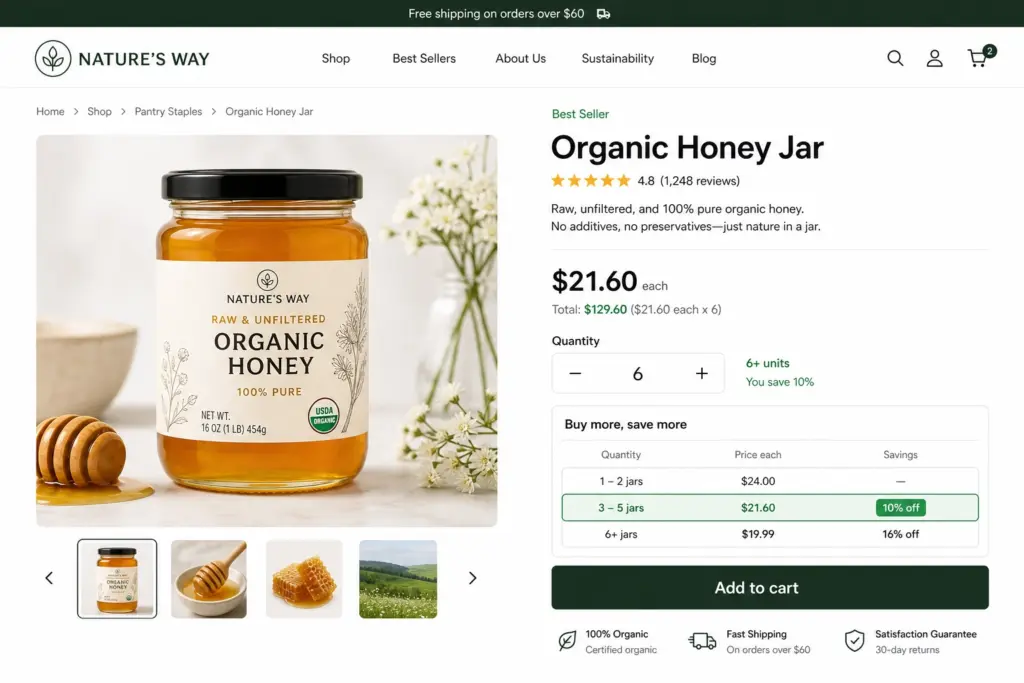
Fetch tiers on page load
GET /store/quantity-pricing?product_id=prod_01XXX&variant_id=variant_01XXX¤cy_code=usdReturns quantity_prices array – render as a table.
Live price when quantity changes
GET /store/quantity-pricing?product_id=prod_01XXX¤cy_code=usd&quantity=6&base_unit_price=24Returns calculated_price with unit_price, line_total, and rule_id.
Cart behavior
On add to cart and quantity update:
- Call Store API with current
quantity,product_id,variant_id,currency_code - Apply returned
unit_priceto the line item - Optionally store
rule_idin line metadata for auditing
| Customer action | Expected result |
|---|---|
Increase qty across tier boundary |
Unit price may drop |
Decrease qty |
Price may increase to higher tier |
Change variant |
Variant-specific tiers apply |
Mixed cart |
Each line priced independently |
Checkout
| Step | Quantity pricing role |
|---|---|
Review order |
Line totals reflect tier-adjusted unit prices |
Payment |
Charged amount matches tier pricing |
Confirmation |
Receipt shows quantity and unit price paid |
Tip Re-validate tier price at checkout – quantity may have changed since the product page.
API parameters reference
| Parameter | When to pass |
|---|---|
|
Always |
|
When customer selected a variant |
|
From store region / currency context |
|
For live |
|
When discount tiers need explicit catalog price |
|
Logged-in B2B customers |
|
Regional pricing context |
B2B logged-in customers
When using customer groups (via Admin API):
- Customer logs in
- Storefront reads their
customer_group_id - Pass it to Store API
- Group-specific tiers returned and displayed
Storefront integration checklist
- [ ] Fetch tiers on product page load
- [ ] Recalculate when quantity input changes
- [ ] Pass
variant_idwhen variant is selected - [ ] Pass
currency_codefrom store context - [ ] Pass
base_unit_pricefor percentage/fixed discount tiers - [ ] Update cart line price on add/update
- [ ] Re-validate at checkout
- [ ] Test boundary quantities (9 vs 10, 50 vs 51)
Customer-facing help text (copy-paste)
> Why did my price change when I added more items?
> We offer volume discounts – the more you buy, the lower the per-unit price.
> Which price applies?
> The price shown for your current quantity in the tier table applies to your entire line quantity.
Developer helper (optional)
For custom cart workflows, use the exported helper:
import { resolveQuantityUnitPrice } from "@webbycrown/medusa-quantity-pricing-rules"

const unitPrice = await resolveQuantityUnitPrice(container, {
  product_id: "prod_01...",
  variant_id: "variant_01...",
  quantity: 25,
  currency_code: "usd",
})