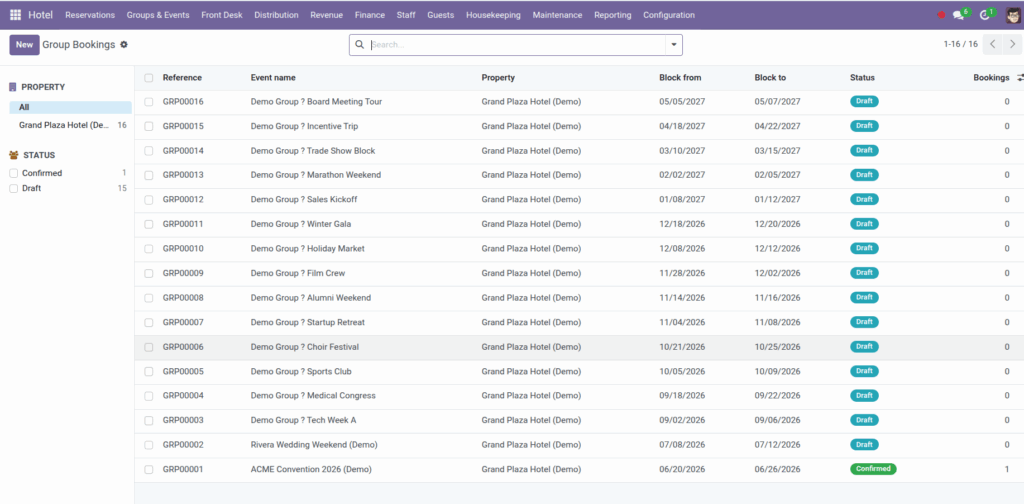
Manage group blocks, track allotment pickup, and maintain rooming lists.
Overview
Conferences, weddings, and tour groups often contract a block of rooms for specific dates. A group / event record holds the block dates, organizer, contracted room counts by type, and a rooming list of individual guests. Individual bookings link to the group so you can measure how much of the block has been picked up.
Find group events under Hotel → Groups & Events → Group Bookings, with separate menus for Allotments and Rooming lists.
How It Works
Create a group event with block from and block to dates (same date convention as bookings – block to is exclusive). Add allotment lines: one row per room type with the number of rooms contracted. The system computes Pickup (room-nights) from confirmed bookings linked to the event.
The rooming list tracks who is staying: guest name or contact, requested room type, assigned room, and optional link to their booking. Use it before arrival to assign rooms and during the event to see gaps.
Group states: Draft → Confirmed → Done, or Cancelled. Link each guest booking to the group via the Group / event field on the booking form.
Step-by-Step Guide
- Open Hotel → Groups & Events → Group Bookings and click New.
- Enter event name, property, organizer, and block dates.
- On the Allotments tab, add a line per room type with rooms contracted.
- Click Confirm when the contract is signed.
- As guests register, create bookings and set Group / event on each.
- Add rooming list lines with guest names, requested types, and assigned rooms.
- Link rooming list entries to bookings when individual reservations are confirmed.
- Monitor pickup on allotment lines – compare contracted rooms to pickup room-nights.
- Click Done after the event, or Cancel if the block is released.
Fields Table
| Field Name | Description | Example |
|---|---|---|
Event name |
Title of the group or function |
Smith Wedding |
Reference |
Auto-generated group reference |
GRP/2026/00007 |
Property |
Hotel hosting the group |
Grand Plaza Hotel |
Organizer / Agency |
Contact for the group planner |
Bright Events Ltd |
Block from / Block to |
Date range of the room block |
10-14 Sep 2026 |
Group – Status |
Draft, Confirmed, Done, Cancelled |
Confirmed |
Rooms contracted |
Allotment quantity per room type |
20 |
Pickup (room-nights) |
Confirmed booking room-nights for that type |
48 |
Rooming – Guest name |
Name when no contact exists yet |
Alex Johnson |
Rooming – Guest |
Linked contact record |
Alex Johnson (contact) |
Requested type |
Room category on rooming line |
Standard Double |
Assigned room |
Physical room allocated |
214 |
Rooming – Booking |
Linked individual reservation |
HB/2026/00301 |
Field Explanations
Event name
Human-readable name shown on lists and reports – wedding name, conference title, tour code.
Reference
System ID for the group block. Appears alongside the name in dropdowns.
Property
All allotments, rooming lines, and linked bookings must be for this hotel.
Organizer / Agency
Planner or company contact – useful for billing master accounts and correspondence.
Block from / Block to
Contract window. Nights = days between dates. Block to follows booking check-out rules (exclusive end).
Group – Status
- Draft – negotiating.
- Confirmed – active block.
- Done – event finished.
- Cancelled – block released.
Rooms contracted
How many rooms of each type the group holds – not yet assigned to named guests.
Pickup (room-nights)
Automatically calculated from confirmed bookings linked to this event for that room type (nights × rooms).
Rooming – Guest name
Free-text name for rooming lists received before contacts are created.
Rooming – Guest
Link to a Guest Profile when the contact exists in Odoo.
Requested type
What the guest asked for – helps assign the right category from the block.
Assigned room
Specific room number allocated on the rooming list before or at check-in.
Rooming – Booking
Connects the rooming line to the actual reservation. Must belong to the same group event.
Tips
- Compare pickup to contracted rooms regularly – low pickup may mean you can release unsold rooms back to general inventory.
- Use room holds for tentative VIP rooms within the block while the rooming list is finalized.
- Open linked bookings from the group form to audit all reservations in one place.
Common Mistakes
- Bookings without group link Pickup only counts confirmed bookings with Group / event set – orphan bookings skew pickup reports.
- Wrong property on rooming line Room and room type must belong to the event’s property.
- Confusing rooms contracted with room-nights Contract is a room count for the block period; pickup is cumulative room-nights from actual bookings.
Image