Store guest contact details and reuse them on every booking, folio, and invoice.
Overview
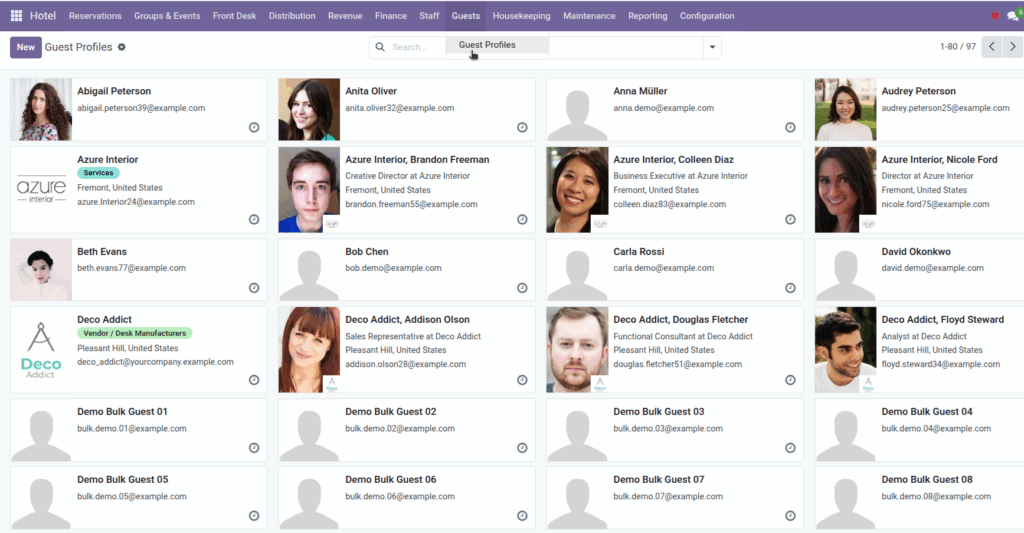
Guests in Hotel Management are standard Odoo contacts (res.partner). The dedicated menu Hotel → Guests → Guest Profiles opens the contact list configured for individual customers – the people who stay at your hotel.
Keeping accurate guest profiles saves time at reservations and the front desk, ensures invoices go to the right email, and builds history you can search when a repeat guest calls.
How It Works
When you create a booking, waitlist entry, or folio, you pick a Guest from contacts. That link carries through to deposit invoices and final bills. New guests can be created directly from the booking form or beforehand under Guest Profiles.
Guest Profiles uses the same contact form as elsewhere in Odoo: name, email, phone, address, and optional notes. Contacts created here default to individual customers (not companies).
Search by name, email, or phone from any guest dropdown. Over time, each profile accumulates linked bookings visible from the contact record if your Odoo setup shows related documents.
Step-by-Step Guide
- Open Hotel → Guests → Guest Profiles.
- Click New to create a guest before they book, or skip this and create inline on a booking.
- Enter the guest’s full name, email, and mobile phone at minimum.
- Add address details if you send postal confirmations or need billing address on invoices.
- Save the contact.
- When creating a booking, select this guest in the Guest field – see Reservations & Bookings.
- To update details later, search Guest Profiles, open the contact, edit, and save. Future documents use the updated information.
Fields Table
| Field Name | Description | Example |
|---|---|---|
Name |
Guest’s full name |
Maria Gonzalez |
Primary email for confirmations and invoices |
||
Phone |
Main phone number |
+1 555 0100 |
Mobile |
Cell number for SMS or urgent contact |
+1 555 0199 |
Street / City / ZIP |
Mailing or billing address |
12 Oak Lane, Austin, 78701 |
Country |
Guest’s country |
United States |
Is a Company |
Should be off for individual guests |
Unchecked |
Internal notes |
Private notes visible to staff only |
Prefers high floor, allergic to feathers |
Field Explanations
Name
How the guest appears on bookings, folios, and invoices. Use the name they present at check-in.
Used when sending invoices or confirmation emails from Odoo. Double-check spelling to avoid bounced messages.
Phone
Landline or main number. Helpful for same-day arrival coordination.
Mobile
Best number for text or mobile contact. Many front desks prefer mobile for day-of-arrival calls.
Street / City / ZIP
Full address for billing or loyalty mailings. Appears on printed invoices if configured.
Country
Important for tax rules, visa reporting, and marketing segmentation.
Is a Company
Guest Profiles defaults to individuals. Turn on only when the paying entity is a corporate account – otherwise use a person as guest and bill-to company separately if needed.
Internal notes
Staff-only preferences and history – VIP status, past issues, room preferences. Not shown to the guest on standard documents.
Tips
- Search before creating a duplicate – type part of the email or phone in Guest Profiles to find returning guests.
- Record preferences in internal notes so the next shift sees them when opening the guest’s booking.
- For corporate-paid stays, you may still use an individual guest on the booking while the invoice partner is the company – coordinate with your accountant.
Common Mistakes
- Duplicate profiles Creating “John Smith” twice makes history hard to track. Always search first.
- Missing email on invoice Deposit and folio invoices use the guest contact – without email, Odoo cannot send the bill electronically.
- Company flag on leisure guest Leaving “Is a Company” checked breaks the Guest Profiles filter and can confuse reporting.
Image