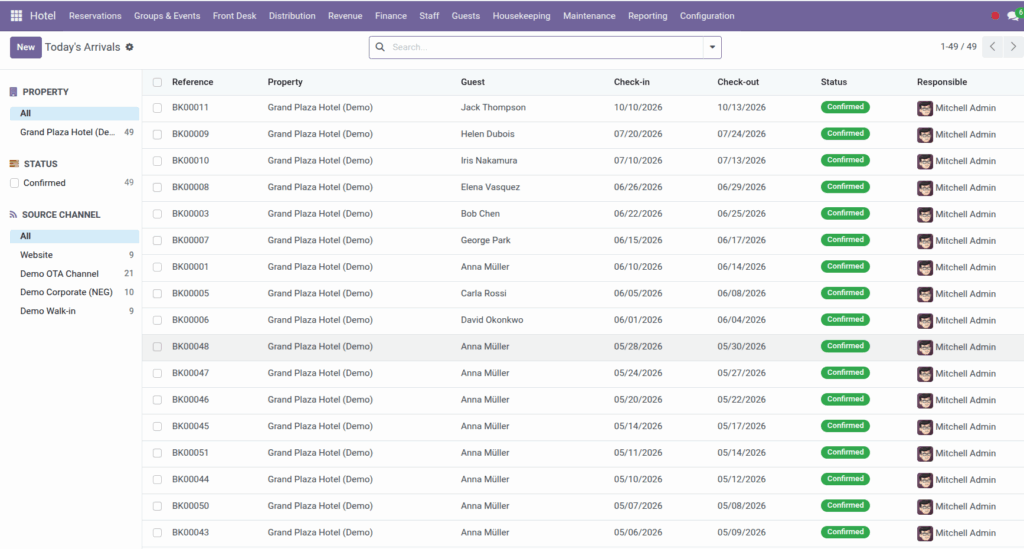
Manage today’s arrivals, departures, and live room status from the front desk menu.
Overview
The front desk team needs a fast picture of who is arriving, who is leaving, and which rooms are ready. Under Hotel → Front Desk you will find three key screens: Today’s Arrivals, Today’s Departures, and Room Rack / Status.
These views pull from confirmed bookings and live room operational status so agents can assign keys, coordinate housekeeping, and answer “which rooms are clean?” without digging through spreadsheets.
How It Works
- Today’s Arrivals – lists confirmed bookings whose check-in date is today. Open a booking to verify guest details, room assignment, and folio.
- Today’s Departures – lists confirmed bookings checking out today. Use it to plan final bills and room turnover.
- Room Rack / Status – shows every room grouped by operational status. Rooms appear in columns such as Vacant, Dirty, Clean, Inspected, and Out of order, each with a color cue.
Room status (ops_status) is updated by housekeeping when tasks finish, by maintenance when work starts or ends, and manually from the room form. Out-of-order rooms cannot be confirmed on new bookings.
Step-by-Step Guide
- At shift start, open Hotel → Front Desk → Today’s Arrivals.
- Review each arrival: guest name, room number, and special requests on the booking.
- Open Today’s Departures to see who leaves today and ensure folios are ready – see Folios & Invoicing.
- Open Room Rack / Status to see which rooms are clean or still dirty.
- Drag room cards between status columns on the kanban board, or open a room and change Room status manually when appropriate.
- If a room shows Out of order, check Maintenance → Out-of-Order Rooms for the active work order.
- When assigning walk-in rooms, prefer Inspected or Clean rooms in the rack before selling a Dirty room still being turned over.
Fields Table
| Field Name | Description | Example |
|---|---|---|
Guest (arrival/departure list) |
Name on the booking |
Robert Chen |
Reference |
Booking number |
HB/2026/00145 |
Check-in |
Arrival date used to filter today’s arrivals |
Today |
Check-out |
Departure date used to filter today’s departures |
Today |
Room Number |
Assigned room on the booking line |
412 |
Room status (ops_status) |
Housekeeping/maintenance state on the rack |
Clean |
Floor |
Floor label on the room card |
4 |
Room Type |
Category shown on the rack card |
Deluxe King |
OOO note |
Short reason when room is out of order |
AC repair in progress |
Property |
Hotel filter on rack and lists |
Grand Plaza Hotel |
Field Explanations
Guest (arrival/departure list)
The primary contact on the confirmed booking. Click through to the booking form for full details.
Reference
Unique booking ID for lookup at the desk and on guest correspondence.
Check-in
On the arrivals list, only bookings with check-in equal to today’s date appear (confirmed status).
Check-out
On the departures list, only bookings with check-out equal to today’s date appear.
Room Number
The physical room assigned on the booking. Verify it matches the key you hand to the guest.
Room status (ops_status)
- Vacant – empty and typically sellable.
- Dirty – needs cleaning after checkout.
- Clean – housekeeping completed.
- Inspected – supervisor approved.
- Out of order – blocked; not for sale.
Floor
Helps porters and housekeeping locate the room quickly on the rack board.
Room Type
Shows the category on kanban cards so front desk can swap assignments within the same type if needed.
OOO note
Brief explanation when maintenance marks a room out of order – visible on the room record.
Property
Filter the rack and lists when you operate multiple hotels in one Odoo database.
Tips
- Keep Today’s Arrivals open on a front-desk monitor and refresh periodically – new confirmations appear as reservations staff confirm bookings.
- Group the room rack by status (default) to see at a glance how many rooms are ready vs. dirty.
- Coordinate with housekeeping: when a departure room shows Dirty, a cleaning task should follow in Housekeeping.
Common Mistakes
- Checking in guest to dirty room Always verify room status on the rack before handing over keys – especially on early check-in requests.
- Ignoring out-of-order roomsDo not reassign an OOO room on a booking without maintenance closing the work order first.
- Wrong property filter In multi-property setups, filter by property on arrivals and the rack so you do not mix hotels.
Image