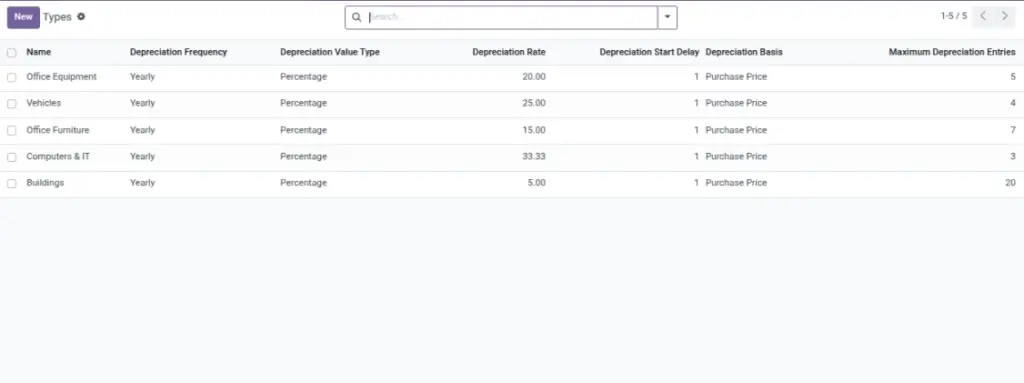
Asset Types are categories like “Computers & IT”, “Vehicles”, and “Office Furniture”. They don’t just group assets — they also define how depreciation is calculated and how often it runs.
Overview
Go to Asset → Configuration → Types. Create types once, then select them when creating assets. If you update a type rule, it can affect future depreciation entries for assets using that type.
How it works
- Depreciation Frequency: how often the system should apply depreciation (monthly, yearly, or by days).
- Depreciation Value Type: fixed amount each time, or a percentage.
- Depreciation Basis: whether the percentage is calculated on the purchase price or on the current book value.
- Maximum Depreciation Entries: optional limit (useful if you only depreciate for a certain number of periods).
Why this matters: consistent type rules keep depreciation totals predictable and easy to explain.
Step-by-step guide (find the right menu)
Create a type
Go to Asset → Configuration → Types and click Create.
Set depreciation frequency and method
Choose how often to depreciate and whether it’s a fixed amount or a percentage.
Set the basis (purchase price vs book value)
If your policy is “always calculate on purchase price”, choose that basis. If your policy is “calculate on remaining value”, choose book value basis.
Apply the type to assets
When you create or update an asset, select the type in the asset form.
Fields table
| Field Name | Description | Example |
|---|---|---|
Name |
The category name used on assets. |
Computers & IT |
Depreciation Frequency |
How often depreciation should be applied. |
Yearly |
Depreciation Value Type |
Fixed amount or percentage. |
Percentage |
Depreciation Rate |
The fixed amount or percentage value. |
33.33 |
Depreciation Start Delay |
How long to wait before depreciation begins. |
1 (period) |
Depreciation Basis |
Whether the rate is calculated on purchase price or book value. |
Purchase Price |
Maximum Depreciation Entries |
Optional limit on the number of depreciation entries. |
3 |
Field explanations
| Field Name | Explanation |
|---|---|
Name |
Clear category label used by assets (e.g., Computers & IT, Vehicles). |
Depreciation Frequency |
How often depreciation applies (monthly, yearly, or by days). |
Depreciation Value Type |
Choose a fixed amount per period or a percentage rate. |
Depreciation Rate |
The actual amount or percentage used in the calculation. |
Depreciation Start Delay |
Wait period before depreciation begins (e.g., start after 1 month/year). |
Maximum Depreciation Entries |
Ceiling on how many entries can be created; stops after reaching it. |
Depreciation Basis |
Calculate on purchase price (constant) or on book value (shrinks over time). |
Tips
- Create a small set of types (don’t over‑split). Fewer types = simpler reporting.
- Align with finance policy so reports match expectations.
- Test with one sample asset before rolling a new rule to all assets.
Common mistakes
- Choosing the wrong basis: totals may look “too high” or “too low”.
- Too many types: users choose the wrong one, and reporting becomes confusing.
- Changing rules mid‑year without a note: later audits may require explanation.
Image placeholder