Summarize This Article With AI
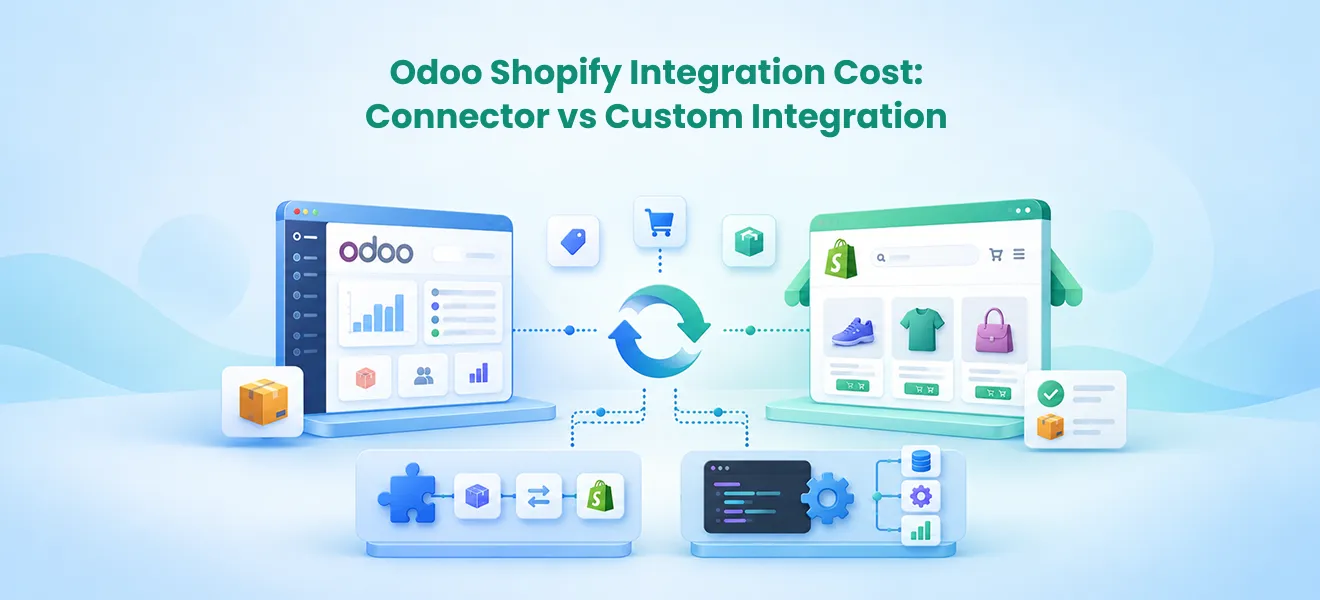
Odoo Shopify integration costs depend on the connector you choose, your existing Odoo environment, the data you need to synchronize, and the amount of implementation work required. A connector license can cost a few hundred dollars, but the total project budget may be significantly higher once setup, product mapping, inventory workflows, testing, and support are included. Businesses comparing connector-based and custom integrations should calculate the full first-year cost rather than judging the project by the app price alone.
Key Takeaways
- Connector pricing is only one part of the budget. Implementation, testing, hosting, subscriptions, and maintenance can cost more than the connector itself.
- Odoo 19 has a documented Shopify connector option. Its documented setup requires Odoo.sh and uses scheduled synchronization rather than real-time webhooks.
- Prebuilt connectors are worth evaluating first when standard products, orders, inventory, and fulfillment workflows meet business requirements.
- Custom integration makes sense when businesses need specialized inventory allocation, multi-system coordination, or workflows existing connectors cannot support.
- The best comparison is total ownership cost. Include initial implementation, recurring expenses, operational risks, and expected benefits.
1. How Much Does Odoo Shopify Integration Cost?
There is no single fixed price for connecting Shopify with Odoo ERP. A business may purchase a connector for a relatively modest license fee and still need professional help configuring products, warehouses, payment mappings, taxes, and fulfillment processes. Another company may require custom API development because its operations involve multiple Shopify stores, complicated ERP workflows, or specialized inventory rules.
The cost therefore depends on three separate questions: what software and infrastructure are needed, how much implementation and testing work is required, and what ongoing operations and maintenance will cost.
Current Shopify Odoo connector price examples
The following examples show vendor-listed prices checked on October 22, 2026. They are product listing prices, not complete implementation quotations or a like-for-like feature comparison.
| Connector | Listed price | Pricing notes |
|---|---|---|
| Webkul Odoo Multichannel Shopify Connector | $170 | Listed module price; separately offered installation and base-module prerequisite |
| Shopify module by Odoo IN Pvt Ltd, v19 | $199 | Odoo Apps third-party listing; not a quote for Odoo.sh or setup |
| Emipro Shopify Odoo Connector, v19 | $633.27 | Odoo Apps module listing; vendor may offer limited included setup under conditions |
| Webkul Shopify-side Odoo Connector | $35/month | Subscription-style offer; verify subscription terms before purchase |
These products are not interchangeable. Supported Odoo versions, integration directions, licensing, required modules, support conditions, and capabilities differ. Taxes, hosting, data cleanup, installation services, and upgrade work may not be included.
Why the connector price is not the integration cost
Consider a business purchasing a $199 connector. The software may provide a data exchange mechanism, but its team still needs to configure the connection and verify actual business processes. Are product SKUs consistent? Which system controls inventory availability? How are refunds, cancellations, and partial shipments mapped? Does the business operate one warehouse or several? What happens when synchronization fails?
If a connector supports these needs through straightforward configuration, it may offer strong value. If extensive modifications are required, a focused custom integration may prove easier to maintain.
2. Odoo Shopify Connector Options and Their Pricing Models
Before paying for custom development, businesses should evaluate integration options supported by their Odoo version, edition, and hosting environment.
Odoo 19 Shopify Connector
Odoo 19 documentation describes a Shopify Connector that synchronizes orders, products, inventory, deliveries, returns, and refunds. The published setup is for Odoo 19 on Odoo.sh. The default workflow uses scheduled actions rather than real-time webhooks: orders are synchronized every 10 minutes, and available stock is pushed after order synchronization. Requirements for faster update intervals must be examined separately.
The Odoo Apps listing by Odoo IN Pvt Ltd currently advertises a $199 v19 module. This is a specific third-party listing, not evidence that the complete Odoo environment and implementation cost $199. Confirm the current app, prerequisites, support, and licensing with the provider before purchasing.
Technical source: Odoo 19 Shopify Connector documentation.
Third-party Odoo Shopify connectors
Third-party connectors may support different synchronization features, multi-store configurations, field mappings, and warehouse workflows. A feature list is not a substitute for a workflow demonstration using the merchant’s real products and orders. A business with multiple warehouse locations, for example, should test inventory reservations, split shipments, returns, and available-to-sell quantities before selection.
Subscription-based connectors
Subscription connectors can lower initial licensing expense but add ongoing fees. A hypothetical annual calculation for a $35 monthly fee is $420 over 12 months, before implementation and additional services. Check whether support, vendor-hosted infrastructure, upgrades, and cancellation or migration provisions are included.
Custom Shopify Odoo API integration
Custom integration builds the data flows around the business’s operational rules using Shopify APIs and appropriate Odoo interfaces. It may involve message processing, monitoring, mappings, and reconciliation. Shopify GraphQL Admin API calls have calculated query-cost limits, so architecture and retry logic must account for the applicable request budget and supported API version.
Technical source: Shopify GraphQL Admin API rate limits.
Custom development provides control but transfers more responsibility for engineering, testing, security, API compatibility, and maintenance to the project team. It is justified by requirements, not simply by the preference for custom software.
3. What Factors Affect Shopify Odoo Integration Pricing?
Product catalog size and data quality
A clean catalog with consistent SKU identifiers is easier to synchronize than one containing duplicates, missing SKUs, or inconsistent variants. Odoo 19 documentation describes SKU-to-internal-reference matching. Product mapping and data-cleanup requirements should therefore be identified before a project estimate is finalized.
Inventory synchronization requirements
Inventory synchronization is more complex than copying a physical quantity. If a warehouse holds 100 units and 15 are reserved, Shopify may need to display 85 units available for sale, subject to the business’s stock policy. Multi-location inventory, safety stock, bundles, returns, and shared channels add design and testing effort. Define which platform owns the stock calculation and how conflicts are resolved.
Orders, returns, and fulfillment
A basic order import may use customer, product, shipping, tax, and payment information. More advanced workflows include partial fulfillment, cancellations after picking starts, refunds, credit notes, shipment tracking, backorders, and exchanges. Each condition adds design decisions and acceptance tests. Odoo connector behavior can also differ according to whether fulfillment is handled in Shopify or Odoo.
Multiple stores, companies, or warehouses
Connecting one Shopify store to one Odoo company is usually simpler than coordinating multiple legal entities, markets, currencies, catalogs, and warehouses. Mappings must preserve the originating store, tax treatment, inventory ownership, and company boundary. Shared stock across several storefronts requires especially careful controls to limit overselling.
Custom Odoo modules and other business systems
Custom Odoo approvals, accounting workflows, shipping providers, marketplaces, and warehouse management systems may affect how Shopify data should be processed. In such cases the project may resemble wider integration architecture rather than simple connector installation.
Hosting, subscriptions, and platform prerequisites
Confirm Odoo licensing, hosting, and module-installation requirements early. Odoo 19’s documented Shopify Connector requires Odoo.sh. Third-party modules may require additional dependencies or a different hosting environment. A connector selected without this check can trigger unexpected infrastructure or migration expenses.
Current licensing reference: Odoo pricing.
4. Example Odoo Shopify Integration Budgets
The next two examples are hypothetical planning scenarios, not WebbyCrown quotes, vendor benchmarks, or verified market averages. Both assume a blended implementation rate of $90 per hour solely to illustrate budget calculation. Real rates, hours, infrastructure needs, and scope can differ substantially.
Scenario A: Connector-led implementation
Assume a compatible Odoo 19 environment already runs on Odoo.sh, with one Shopify store, a clean product catalog, standard order workflows, and one main warehouse. The business selects the $199 connector and needs mapping, testing, and handover.
| Work item | Assumed hours | Illustrative cost |
|---|---|---|
| Requirements and workflow mapping | 8 | $720 |
| Connector setup and authentication | 12 | $1,080 |
| Products, inventory, and order mapping | 16 | $1,440 |
| Integration and recovery testing | 12 | $1,080 |
| Training and handover | 8 | $720 |
| Connector license | — | $199 |
| ILLUSTRATIVE INITIAL TOTAL | 56 | $5,239 |
This excludes Shopify and Odoo subscriptions, Odoo.sh charges, taxes, extra modules, historical cleanup beyond the assumed scope, and ongoing support. It does not claim that every connector installation needs 56 hours.
Scenario B: Custom API integration
Assume specialized stock reservations, an additional warehouse management system, custom refund logic, and monitoring are needed, and connector testing shows a substantial functional gap.
| Work item | Assumed hours | Illustrative cost |
|---|---|---|
| Discovery and technical architecture | 40 | $3,600 |
| API integration and business logic | 120 | $10,800 |
| Testing and failure recovery | 40 | $3,600 |
| Deployment and handover | 16 | $1,440 |
| Subtotal | 216 | $19,440 |
| Illustrative 15% contingency | — | $2,916 |
| ILLUSTRATIVE INITIAL TOTAL | — | $22,356 |
The contingency is a selected budgeting assumption, not a recognized industry standard. A narrower custom project could cost less; a complex, multi-company implementation could require far more.
Calculate your own budget
First-year integration cost = licensing + discovery + configuration or development + data preparation + testing + deployment + hosting + 12 months of support.
Three-year ownership cost = initial project cost + recurring fees for three years + expected maintenance and upgrades.
Ask providers for the assumptions behind each estimate and for a clear separation between one-time and recurring charges.
5. Shopify Odoo Connector vs Custom Integration: Which Is Better?
A prebuilt connector should usually be assessed first because it may already implement common commerce and ERP workflows. Custom integration is valuable when the specific business requirements justify extra engineering control and responsibility.
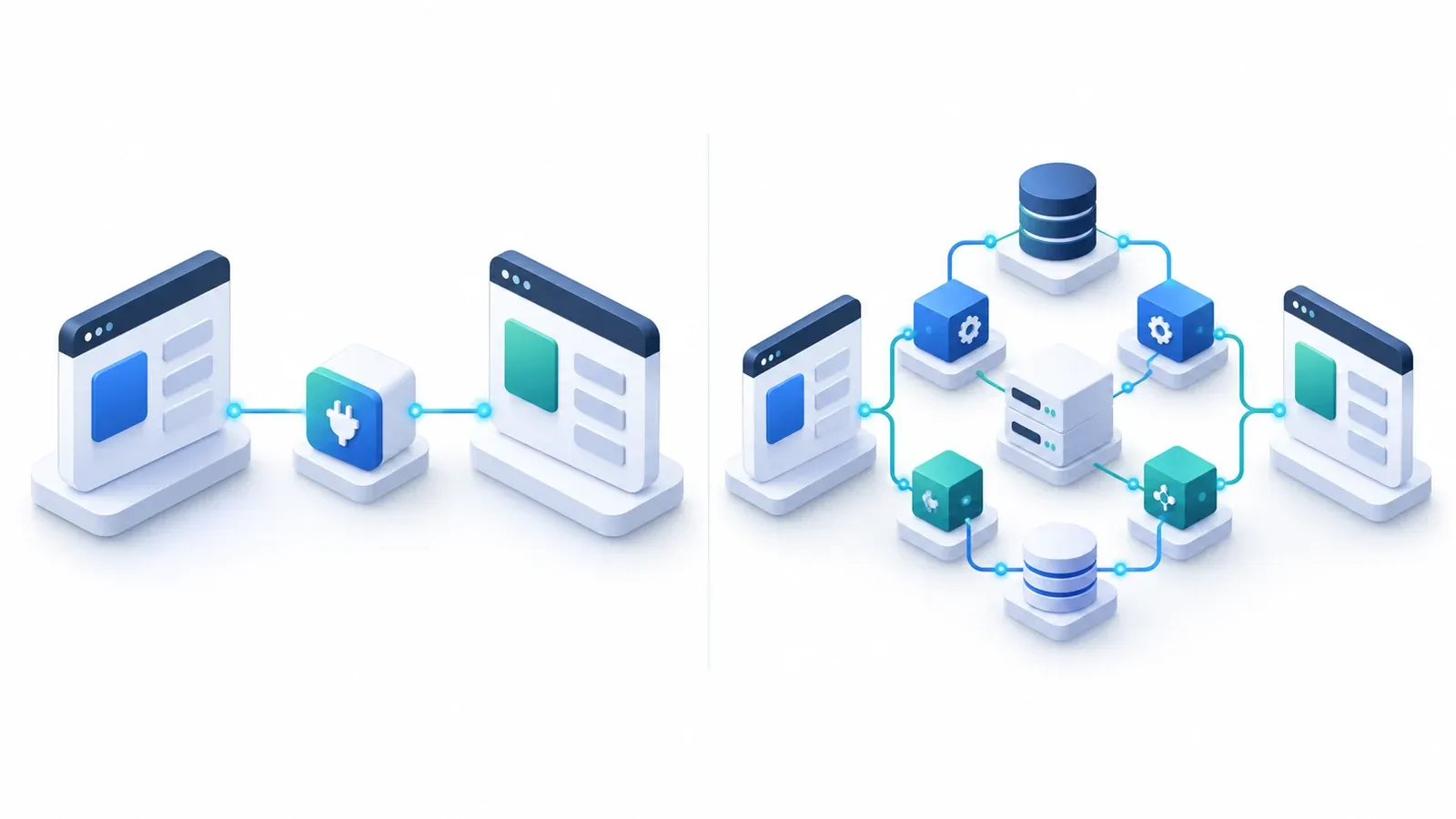
| Decision factor | Prebuilt connector | Custom integration |
|---|---|---|
| Initial cost | License or subscription + setup | Development and deployment work |
| Typical workload | Configuration, mapping, tests | Architecture, code, tests, monitoring |
| Standard order sync | Usually a supported feature | Designed for specified workflows |
| Specialized workflows | Limited by connector design | Flexible but requires engineering |
| Upgrade dependency | Vendor support and compatibility | Internal or contracted maintenance |
| Best fit | Standard, well-defined integration | Complex or distinctive business rules |
When a connector is the right choice
Choose a connector when its documented functionality passes tests for your products, orders, inventory, fulfillment, errors, and recovery—with limited modification. Lower advertised feature counts are not necessarily a drawback if the required operations work reliably.
When custom development is justified
Custom development may be justified for location-priority inventory allocation, unusual warehouse routing, multi-system order orchestration, or business rules that do not fit connector configuration. It should solve a demonstrated gap rather than merely promise flexibility.
A practical decision rule
Test critical workflows on a trial or staging dataset. If a connector passes with manageable changes, compare its total ownership cost against custom work. If it fails essential workflows, estimate the cost of extension and long-term support before committing.
Businesses planning additional storefront work can also review Shopify development services before finalizing integration scope.
6. How to Plan and Implement Shopify Odoo Integration
Step 1: Define data ownership
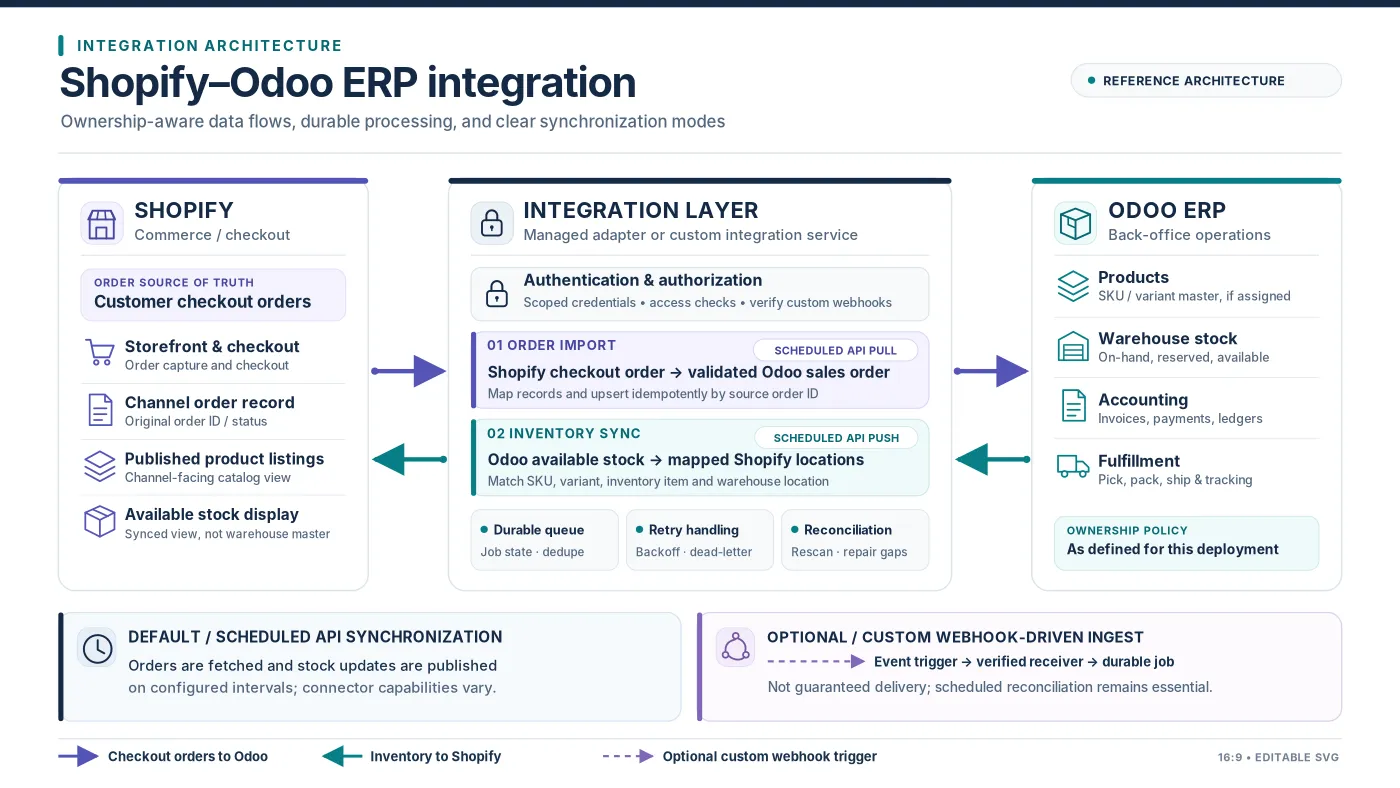
Decide which system is authoritative for every key business record. For example, Shopify may own checkout order capture while Odoo owns warehouse stock and procurement. Fulfillment ownership must follow the merchant’s chosen operating model. Document conflict-resolution rules rather than assuming that bidirectional synchronization is automatically safe.
| Data | Illustrative system responsibility |
|---|---|
| Online checkout orders | Shopify as source; confirmed orders imported to Odoo |
| Warehouse stock and reservations | Odoo, if chosen as inventory master |
| Storefront product content | Shopify, if chosen as display master |
| Procurement and accounting | Odoo under approved business rules |
| Fulfillment status | Depends on Shopify-managed vs Odoo-managed fulfillment |
Step 2: Audit products and warehouse mappings
Review SKUs, variants, units of measure, locations, existing orders, and tax settings. Resolve duplicate identifiers before importing or mapping records. Decide how the integration handles missing and conflicting matches rather than creating products silently.
Step 3: Validate the technical environment
Confirm Odoo edition, version, hosting, connector prerequisites, Shopify API permissions, and authentication. Restrict credentials to necessary scopes; plan secure storage, rotation, and revocation.
Step 4: Configure synchronization and recovery
Decide which updates run on a schedule and which are event-triggered. Shopify webhooks can notify custom systems about changes, but delivery can be duplicated, delayed, missed, or out of order. Use durable processing and periodic reconciliation for critical business records. Do not label Odoo 19’s documented scheduled connector as real-time.
Step 5: Test realistic operational scenarios
- New order creation and repeated delivery without duplicate ERP orders.
- Inventory reservation, stock update, and shared stock across stores.
- Partial shipment, cancellation, refund, and tracking update.
- Missing or conflicting SKU and tax or currency mismatches.
- API rate limiting, credential failure, downtime, and recovery.
- Resynchronization and reconciliation after missed events.
Step 6: Deploy gradually
Start with controlled data where possible, compare records across systems, and monitor the initial flow. Rollback may require more than uninstalling a connector because business records may already have been changed. Plan recovery in advance.
Step 7: Assign operational ownership
Define who reviews failures, connector updates, security access, technical support, and reconciliation discrepancies. A successful initial data sync does not mean the integration needs no ongoing management.
7. Hidden Costs, ROI, and Questions to Ask Before Buying
Include ongoing costs in the estimate
Long-term costs may include Odoo hosting, connector subscriptions, vendor support and version upgrades, operational monitoring, corrective data work, integration middleware, new warehouse or sales-channel requirements, and security reviews. Compare proposals over a defined ownership period rather than on a one-time license price alone.
Estimate return on investment conservatively
Annual net benefit = measurable labor savings + avoided correction costs + other verified operational benefits − annual integration costs.
For illustration, 10 hours of weekly manual data transfer at a hypothetical loaded labor cost of $30/hour represents $15,600 of annual effort over 52 weeks. This is not necessarily $15,600 in realized cash savings: automation may remove only part of that work, and saved employee hours may be redeployed rather than eliminated. Measure actual labor and error reductions after launch.
Questions to ask your integration provider
- Which Odoo and Shopify versions, hosting arrangements, and editions are supported?
- What exactly is included in the software purchase and ongoing support?
- Which order, inventory, customer, tax, fulfillment, and refund fields synchronize?
- How are duplicate events, failed jobs, and recovery handled?
- How are existing products mapped and duplicates prevented?
- Which system owns available inventory and warehouse reservations?
- What configuration, testing, training, and cleanup work is included?
- Who maintains compatibility when Odoo or Shopify changes?
- What recurring fees, hosting costs, and upgrades are excluded?
- What acceptance tests and recovery criteria define project success?
For longer-lived integrations, API contracts also require migration planning. The WebbyCrown guide to API versioning best practices explains how to manage changes without disrupting existing integrations.
Related reading: API versioning best practices.
Frequently Asked Questions
How much does Shopify Odoo integration cost?
A connector license may cost a few hundred dollars, but complete cost depends on configuration, mapping, testing, hosting, data cleanup, and support. Custom integrations need a requirements-based estimate.
Is there a free Shopify Odoo integration?
here may be free or open-source alternatives for certain environments, but compatibility, support, hosting, and implementation still require evaluation. Do not assume an Odoo subscription includes a complete configured Shopify integration.
Does Odoo 19 have a Shopify connector?
Yes. Odoo 19 documentation describes a Shopify Connector for orders, products, inventory, deliveries, returns, and refunds. The documented setup requires Odoo.sh and scheduled synchronization.
What is the cheapest way to connect Shopify with Odoo?
A compatible prebuilt connector is often the first low-upfront-cost option to evaluate for standard workflows. The cheapest overall choice depends on hosting, configuration, support, and maintenance.
Can Shopify inventory sync with Odoo in real time?
Some third-party or custom integrations advertise event-driven updates. Odoo 19’s documented connector relies on scheduled actions; its default stock updates should not be called real-time.
Does Shopify Odoo integration support multiple warehouses?
Certain connectors support warehouse mapping, but the actual handling of reservations, transfers, and stock availability must be tested against your setup.
Can Shopify orders be imported into Odoo automatically?
Yes. Supported connectors can import Shopify orders into Odoo, though timing, workflow coverage, refunds, cancellations, and payment handling vary.
Is custom integration better than a connector?
Not always. A connector can be preferable for standard requirements. Custom integration makes sense when essential business logic cannot be handled reliably by available connectors.
What ongoing expenses should I expect?
Potential recurring expenses include connector subscriptions, hosting, support, security maintenance, compatibility upgrades, and reconciliation work.
How do I request an accurate integration quote?
Document your Odoo version and hosting, Shopify stores, product catalog, warehouses, data flows, accounting rules, expected synchronization timing, and failure-recovery needs. Ask for an itemized scope and recurring-cost breakdown.
Conclusion
Odoo Shopify integration should be evaluated as a complete business investment, not simply a connector license. For standard requirements, a compatible prebuilt connector may offer a practical route to synchronizing sales, inventory, and fulfillment. More specialized operations should compare the maintainability of connector customization with a focused custom integration. Define the data ownership rules, compare full ownership costs, test critical business scenarios, and select a solution that can be supported over time.
If your business needs an implementation assessment or help reviewing custom synchronization requirements, explore WebbyCrown’s Odoo Integration Services.