
Getting Started
Install the plugin, run the setup wizard, and have your jewelry store ready in minutes.

Transform your WooCommerce store into a complete jewelry marketplace. Let customers build custom rings, browse natural and lab-grown diamonds and gemstones, compare products, and purchase seamlessly.

By Akash Soni June 29, 2026
Install the plugin, run the setup wizard, and have your jewelry store ready in minutes.
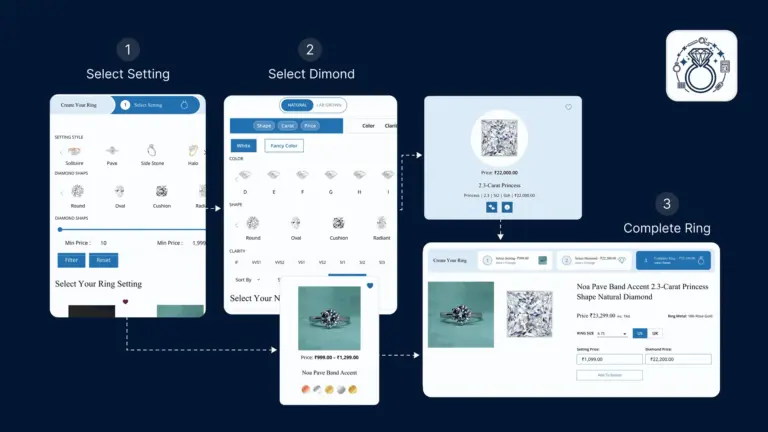
Understand the 3-step customer ring-building flow and how to set up ring products.
Configure API keys, template colors, layout, commission, pagination, and shortcodes.
Add, manage, search, and export your natural mined diamond inventory.
Manage lab-grown diamonds separately from natural stones - same fields, separate catalog.
Manage shape, cut, color, clarity taxonomy terms used to filter the diamond builder.
Bulk-import diamonds and gemstones from CSV files using the modern Import Hub screen.
Manage your natural colored gemstone inventory with full grading and pricing details.
Manage lab-created gemstones separately from natural stones for clear catalog organization.
Set up the taxonomy terms (shapes, colors, cuts) used in gemstone filters on the front end.
Upload custom SVG or image files for each diamond and gemstone shape shown in the builder.

Customers pick a setting, choose a diamond or gemstone, and review before adding to cart – all in one guided 3-step flow.

Manage a full inventory of natural and lab-grown diamonds with detailed grading fields – cut, color, clarity, carat, and more.

Sell colored gemstones alongside diamonds. Supports natural and lab-grown gemstones with rich filtering and detailed specs.

Import hundreds or thousands of diamonds and gemstones at once using standard CSV files with visual column mapping.

Choose your brand primary and secondary colors, pick a steps layout style, and personalize the builder look without coding.

Customers filter by shape, cut, color, clarity, carat range, price, lab, and more. Color grades show as labels, images, or both.

A guided 6-step wizard after installation loads placeholder images, creates demo ring products, and imports sample stones.

Apply a percentage or fixed markup on top of your stone purchase cost to automatically calculate the customer-facing price.