Summarize This Article With AI
AI invoice processing automation cost depends on the number and complexity of invoices, the software pricing model, required accounts payable (AP) controls, and ERP integration work. A ready-made subscription may start at a modest monthly price, while a custom workflow adds discovery, engineering, testing, and maintenance. Extraction API pricing alone does not represent the cost of approving and posting invoices. To compare options fairly, calculate first-year ownership and the fully loaded cost per successfully processed invoice, including exception reviews and integration support.
Key Takeaways
- Compare complete workflows, not extraction prices. Capturing invoice fields is only one step before matching, approval, posting, and reconciliation.
- Pricing units vary. Vendors may charge per document, page, user, workflow block, transaction, or contract; those units are not interchangeable.
- Start with an existing product when standard processes fit. Custom development is justified when integration or control requirements cannot be met economically through configuration.
- Human review remains important. Uncertain fields, duplicates, payment-detail changes, tax exceptions, and mismatched purchase orders need governed handling.
- Use actual volumes and exception rates. The number of documents received does not always equal the number of invoices processed successfully.
1. What Does AI Invoice Processing Automation Actually Cost?
A useful estimate starts by defining what is included in the word “processing.” Optical character recognition (OCR) converts images into text. Document AI adds extraction and classification, such as supplier, invoice number, currency, totals, and line items. Accounts payable automation connects these results to validation, approvals, ERP posting, and downstream payment processes. An AI tool that extracts a total from a PDF is not automatically an end-to-end AP system.
For example, a supplier invoice may need to be matched to a purchase order and receipt. If the quantity, supplier bank details, or tax amount does not agree, the item should be routed for authorized review rather than automatically approved. These steps create meaningful costs beyond the document parser itself.
Current vendor pricing examples
The public prices below were checked on October 26, 2026. They illustrate different buying models, not directly comparable quotations for the same AP workflow.
| Offering | Published pricing example | Unit and important limitation |
|---|---|---|
| Google Cloud Document AI, Invoice Parser | $0.10 per count at the listed standard rate | One count covers up to 10 pages of a document; parsing only. Higher page counts consume additional counts. |
| Nanonets Starter | $50 starting credits; then $100/month for 100 credits | Credits pay for workflow block runs; listed examples include $0.02 simple, $0.10 standard AI, $0.30 complex AI per run. Actual document cost depends on the blocks executed. |
| Dext, US business plan example | $25.21/month equivalent, billed $302.50 annually | Page display shows 250 documents/month and five users at this selection; additional functions and limits require review. |
| Custom integration around document AI | Vendor API fees plus implementation and operations | No universal fixed custom-development price; engineering and exception costs must be scoped. |
See the Google Cloud Document AI pricing page, Nanonets pricing page, and Dext US pricing page for current terms. Discounts, geography, add-ons, credits, excess usage, and plan selection can change the quotation.
The difference in units matters. A $0.10 invoice parser call that extracts structured fields does not include every AP approval, vendor verification, accounting check, or ERP integration step. Likewise, a monthly bookkeeping platform plan is not a like-for-like substitute for an enterprise AP implementation. Buyer comparisons must normalize scope before comparing effective prices.
A relevant baseline: what manual processing costs
APQC’s October 2026 explanation reports a cross-industry median $6.00 cost per AP invoice, using benchmarking data from 5,846 organizations. This includes personnel, systems, overhead, other internal costs, and outsourced costs; it is not an automation vendor price or a universal baseline for your business. APQC explains the measure and sample.
Use the benchmark as external context only. A business processing a high share of clean electronic invoices might already spend less. A business handling manual exception-heavy invoices may spend more. A before-and-after calculation should use the same cost definition and time period.
2. SaaS vs Custom AI Invoice Processing: Which Model Fits?
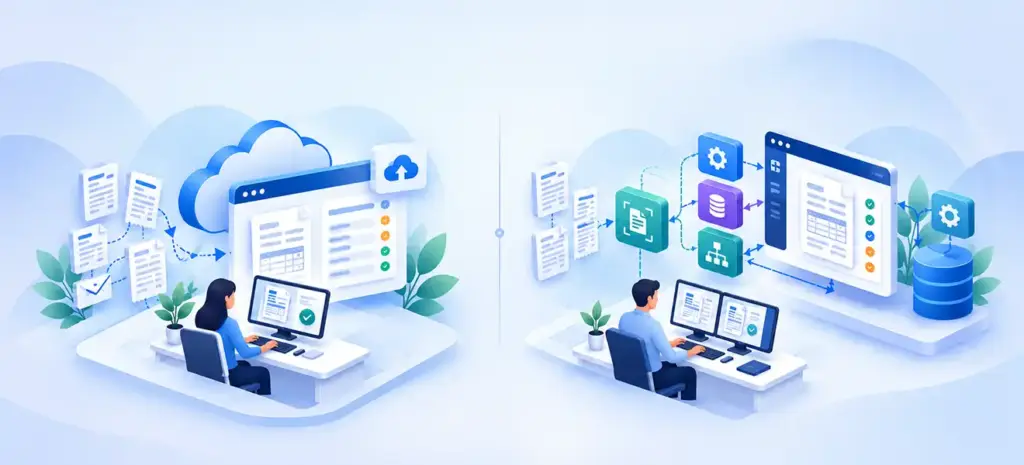
The best option is usually the simplest product that satisfies the organization’s actual accounting workflow, security requirements, and exception-handling needs. Custom software offers control, but it also moves more responsibility for reliability and maintenance to the buyer.
| Decision factor | SaaS/AP platform | Extraction API plus internal workflow | Custom AI/AP integration |
|---|---|---|---|
| Setup effort | Often configuration and migration | Requires engineering for workflow | End-to-end architecture and delivery |
| Pricing | Plan, documents, users, or usage | API consumption plus infrastructure | Development plus APIs, hosting, review, support |
| ERP connectivity | Supported connectors or vendor services | Built by internal or partner team | Purpose-built mappings and posting logic |
| Approval controls | Check available product features | Must be implemented | Designed for specified roles and policy |
| Updates | Mostly vendor-managed product | Shared vendor and in-house responsibility | More in-house ownership |
| Best fit | Repeatable common AP operations | Teams with existing integration capacity | Distinctive complex workflows or data boundaries |
When a SaaS product is usually preferable
A SaaS solution can be an efficient starting point when invoices arrive through known channels and the business needs familiar capture, coding, review, and export functions. A small finance team may value an existing interface and support arrangements more than the ability to customize every rule.
Check its ERP connector carefully. “Integrates with ERP” can mean native posting, CSV export, a one-way sync, or a separately billed implementation. Also verify permissions, retained attachments, tax coding, audit trails, approval chains, and the treatment of invoices that fail validation.
When an API-led build makes sense
An API-led approach uses a cloud parser for document extraction while the organization builds the surrounding workflow. This can fit teams that already have an ERP integration layer and only need to replace manual field entry.
The main engineering work moves from extraction to orchestration: receiving files safely, avoiding duplicates, mapping vendor IDs, validating totals and currencies, making ERP writes idempotent, and recovering failed jobs. Teams should price this work rather than assuming the extraction API is the total solution.
When custom development becomes justified
Custom development deserves consideration when approvals depend on specialized purchasing rules, multiple entities or ERPs, custom purchase-order matching, regional data handling, or integrations that supported products cannot provide without costly workarounds. It may also be relevant where data residency or deployment architecture creates constraints.
However, “custom AI” should not automatically mean training a new model. A practical system may combine an existing invoice parser with deterministic validation, ordinary workflow automation, and human review. Build only the components that create defensible value.
3. The Biggest Drivers of AI Invoice Automation Pricing
Invoice volume is only the starting point. Two companies with the same monthly document count can have very different costs because of document quality, line-item requirements, ERP constraints, and approval complexity.
Volume, pages, and pricing units
Determine monthly document count, average pages per invoice, peak volume, and the number of retries or reprocessed files. Some APIs charge per page; some charge per block execution, while specialized parsers use a defined document count. Google Cloud’s public invoice parser rate treats up to 10 pages as one count, with additional counts for longer documents.
If a business processes 2,000 one- to ten-page invoices monthly using that parser, the illustrative parser-only charge at $0.10 per count is 2,000 × $0.10 = $200/month, before any other service or operational expense. If those documents were longer or required other processors, the bill could differ.
Data quality and extraction complexity
Digital PDFs with consistent layouts may be easier to process than blurred photographs or poor-quality scans. Multi-page line items, credit notes, mixed currencies, handwritten annotations, and multilingual invoices can increase exceptions and evaluation effort.
Do not confuse field extraction accuracy with business correctness. An extracted amount can be visually accurate but still fail a purchase-order rule or point to the wrong vendor account.
ERP and accounts payable integrations
An integration may need to create draft vendor bills, attach source documents, assign cost centers, reconcile purchase orders, or manage approvals in Odoo, Dynamics 365, SAP, NetSuite, or another system. Each environment has unique data models, permissions, and lifecycle states.
Existing accounting processes can change the estimate more than the chosen AI model. For a related but distinct topic, WebbyCrown’s Odoo AI integration overview describes invoice extraction as one possible ERP automation use case. The purchase decision covered here is the complete cross-platform cost and operating model.
Human review and audit requirements
Review work is not evidence of failed automation. Risk-based review can prevent duplicate invoices, incorrect tax treatment, and unauthorized payment-detail changes. Define which exceptions are routed to whom, the required evidence, and whether changes trigger a second approval.
A workflow with 10% exceptions requiring two minutes each has different labor costs from one with 40% exceptions requiring five minutes. Test these assumptions with a representative invoice sample, not a best-case demonstration.
Security, ownership, and ongoing maintenance
Invoices often contain names, contact details, banking information, pricing, or confidential purchasing data. Budget for access control, encryption, retention limits, log redaction, environment separation, incident handling, and vendor review as appropriate.
Maintenance also includes changing ERP schemas, new invoice formats, updated account mappings, monitoring, retraining only when genuinely necessary, and support for failed synchronization.
4. Illustrative First-Year Budgets and Cost-per-Invoice Models
The two examples below are planning scenarios, not WebbyCrown quotations or representative market averages. They use explicit assumptions so a buyer can substitute their own numbers.
Scenario A: Small finance team using a packaged solution
Assume the team receives 200 documents a month, needs capture and bookkeeping preparation, and can use a compatible accounting connection with little extra development. As an illustration only, Dext’s displayed US plan selection advertises $302.50 billed annually with 250 documents per month and five users.
At 200 documents per month, 2,400 documents would be received annually. Dividing $302.50 by 2,400 yields about $0.13 per received document for that plan charge alone. This does not estimate the cost of manual review, staff onboarding, exceptions, payment approvals, or additional products. The plan’s feature limits must be checked before assuming it meets full AP requirements.
A team processing invoices only after purchase-order and receipt checks may need a substantially different product or extra workflow support. The correct comparison is the total cost of completing the same scope, not the lowest displayed license price.
Scenario B: API-led custom automation at 2,000 invoices/month
Assume a company processes 2,000 invoices monthly, all within 10 pages, uses Google Cloud’s invoice parser at the displayed standard $0.10 per count, and develops its own ERP posting and exception workflow.
The following labor and operating numbers are hypothetical assumptions for budget planning. They are not published prices or measured implementation results.
| Cost item | Assumption | Calculation |
|---|---|---|
| Initial design and development | 160 hours at assumed $100/hour | $16,000 once |
| Parser usage | 2,000 counts/month × $0.10 | $200/month |
| Infrastructure and monitoring | Assumed operating allowance | $150/month |
| Manual exception review | 30% of invoices, 3 minutes each, $30 loaded labor/hour | $900/month |
| Ongoing engineering support | 8 hours/month at assumed $100/hour | $800/month |
| Illustrative first-year cost | $16,000 + 12 × ($200 + $150 + $900 + $800) | $40,600 |
Dividing $40,600 by 24,000 annual invoices gives approximately $1.69 per received invoice in year one, under these assumptions. Removing the one-time development allowance leaves $24,600 annual recurring modeled costs, or about $1.03 per received invoice before future upgrades.
This is not the full cost of a finance department. It excludes baseline AP staff work outside the modeled exceptions, ERP licensing, security audits, tax advice, contract-specific charges, unexpected reprocessing, and implementation contingency. If invoice processing does not succeed for every document, cost per successfully processed invoice will be higher than cost per received document.
The calculation template buyers should reuse
First-year automation TCO = initial implementation + annual software/API charges + infrastructure + human review + training + support + other required fees.
Cost per successfully processed invoice = relevant total processing cost ÷ invoices successfully completed during the same period.
Use the same definition for “completed” before and after the project. For example, extraction alone is not completion when posting and approval are required.
5. ROI: When Does Invoice Automation Pay Back?
Return on investment depends on measured cost reduction and better processing controls, not just the number of documents an AI model can read. Establish a baseline using payroll-inclusive labor, error correction, approvals, systems costs, and other relevant AP expenses.
APQC’s reported $6.00 cross-industry median is useful context, but it cannot replace a company’s own baseline. Benchmark samples, processes, and accounting definitions differ between organizations.
Worked ROI illustration
Consider 24,000 invoices a year and an assumed current fully loaded AP cost of $5.00 per invoice, or $120,000 annually. Suppose a proposed project, after measurement, reduces comparable annual processing costs by $35,000 while introducing $24,600 in annual recurring automation costs and $16,000 one-time implementation cost.
If the $35,000 savings estimate is calculated *before* these new automation expenses, first-year net benefit is:
$35,000 − $24,600 − $16,000 = −$5,600.
In subsequent years, ignoring additional upgrades and assuming the same operating conditions, annual net benefit is:
$35,000 − $24,600 = $10,400.
These are deliberately illustrative figures, not predicted customer outcomes. The key lesson is that a low parser rate does not guarantee first-year ROI when review, engineering, and operational costs are counted.
How to measure actual value
Track mean or median cycle time from receipt through approval, touchless completion rate, labor minutes per invoice, duplicate invoice prevention, exception rates, corrections, and successful ERP posting. Split results by document type, supplier, and entity so improvements are not hidden behind averages.
If the automation saves employee time but the same staff remain employed, count realized business value carefully. Reallocated capacity may improve throughput without immediately reducing cash expenses. Avoid treating theoretical time savings as guaranteed cash savings.
6. A Safe Implementation Workflow for AP Teams
Reliable invoice automation should be designed as a governed financial workflow, not a model that autonomously authorizes payments.
Step 1: Define boundaries and approval ownership
Decide whether the system is responsible for document capture, data extraction, bill creation, matching, approvals, or payment initiation. Document what humans must authorize and separate extraction from payment approval privileges.
A narrow extraction-and-draft-posting pilot is often easier to control than automating an entire purchase-to-pay process from the start.
Step 2: Build a representative evaluation set
Collect invoice samples across major suppliers, currencies, scan quality, credit notes, missing fields, and line-item complexity. Remove or protect sensitive information appropriately. Define pass/fail criteria for critical fields and end-to-end outcomes. Do not claim accuracy before testing on real business cases.
Step 3: Validate against business rules
Check supplier identifiers, duplicate invoice numbers, purchase orders, receipts, currency, totals, taxes, and payment details. Apply deterministic rules where possible. Flag uncertain outputs, conflicting records, and unusual bank-account updates for manual review.
Step 4: Route exceptions and approvals
Send exceptions to authorized reviewers with the original document and extracted field evidence. Record changes, decisions, timestamps, and ownership. For sensitive vendor-master or payment changes, require the organization’s established independent verification procedures.
Step 5: Post to the ERP safely
Use reliable mappings and controlled API permissions. Make posting idempotent so retrying a job does not create duplicate bills. Store event/job identifiers, status, and outcomes; queue and reconcile failures rather than silently dropping documents.
Teams deciding between rule-based automation and AI-supported workflows can use WebbyCrown’s RPA vs AI agents vs intelligent automation guide for the broader automation choice. This invoice-cost guide focuses on the purchasing and financial calculation.
Step 6: Pilot, monitor, and expand
Pilot one business unit or invoice category, measure exception rates and effort, and compare them with the baseline. Monitor stuck work, duplicate attempts, parser charges, ERP failures, and stale approvals. Expand only after evidence shows the workflow meets the business’s financial control requirements.
7. How to Choose a Vendor—or Decide Not to Use AI
Request comparable proposals for the same invoice volumes, document types, approval rules, number of entities, integrations, and support requirements. Ask vendors to price the exact stages that they will deliver.
| Buying question | Why it matters |
|---|---|
| Is pricing by page, document, block, user, or transaction? | Determines the denominator and potential overage charges |
| What happens to invoices requiring manual review? | Human work can dominate total costs |
| Is ERP posting included, and in which direction? | “Integration” may be limited to export |
| How are duplicates and replays handled? | Prevents erroneous double posting |
| What approvals and audit logs are supported? | Protects financial controls |
| Where are invoices stored and for how long? | Affects confidentiality and retention |
| What are the support, upgrade, and exit terms? | Determines long-term ownership and switching cost |
| Can we test on our own sample? | Establishes realistic acceptance criteria |
When a simpler approach is better
If most invoices arrive as structured electronic records, use supported direct data exchange before paying to extract fields from PDFs. If the accounting system already has a capable invoice-import function, configuration may be sufficient. If volume is very low and document variation minimal, a controlled manual process can cost less than maintaining a custom AI stack.
Do not automate payment authorization merely because extraction quality looks good. Approvals should follow financial controls, segregation of duties, and business policy.
For organizations that need OCR and document workflows connected to ERP approvals, WebbyCrown’s computer vision development services provide a relevant route to discussing the technical scope. A useful first engagement is a defined architecture and cost assessment, not a promise of a particular ROI.
Frequently Asked Questions
How much does AI invoice processing automation cost?
It depends on the tool’s billing unit and the full AP scope. Vendor subscriptions may have published entry prices, while custom implementations add discovery, workflow engineering, testing, integrations, review labor, and maintenance. Compare total ownership costs rather than extraction prices alone.
Is OCR the same as AI invoice automation?
No. OCR reads text from documents. Invoice automation may also classify invoices, validate fields, match purchase orders, obtain approvals, create ERP bills, and manage exceptions. Those additional functions may be separate services or products.
How is invoice parser API pricing calculated?
Some APIs charge per page, while others use document counts or workflow runs. Google Cloud’s Invoice Parser publicly lists $0.10 per count at the standard rate, with one count covering up to 10 pages of a document. Other associated costs are separate.
Is SaaS cheaper than a custom invoice processing system?
SaaS often costs less to start when standard workflows fit. Custom solutions can be justified for distinctive rules or integrations, but require higher initial engineering and ongoing ownership. Compare the same end-to-end scope over a realistic period.
What is a good cost per invoice?
There is no universal target. APQC reported a cross-industry median of $6.00 per AP invoice from 5,846 organizations in October 2026. Use your own comparable baseline and include personnel, systems, overhead, exceptions, and outsourced costs.
How many invoices justify automation?
Volume alone is not enough. High labor effort, repeated exceptions, and meaningful controls can justify automation even at modest volume. Very low-volume, clean processes may be better served by basic accounting software or standardized imports.
Does AI invoice processing eliminate human review?
Not necessarily. Uncertain extraction, unmatched purchase orders, supplier changes, tax issues, and unusual payments may require authorized review. Review thresholds should follow business risk rather than a marketing promise of zero-touch processing.
Can AI invoice processing connect to Odoo or other ERPs?
Yes, integrations are possible through supported connectors or APIs, depending on system capabilities. Data mapping, approval states, permissions, and duplicate handling need to be checked for the specific ERP version and workflow.
What hidden costs should buyers include?
Common categories include integration setup, data cleanup, exception review labor, extra pages or block runs, security controls, hosting, vendor support, ERP upgrades, and reprocessing failed invoices.
How should a company measure invoice automation ROI?
Measure the same fully loaded process before and after implementation. Track cycle time, successful completion, labor, exceptions, corrections, and total ownership costs. Do not count every minute theoretically saved as realized cash savings.
Conclusion
AI invoice processing automation can be economical when it eliminates real manual work without weakening financial controls. But vendor pricing units differ, and the extraction bill is often only a small part of the total accounts payable workflow.
Begin with representative invoice samples, a measured cost baseline, and a clear specification for approvals and ERP posting. Compare a packaged product with a narrowly scoped API-led integration before commissioning custom development. The right budget is one that includes people, software, governance, and ongoing support—not just an attractive per-document rate.