


Understanding the architecture is crucial for building and maintaining the application. This section covers the overall system design, data flow, and component relationships.
High-Level Architecture
The application follows a headless commerce architecture with clear separation between frontend and backend:
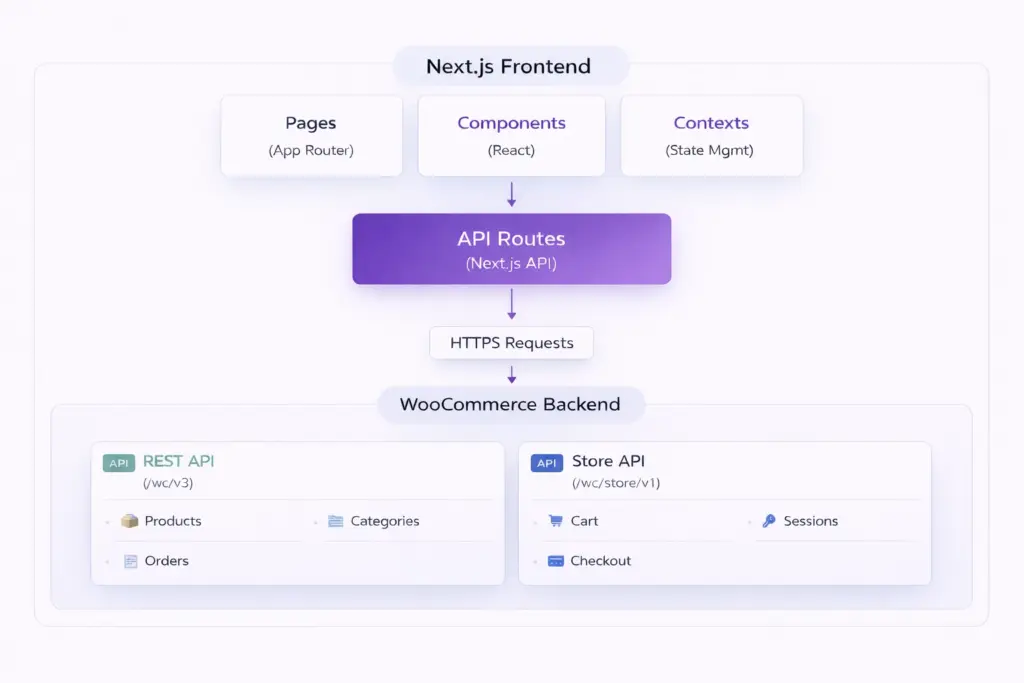
Architecture Layers
Presentation Layer
Next.js pages and React components that render the UI. Handles user interactions and displays data.
State Management Layer
React Context API for global state (Cart, Wishlist). Manages application state across components.
API Layer
Next.js API routes that act as a proxy between frontend and WooCommerce. Handles authentication and request transformation.
Backend Layer
WooCommerce REST API and Store API. Handles business logic, data persistence, and commerce operations.
Data Flow
1. Product Fetching Flow
- User visits shop page
- Next.js Server Component calls
WooCommerceAPI.getProducts() - WooCommerce client makes request to REST API
- WooCommerce returns product data
- Server Component renders products to HTML
- HTML sent to browser (no JavaScript needed for initial render)
2. Cart Operations Flow
- User clicks “Add to Cart”
- Client Component calls
addToCart()from CartContext - Context makes POST request to
/api/cart - API route proxies to WooCommerce Store API
- Store API updates cart and returns cart token
- Cart token stored in cookies
- Context updates local state
- UI updates immediately (optimistic update)
Directory Structure
The project follows Next.js 15 App Router conventions:
src/
├── app/
│   ├── (admin)/admin/         # Admin routes (/admin/*)
│   ├── (public)/              # Public routes (/)
│   │   ├── shop/              # Shop page
│   │   ├── product/[slug]/    # Product details
│   │   ├── cart/              # Shopping cart
│   │   ├── checkout/          # Checkout
│   │   └── account/           # User account
│   └── api/                   # API routes
│       ├── products/          # Products API
│       ├── cart/              # Cart API
│       ├── checkout/          # Checkout API
│       └── admin/             # Admin API
├── components/                # React components
├── contexts/                  # State management
├── lib/woocommerce.js         # WooCommerce client
└── middleware.js              # Route protection
Route Groups
Next.js uses route groups (folders in parentheses) to organize routes without affecting the URL structure:
(admin) Route Group
- Purpose: Admin-only routes with authentication
- Layout: Admin sidebar layout
- Routes: All routes under
/admin/* - Protection: Requires admin authentication
(public) Route Group
- Purpose: Public-facing customer routes
- Layout: Public layout with header and footer
- Routes: Shop, product, cart, checkout, account pages
- Protection: Some routes require authentication (account, checkout)
Component Architecture
Server Components (Default)
- Run on the server only
- No JavaScript sent to client
- Can directly access databases and APIs
- Better for SEO and performance
- Used for: Data fetching, static content
Client Components
- Run in the browser
- Require
"use client"directive - Can use React hooks and browser APIs
- Used for: Interactive UI, state management, event handlers
State Management Architecture
React Context API
The project uses React Context for global state management:
- CartContext: Manages shopping cart state, operations, and synchronization with WooCommerce
- WishlistContext: Manages wishlist items stored in browser cookies
API Architecture
Next.js API Routes
API routes act as a proxy layer between frontend and WooCommerce:
- Authentication: Handle API credentials server-side
- Request Transformation: Transform requests to WooCommerce format
- Response Transformation: Format responses for frontend consumption
- Error Handling: Centralized error handling and logging
- Security: Hide API credentials from client
WooCommerce Integration Points
| Operation | API Used | Endpoint |
|---|---|---|
Fetch Products |
REST API |
|
Manage Products (Admin) |
REST API |
|
Add to Cart |
Store API |
|
Update Cart |
Store API |
|
Checkout |
Store API |
|
Get Categories |
REST API |
|
Security Architecture
Authentication Flow
- User submits credentials
- Frontend sends to
/api/login - API route authenticates with WordPress
- JWT token returned
- Token stored in httpOnly cookie
- Middleware validates token on protected routes
Cart Session Management
- Cart token generated by WooCommerce Store API
- Token stored in httpOnly cookie
- Token sent with each cart request
- Token persists across page refreshes
Next Steps: Learn more about WooCommerce Integration and Next.js Frontend patterns.