Summarize This Article With AI
A strong enterprise knowledge assistant architecture does more than connect a chatbot to documents. It has to retrieve the right content, respect permissions, ground answers in approved sources, and stay observable after launch. In most enterprise environments, that means using retrieval augmented generation so responses are grounded in current company content instead of relying only on model memory.
This matters because enterprise assistants fail for predictable reasons: they answer from stale content, surface information users should not see, or produce confident answers without evidence. A better architecture balances retrieval quality, security, citations, and operational simplicity.
If you want help designing a production-ready knowledge assistant, contact WebbyCrown Solutions:
What an enterprise knowledge assistant should do
A good knowledge assistant should help employees find answers from internal knowledge, approved documents, and business systems without turning every search into manual work. In many organizations, employees spend too much time switching across tools, reading internal documents, and trying to locate company specific knowledge hidden across a fragmented knowledge base.
A strong assistant should:
- answer questions from internal knowledge
- return grounded responses with citations
- respect existing permissions
- work across multiple data sources
- support role-specific workflows
- reduce time spent searching across systems
- use conversation history carefully when it improves relevance
- support user interactions that reflect real work, not only demo prompts
That is why this is not only a chat problem. It is a retrieval, permissions, and data integration problem.
Why RAG is the right pattern for enterprise knowledge assistants
For most organizations, retrieval augmented generation rag is the right foundation because large language models do not automatically know your current internal policies, project docs, CRM notes, or other critical operational data. If answers must reflect real enterprise context, you need runtime retrieval from trusted data sources.
This is where rag systems and other rag solutions help. A well-designed RAG layer gives the assistant access to:
- current documents
- approved technical documentation
- policy libraries
- internal wiki pages
- support records
- organizational knowledge
- critical operational data essential to daily decisions
A grounded design improves response accuracy, lowers hallucination risk, and gives users a way to verify the answer source. That is why many enterprise teams treat RAG as the base architecture for enterprise AI assistants.
The core architecture layers
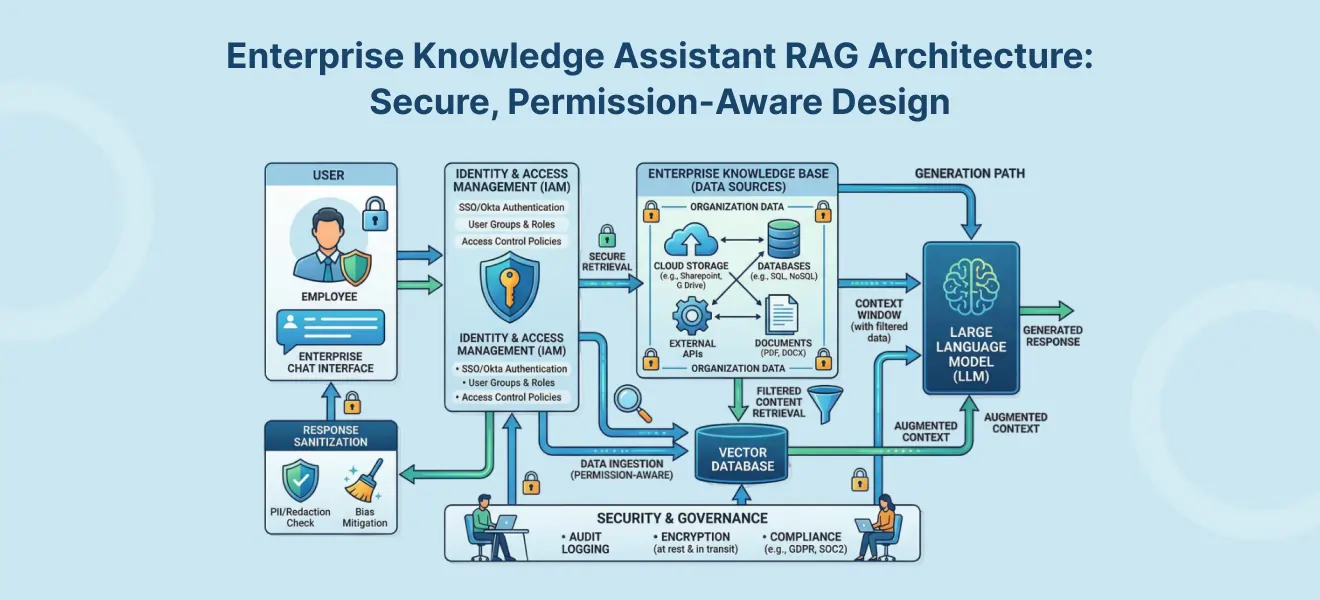
A practical enterprise knowledge assistant architecture usually has five layers.
1) Interface layer
This is the user-facing experience:
- chat UI
- internal employee portal
- embedded assistant in productivity tools
- mobile or web app
- optional voice layer
This layer should be simple, because most of the complexity belongs behind it.
2) Orchestration layer
This layer handles:
- query routing
- intent handling
- prompt assembly
- source selection
- fallback logic
- answer formatting
- business rules
- output handler decisions
This is also where you decide what to do when the user asks something that requires clarification, escalation, or retrieval from a different source.
3) Retrieval layer
The retrieval layer is one of the core components of the system. It usually includes:
- keyword search
- semantic search
- semantic similarity search
- vector retrieval
- metadata filters
- permission-aware retrieval
- reranking and other retrieval strategies
Most enterprise assistants work best with hybrid retrieval, where keyword search helps exact matches and semantic meaning helps the system find conceptually related answers. In practice, similarity search and semantic similarity are useful when people do not use the same wording as the documents.
4) Knowledge layer
This layer contains the underlying knowledge base and other enterprise content:
- documents
- SOPs
- policies
- CRM and ERP notes
- support tickets
- websites
- internal documents
- operational stores
- structured and unstructured data
This layer should also consider:
- document freshness
- source reliability
- data quality
- version control
- multilingual content
- data sovereignty
- which sources contain sensitive data
5) Governance and observability layer
This layer includes:
- role based access control
- logging
- evaluation
- usage reporting
- usage monitoring
- incident review
- performance tracking
- cost tracking
Without this layer, the assistant may look useful in a demo but become a significant challenge in production.
Retrieval design: hybrid search, semantic ranking, and chunking
Retrieval quality drives answer quality. In most enterprise contexts, retrieval augmented generation works best when retrieval combines lexical and semantic methods instead of relying on a single approach.
Why hybrid retrieval matters
Enterprise queries often include:
- acronyms
- product names
- policy numbers
- exact document titles
- informal phrasing
- domain-specific wording
That is why keyword search, semantic search, and vector-based similarity search are often used together.
Why chunking matters
A good chunking strategy significantly impacts relevance. If chunks are too large, answers become noisy. If chunks are too small, important context disappears. This affects both query performance and final answer quality.
A solid chunking strategy should preserve:
- headings
- nearby context
- source links
- enough surrounding text to support citations
Why vector storage matters
Many rag implementations rely on a vector store or other vector databases to support semantic retrieval. These systems are powerful, but they still need:
- metadata design
- permission filters
- freshness controls
- good data pipelines
- clear document ingestion rules
Permission-aware architecture and access control
A knowledge assistant should never become a side door to restricted content. Permission-aware retrieval is essential in enterprise AI.
A strong design should ensure:
- retrieval only searches documents the user can access
- citations only point to viewable sources
- logs capture what content influenced the answer
- downstream actions follow the same identity boundaries
This usually requires:
- role based access control
- identity-aware filtering
- scoped connectors
- source-level permissions
- approval controls for sensitive actions
This matters even more when the assistant touches:
- HR content
- legal policies
- finance records
- project systems
- sensitive data
- customer records
Without proper controls, AI assistants can undermine trust instead of improving access to internal knowledge.
Knowledge sources and content preparation
A production-ready knowledge assistant depends on the quality of its knowledge layer.
Typical sources include:
- PDFs and docs
- internal portals and wikis
- support systems
- CRM or ERP platforms
- intranet content
- policy repositories
- configuration stores
- other structured or unstructured systems
Content preparation should handle:
- document freshness
- duplicate content
- OCR issues
- data processing
- data transformation
- source reliability
- metadata design
- input data quality
This is where strong data pipelines and disciplined data processing matter. If source ingestion is weak, the assistant will retrieve stale or low-quality content no matter how good the model is.
Answer quality, citations, and hallucination control
A good knowledge assistant should answer from evidence, not from confidence.
Architecture should support:
- grounded retrieval
- source citations
- “I don’t know” fallback behavior
- retrieval evaluation
- answer faithfulness checks
- review of response accuracy
This is especially important when assistants use ai models that can sound fluent even when evidence is weak, making it critical to pair them with experienced machine learning development and consulting services. Strong RAG design helps protect answer quality by making retrieval, grounding, and citations explicit.
Monitoring, evaluation, and cost control
A production assistant needs monitoring from day one.
Track:
- retrieval quality
- citation quality
- usage patterns
- query latency
- permission failures
- no-answer rate
- cost per query
- user satisfaction
- source freshness issues
This supports understanding usage patterns, spotting bottlenecks, and guiding future improvements with RAG evaluation metrics.
You should also track:
- cost analysis
- cost optimization
- resource allocation
- token usage and tokens generated
- peak traffic and peak usage times
- model mix and computational resources
- other computational resources such as search and storage
This matters because a scalable enterprise knowledge assistant architecture has to support both relevance and effective budget management. If you do not understand operational cost drivers, the system may become difficult to scale within an acceptable operational budget.
Conversation state and historic context
Some assistants also need lightweight memory or session awareness. Used carefully, conversation history can improve continuity and support ongoing interactions. It can also help in providing historic context when a user follows up on a previous answer.
This should be handled carefully:
- store only what is needed
- respect privacy and retention rules
- do not expose prior content across users
- align memory with user settings and enterprise policies
Historic context is useful when it improves the answer, but it should never bypass permission or governance rules.
Common mistakes in enterprise knowledge assistant design
Using vector search alone
Many enterprise questions still depend on exact matches, so hybrid retrieval is often safer.
Ignoring permissions
If the assistant surfaces restricted content, trust collapses fast.
Weak content preparation
Poor chunking, low data quality, and weak ingestion hurt the entire system.
No freshness controls
Outdated content can outrank newer policy or process guidance.
No monitoring
Without usage monitoring, quality review, and cost visibility, teams cannot improve the system safely.
Overcomplicating too early
Start with the essential core components, then expand. Many teams try to add too many workflows, ai agents, and integrations before the architecture is stable.
A practical rollout plan
Phase 1: Choose one use case
Start with one team or workflow, such as:
- HR policy assistant
- support knowledge assistant
- IT helpdesk assistant
- sales enablement assistant
Phase 2: Connect a small number of trusted sources
Use one or two approved data sources first.
Phase 3: Build retrieval and citations
Prioritize hybrid retrieval, chunking, and source visibility.
Phase 4: Add permission-aware controls
Ensure the assistant respects role based access control and source permissions.
Phase 5: Launch a pilot and monitor
Track adoption, usage patterns, cost, and answer quality.
Phase 6: Expand gradually
Add more sources, workflows, languages, and future improvements after the foundation proves itself.
Work with WebbyCrown Solutions
WebbyCrown Solutions helps teams design secure, grounded assistants that are practical to operate and scale.
We help with:
- enterprise knowledge assistant architecture
- retrieval strategy and hybrid search
- permission-aware access design
- source preparation and data integration
- evaluation and monitoring
- rollout and optimization
For implementation support, explore RAG Development Services
FAQs
What is an enterprise knowledge assistant?
An enterprise knowledge assistant is an AI assistant that answers questions from organization-specific knowledge sources and should respect enterprise permissions, source quality, and governance controls.
Why use RAG instead of only an LLM?
Because retrieval augmented generation grounds answers in enterprise content at runtime instead of relying only on model memory.
How do you make a knowledge assistant permission-aware?
By enforcing access controls at retrieval time so users only receive content they are authorized to view.
What search strategy works best for enterprise RAG?
In many cases, hybrid retrieval with keyword search, semantic search, and vector-based similarity search is the strongest starting point.
How do you reduce hallucinations in a knowledge assistant?
Use grounded retrieval, citations, fallback behavior when evidence is weak, and regular evaluation of answer quality.
What should be monitored after launch?
Monitor retrieval quality, usage monitoring, permission failures, latency, cost, and user satisfaction so the assistant can improve safely over time.