Summarize This Article With AI
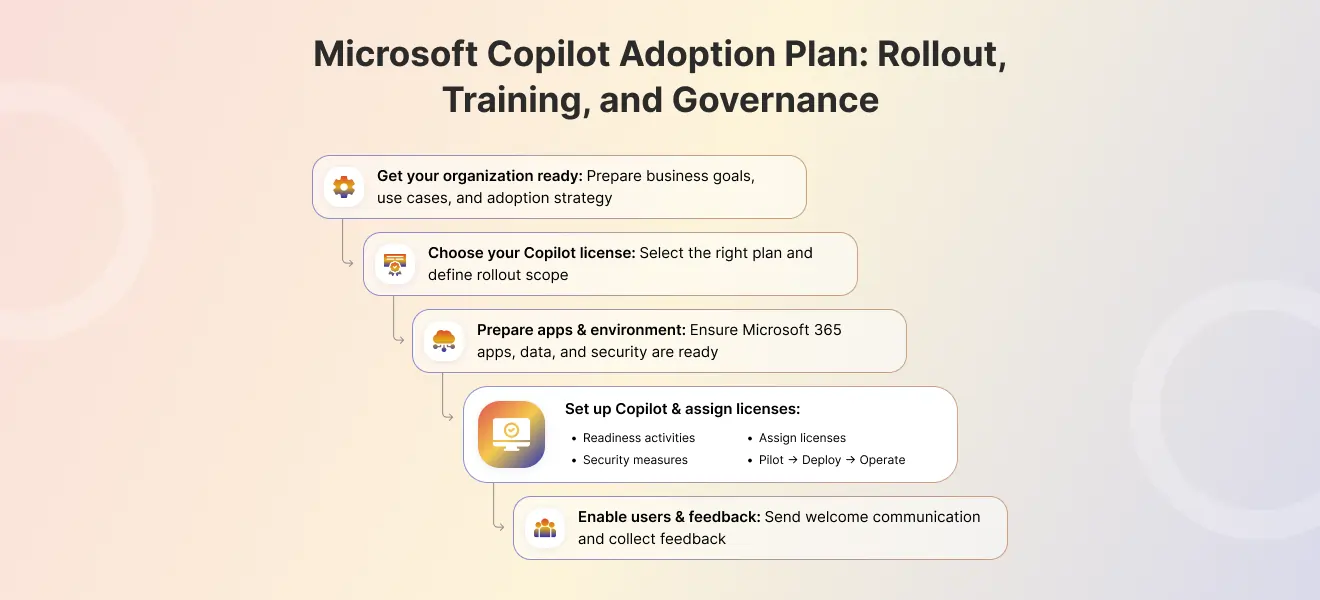
A strong Microsoft Copilot adoption plan is not just a licensing exercise. Enterprise value comes from combining business use cases, technical readiness, governance controls, user enablement, and measurement. Microsoft’s current guidance for Microsoft 365 Copilot emphasizes a phased approach, readiness checks, role-based skilling, adoption resources, and admin controls to manage rollout safely.
This guide explains how to plan, pilot, govern, train, and scale Microsoft Copilot across teams in a practical way.
If you want help designing your rollout, contact WebbyCrown Solutions:
What a Microsoft Copilot adoption plan should include
A practical adoption plan should cover five areas:
- business goals and priority use cases
- technical readiness and licensing
- governance and control design
- user training and change management
- measurement, optimization, and phased expansion
Microsoft’s own adoption materials for Microsoft 365 Copilot are built around readiness, implementation, adoption, and ongoing optimization, with supporting resources such as the Copilot adoption guide, success kit, skilling center, and launch materials.
Organizations that focus on these areas first tend to see stronger ai adoption outcomes than those who simply purchase licenses and hope employees figure it out. The difference between a stalled rollout and scaled impact often comes down to planning.
Phase 1: Readiness and planning
Start by defining where Copilot should create value first.
1) Choose business-aligned use cases
Pick a small group of use cases tied to real workflows, such as:
- meeting recap and follow-up
- document drafting and summarization
- email triage
- research and knowledge retrieval
- sales preparation, especially for teams already using Dynamics 365 CRM development services
- internal productivity tasks
This matters because copilot adoption is stronger when users see immediate value in their daily work, not just generic demos. Microsoft’s enablement resources also emphasize scenario-based rollout and role-based use cases.
Early pilots have shown that document drafting in Word can reduce creation time by 30-50% when users are properly trained. Meeting notes generated in Teams can save time on post-meeting documentation and accelerate follow-up tasks. These are the kinds of outcomes that get employees excited about the technology.
Your rollout strategy should align with workflows that employees already struggle with. If your sales team spends hours preparing for client calls, that’s a use case. If your legal team drowns in contract reviews, that’s another.
2) Confirm technical readiness
Before rollout, verify:
- licensing and plan scope (E3/E5 plans with Copilot add-on)
- supported Microsoft 365 apps environment requirements
- identity and access setup via Entra ID
- data and content readiness, including any Dynamics 365 integration services that connect CRM or ERP data into Microsoft 365
- admin ownership for configuration and oversight
Microsoft provides minimum readiness and rollout guidance for Microsoft 365 Copilot and recommends assigning appropriate admin ownership, including AI-related administration where relevant.
Data readiness deserves special focus. Security researchers estimate that 15% or more of business-critical files may be at risk of oversharing, and 70% of security teams have concerns about exposure. Before you enable Copilot, review how company data and financial data are currently shared across SharePoint and OneDrive.
3) Define the pilot group
Start with a controlled pilot instead of a company-wide launch.
Choose users who:
- represent real business workflows
- are comfortable giving feedback
- can act as internal champions
- are likely to use Copilot several times per week
Microsoft recommends beginning with a phased rollout and a smaller, manageable set of users before broader expansion. Pilots limited to up to 100 low-risk sites tend to surface permission issues early, before they become enterprise-wide problems.
Phase 2: Governance and control design
This is one of the most important parts of enterprise rollout.
Why governance matters
Without governance, organizations can run into problems such as:
- unclear ownership
- oversharing concerns
- inconsistent use across departments
- weak approval paths for custom extensions or agents
- poor visibility into adoption and usage
Microsoft now frames Copilot governance and administration through the Copilot Control System, which is intended to help organizations secure, manage, and measure Microsoft 365 Copilot, Microsoft 365 Copilot Chat, and related Copilot capabilities.
Most Copilot deployments that stall do so between weeks 6 and 12 post-launch, when governance gaps emerge. Having controls in place from the start prevents reactive incident management.
What to define before rollout
Build a simple governance model covering:
- who owns rollout and policy decisions
- who can enable or expand Copilot features
- what data and content boundaries matter
- what reporting and auditability are required
- what approval path is needed for custom agents or extensions
Organizations in regulated industries—finance, healthcare, legal—need to address compliance requirements early. Different tools require different controls, and Copilot is no exception, especially as teams prepare against frameworks like the EU AI Act readiness checklist.
Minimum governance checklist
| Item | Status |
|---|---|
|
Named business sponsor |
– |
|
Named IT/admin owner |
– |
|
Security/compliance review completed |
– |
|
Data-sharing and permission concerns reviewed |
– |
|
Extension/agent approval process documented |
– |
|
Adoption reporting owner assigned |
– |
This keeps the rollout manageable and reduces avoidable confusion later. Governance isn’t about slowing things down—it’s about ensuring you can scale safely.
Microsoft Purview integration, rolled out in January 2026, enables validation of AI pathways including prompts, grounding, and responses. This goes beyond traditional DLP and helps protect intellectual property and sensitive data.
Phase 3: Pilot rollout
The pilot phase should be structured and measurable.
Good pilot design
Use one or two departments, or one role group at a time. Focus on:
- realistic work scenarios
- measurable before/after outcomes
- fast feedback loops
- early support for blockers
Examples:
- sales team using Copilot for meeting prep and follow-up
- operations team using Copilot for summarization and document drafting
- leadership support teams using Copilot for notes and communication workflows
Microsoft’s guidance and enablement resources support phased launch, scenario-based rollout, and department-specific enablement rather than blanket deployment.
What to measure in the pilot
Track:
- active usage
- repeat usage
- top scenarios used
- user satisfaction
- friction points
- content/security concerns raised
- requests for training or expansion
A pilot should help you decide not only whether people use Copilot, but also which use cases deserve wider rollout.
The Copilot Dashboard, expanded in February 2026, now provides usage trends, retention data, and app breakdowns even for tenants with just one license. This helps you measure impact early and build a case for expansion with real data, not assumptions.
Executives often want ROI proof. Combine adoption metrics with risks addressed—overshared sites remediated, DLP coverage expanded—to tell the full story.
Phase 4: Training and user enablement
Copilot adoption depends heavily on how well users are prepared.
What training should include
Train users on:
- when to use Copilot
- how to write effective prompts
- how to review outputs critically
- what data or content boundaries matter
- when not to rely on Copilot without review
Prompt literacy is a game changer. Users who learn to be specific about context, role, and desired outcomes get significantly better results than those who type vague requests.
Use role-based enablement
Training should vary by role:
| Role | Focus Area |
|---|---|
|
Leaders |
Value-focused adoption guidance, responsible AI |
|
Admins |
Configuration, controls, Purview integration |
|
Business users |
Workflow examples in Outlook, Teams, Word, Excel |
|
Champions |
Advanced usage, troubleshooting, peer coaching |
Microsoft offers role-based skilling resources, a Copilot Success Kit, and launch-day guidance specifically to support enablement and change management.
Adoption works better with champions
A strong rollout usually includes:
- a champion group
- office hours or support sessions
- internal examples of good prompts
- a feedback channel for user questions
This helps move adoption beyond one-time launch activity. Champions enable ongoing programs that keep driving adoption long after the initial excitement fades.
Culture matters. Organizations where AI is positioned as a support tool—not a replacement—see stronger long-term engagement from employees.
Phase 5: Measure usage and optimize adoption
Do not stop at license assignment.
What success should measure
A useful adoption plan tracks:
- active users
- repeat usage patterns
- scenario-level usage
- department-level adoption
- training effectiveness
- user-reported time savings or productivity improvements
- support requests and friction trends
Microsoft highlights reporting and adoption insights as part of Copilot administration and rollout maturity. User-reported time savings in pilots often range from 20-40%, but you need to collect this data systematically.
What to do with the data
Use adoption data to:
- identify underused departments
- improve training materials
- refine prompt guidance
- prioritize next rollout waves
- decide which scenarios should be formalized and supported
This turns Copilot adoption into a managed program instead of a passive software rollout.
Consider quarterly reviews involving IT, security, HR, and business sponsors. Review metrics, approve expansion, and plan new scenarios such as Copilot Studio agents for specific workflows.
2026 trends point toward agentic workflows—sales agents monitoring pipelines, operations bots flagging risks, and domain-specific assistants similar to those you might deploy alongside an iOS app development company. These require the foundation you’re building now.
Common mistakes in Microsoft Copilot adoption
1) Starting with licenses instead of use cases
Buying access before defining value leads to weak engagement. Employees see Copilot as “fancy autocomplete” rather than a productivity tool.
2) Launching too broadly
A large launch without a pilot usually creates confusion, weak support, and poor feedback quality. Start small, learn, then scale.
3) No governance owner
If nobody clearly owns admin controls, reporting, and expansion decisions, rollout becomes fragmented. Assign named owners before day one.
4) Treating training as a one-time webinar
Users need ongoing examples, support, and reinforcement. A single video or report won’t change behavior.
5) Not measuring usage meaningfully
License counts are not adoption. Active usage and workflow fit matter more. If you can’t prove value, you can’t justify expansion.
A practical Microsoft Copilot adoption checklist
Use this before expansion beyond the first pilot group:
- Priority use cases defined
- Pilot users selected
- Technical readiness confirmed
- Admin owner assigned
- Governance rules documented
- Training materials prepared
- Champion group identified
- Rollout communications ready
- Adoption metrics defined
- Feedback process active
- Expansion criteria agreed
Review this checklist before moving from pilot to broad deployment, and again before enabling advanced scenarios such as Copilot Studio agents.
Work with WebbyCrown Solutions
WebbyCrown Solutions helps teams turn Microsoft Copilot rollout into a structured adoption program.
We can help with:
- use-case discovery and rollout planning
- phased pilot design
- governance and control design
- training and enablement structure
- adoption measurement and optimization
Whether you’re leading a small pilot or preparing for enterprise-wide deployment, a structured approach makes the difference between stalled projects and sustained productivity gains. For implementation support, explore AI Copilot Development Services
FAQs
What should a Microsoft Copilot adoption plan include?
It should include business goals, pilot scope, technical readiness, governance controls, training, and adoption measurement. Microsoft’s own adoption guidance supports this phased structure. The most successful programs align Copilot scenarios with real work rather than treating it as a generic technology rollout.
How should organizations roll out Microsoft 365 Copilot?
Start with a phased rollout using a limited pilot group, role-based scenarios, and defined feedback loops before broader expansion. A typical pilot runs 6-12 weeks with 50-200 users representing key workflows across different functions.
Who should be in the pilot group?
Choose users tied to real business workflows, people willing to give feedback, and likely champions who can support broader adoption later. Avoid selecting only tech-savvy early adopters—you need a mix that reflects your actual workforce.
What governance controls should be in place?
At minimum: named ownership, admin controls, approval paths for extensions or agents, security/compliance review, and usage reporting. Microsoft’s Copilot Control System is designed to support this kind of governance. Organizations dealing with industry-specific regulations should involve legal and compliance teams early.
How should users be trained for Copilot?
Use role-based training, scenario-based practices, practical prompt guidance, and ongoing enablement through champions and support sessions. Microsoft provides skilling and success resources specifically for this. The best training programs include examples drawn from actual company workflows rather than generic demos.
How do you measure Microsoft Copilot adoption success?
Track active usage, repeat usage, scenario fit, user feedback, and adoption insights rather than only license assignment. Microsoft highlights adoption insights and related reporting in administration guidance. Combine quantitative metrics with qualitative feedback to understand both what’s happening and why.