Summarize This Article With AI
Choosing between a no-code chatbot builder and custom chatbot development is not only a tech decision—it’s a workflow decision. The best option depends on how complex your support flows are, whether you need secure integrations, and how much control you need over data, escalation, and analytics.
Chatbot technology has evolved from rigid scripts to AI-driven systems that understand intent and context, thanks to advancements in large language models (LLMs) and natural language processing (NLP).
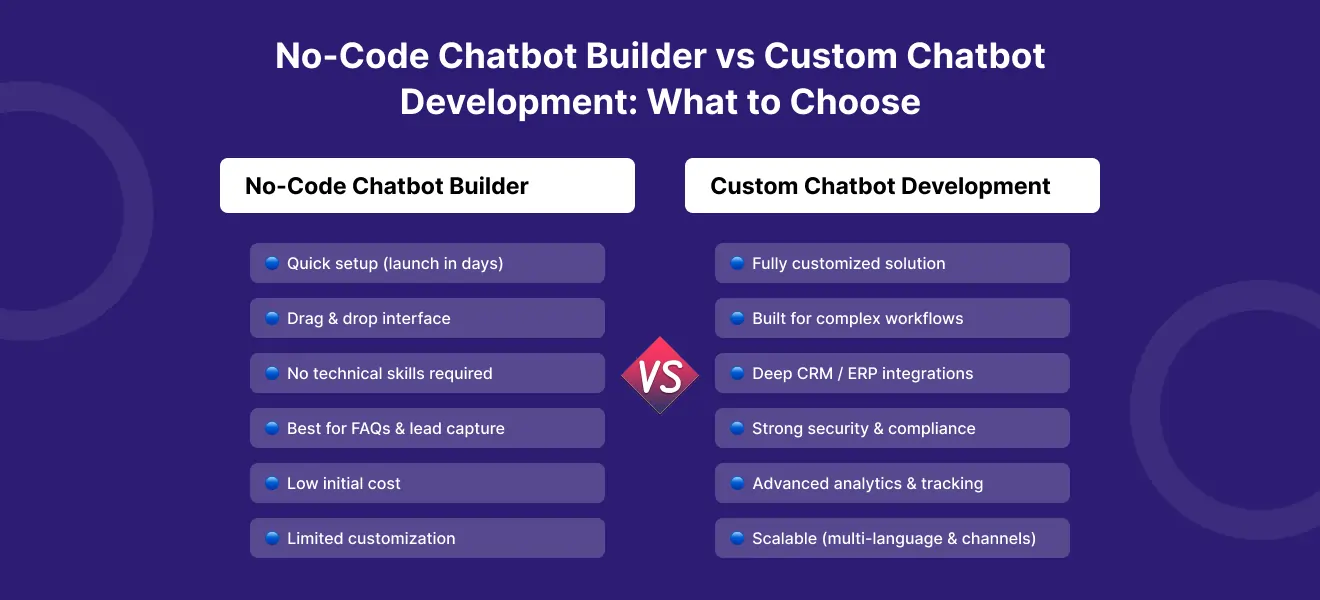
A no-code chatbot builder is ideal when you want to launch quickly with simple customer interactions. These platforms typically feature drag-and-drop interfaces and require minimal technical expertise, making them accessible to non-technical users. In contrast, custom chatbot development is driven by specific business needs and requires more technical expertise for advanced features, customization, and integration.
Understanding your business needs is crucial in choosing between no-code and custom chatbot development.
This guide explains how to choose the right approach, using a practical decision checklist you can apply to customer support, sales, and internal helpdesk use cases.
If you want help planning or building a production-ready chatbot, explore enterprise AI chatbot development services
Quick comparison
When comparing chatbot solutions, it’s important to understand the key differences between no-code chatbot platforms and custom bots. Use a no-code chatbot builder when you want speed and your workflows are simple. Choose custom chatbot development when you need control, security, and integrations.
| What you need | Best fit |
|---|---|
|
Launch fast with basic flows |
No-code builder (no-code chatbot platforms typically use drag-and-drop interfaces and pre-built templates for easy setup) |
|
Simple FAQ and lead capture |
No-code builder |
|
Complex workflows and business logic |
Custom development (custom bots are built from the ground up using frameworks like TensorFlow or OpenAI GPT) |
|
Deep CRM/helpdesk/ERP integration |
Custom development |
|
Strong security and auditability |
Custom development |
|
Scalable multilingual support + handoff |
Custom development |
|
You’re unsure and want to pilot |
Start no-code, plan migration |
What a no-code chatbot builder is (and where it fits)
A no-code chatbot builder—also known as a no-code chatbot or no-code platform—is a chatbot platform that lets teams create chat flows using drag-and-drop interfaces, pre-built templates, and visual tools. These no-code chatbot platforms are designed for non-technical users, requiring minimal coding skills or technical resources, making automation accessible to anyone with basic digital skills.
An AI chatbot builder enables users to create and customize chatbots using intuitive interfaces, pre-built templates, and integrations with messaging platforms, all without writing code. No-code solutions are budget-friendly, with initial investments starting around $45/month and typical costs under $150/month, making them accessible for startups and small businesses.
No-code chatbots can be launched in days to answer FAQs, capture leads, or handle routine support without involving developers. No-code chatbot builders help teams deploy chatbots quickly without developer support, making them ideal for structured tasks like FAQs or scheduling. These platforms typically include features like drag-and-drop interfaces, templates, and integrations with messaging platforms.
Best-fit use cases for no-code
No-code is usually a good fit for:
- basic FAQ bots
- lead generation, lead capture, and qualification—no-code chatbots can qualify leads by asking preset questions and engaging in automated conversations to efficiently collect customer information and screen prospects
- appointment booking
- simple customer support triage
- routing users to help center articles
- handling customer inquiries and enhancing customer interactions by providing instant, automated responses that improve engagement and customer satisfaction
For these use cases, speed matters more than deep customization.
No-code chatbots are ideal for structured, predictable tasks like FAQs or scheduling, but may not scale well for complex interactions. They can automate customer interactions, provide instant support, and reduce the workload on human agents. Additionally, no-code chatbots can be deployed in just a few days or weeks, while custom development can take several months.
Where no-code starts to break
No-code tools often struggle when you need (no code falls short when advanced AI capabilities or more advanced features are required):
- complex business logic and branching rules
- deep integrations with CRM, helpdesk, ERP, or internal systems
- custom UX across multiple channels
- advanced analytics and event tracking
- consistent behavior across many edge cases
- strong governance controls (RBAC, audit logs, data retention rules)
- more advanced features like compliance support or custom AI capabilities
- advanced AI capabilities such as sentiment analysis and contextual understanding
No-code chatbots can reduce ticket volume by allowing customers to resolve issues on their own, streamlining human agent workflows. However, they may struggle with high query volumes and complex workflows.
Many teams start with no-code successfully, but hit limits when workflows become more enterprise-grade.
What custom chatbot development is (and why enterprises choose it)
Custom chatbot development means building a chatbot specifically for your workflows, data sources, integrations, and operational requirements. This approach is common for enterprise chatbot use cases because it gives you full control over logic, integrations, and security, especially when you partner with a custom AI development company for end-to-end ML solutions.
Best-fit use cases for custom chatbots
Custom is usually the right choice for:
- customer support chatbots with reliable human handoff
- complex workflows (refunds, account changes, order issues, onboarding)
- multilingual support at scale
- knowledge-base chatbots grounded in internal documentation
- regulated industries with strict compliance requirements
- bots that must access enterprise systems safely
What you can control in custom builds
Custom development lets you control:
- the conversation and UI/UX design
- business rules and workflow orchestration
- integrations (CRM, ERP, helpdesk, payment systems)
- data access rules and permissions
- logging and audit trails
- evaluation and monitoring for response quality
- escalation triggers and safe fallback behavior
This control is why many organizations treat custom chatbot development as a product investment rather than a quick tool deployment.
7 decision factors to choose the right approach
This is the practical checklist most teams need.
1) Time to launch
- No-code: fastest path to a pilot
- Custom: slower start, but higher long-term capability
If you need something live quickly for basic tasks, no-code is often the best starting point.
2) Total cost of ownership (TCO)
No-code often looks cheaper at the start, but TCO changes as volume and complexity increase.
- No-code costs: subscription + usage limits + add-ons + workarounds
- Custom costs: build + maintenance + hosting + monitoring
At scale, custom systems can reduce per-interaction costs and give you more flexibility over infrastructure and integrations.
3) Integrations (CRM, helpdesk, ERP)
If the chatbot must read or update enterprise data, integration quality becomes critical.
- No-code: limited or templated integrations; often shallow
- Custom: deep integration, role-based access, business rules, approvals
If you need reliable workflows across multiple systems, custom is usually the safer choice, particularly when you design them as governed enterprise AI agents with clear safety and risk controls.
4) Security and compliance
Security requirements often determine the answer immediately.
Look for:
- role-based access control (RBAC)
- secure secrets management
- encryption in transit and at rest
- audit logs and traceability
- data retention and deletion rules
- sensitive data handling rules
- No-code: can be acceptable for low-risk use cases, but often limited controls
- Custom: best for compliance, auditability, and permission-aware design
5) Human handoff and escalation
Enterprise support requires strong escalation workflows.
- No-code: may support basic handoff, but context transfer can be limited
- Custom: full control of routing, context transfer, approval gates, and escalation triggers
If customers must repeat themselves after escalation, the bot is hurting support instead of helping it.
6) Analytics and chatbot performance metrics
If you can’t measure performance, you can’t improve it.
Key chatbot analytics include:
- CSAT and customer satisfaction by intent
- containment rate
- first-contact resolution
- handoff quality
- no-answer and fallback rate
- average handle time across bot + human flows
- No-code: often provides basic dashboards
- Custom: enables deeper tracking, event-level analytics, and performance monitoring tied to your workflows
7) Scalability (channels, languages, growth)
Scaling is not only about traffic. It’s also about:
- multiple channels (web, WhatsApp, email, app, voice)
- multilingual support
- multiple teams and queues
- knowledge base expansion
- evolving workflows
- No-code: can work well until complexity increases
- Custom: built for long-term growth and cross-system workflows
If your chatbot is part of core support operations, custom architecture scales better, and it helps to understand how AI agents, chatbots, and workflow automation compare when you design your long-term roadmap.
Cost and ROI: how to think about it
ROI is usually driven by:
- reducing repetitive support workload
- improving customer response time
- improving resolution speed
- reducing escalations through better knowledge retrieval
- improving handoff efficiency when escalation is needed
A common mistake is optimizing for “launch cost” instead of “support impact.”
No-code can create fast wins for simple use cases. Custom development often creates stronger ROI when the chatbot becomes part of customer support operations with integrations and measurable improvements.
Common mistakes to avoid
- Choosing no-code for enterprise workflows too early
- Choosing custom when needs are only basic FAQs
- Ignoring escalation design and human handoff
- Not defining success metrics and KPIs before launch
- Treating chatbots as static—without monitoring and iteration
Recommended rollout plan
Phase 1: Pilot quickly (2–4 weeks)
- focus on top 10 customer intents
- start with one channel
- define success metrics early
- keep scope small
Phase 2: Add grounding and integrations
- connect helpdesk and CRM
- integrate knowledge sources
- improve escalation routing
- implement analytics and monitoring
Phase 3: Scale with governance
- add role-based access and audit logs
- expand languages and channels
- build a continuous improvement workflow
- measure and optimize chatbot performance metrics
This phased approach works whether you start with no-code or go custom from day one.
Work with WebbyCrown Solutions
WebbyCrown Solutions is a web design and development company that helps organizations choose the right chatbot approach and implement production-ready systems.
We can help with:
- chatbot strategy and UX planning
- knowledge-base and integration architecture
- multilingual support and human handoff design
- security, compliance, and auditability
- KPI tracking and continuous optimization
If you need a production-ready implementation on your existing site, especially WordPress, consider WordPress AI development services
FAQs
Is a no-code chatbot builder good for customer support?
Yes for basic support use cases like FAQs and simple routing. For complex workflows, integrations, and escalation quality, custom chatbots perform better.
When do I need custom chatbot development?
When you need deep integrations, strong security controls, multilingual scale, reliable human handoff, or complex business logic.
Can I start with no-code and move to custom later?
Yes. Many teams start with no-code to validate intents and scripts, then migrate to custom once workflows and integrations expand.
How do we add human handoff properly?
Use confidence-based escalation triggers, sentiment signals, and structured context transfer so human agents can continue without customers repeating themselves.
How do we measure chatbot performance?
Track CSAT, containment, first-contact resolution, handoff quality, fallback rate, and handle time across bot + human workflows.
How do we secure an enterprise chatbot?
Implement RBAC, audit logs, secure API integrations, encryption, data minimization, and clear rules for sensitive data handling.