Summarize This Article With AI
In 2026, the question isn’t “Should we use AI?”—it’s what kind of AI (or automation) is right for this job. The wrong choice can create hidden costs: broken workflows, security gaps, poor customer experience, or unreliable outputs. This guide helps you choose the right option—chatbot, automation, or AI agent—based on real operational needs and risk, focusing on the key differences between these intelligent systems.
What changed in 2026
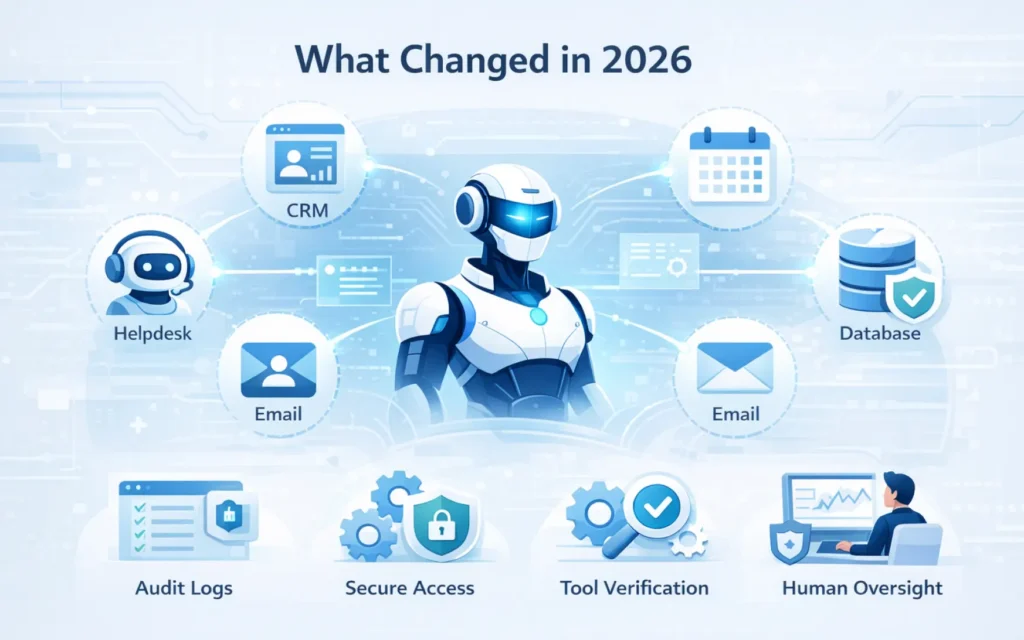
AI agents can now use tools (CRM, helpdesk, email, calendars, databases) to complete multi-step tasks. That makes them powerful autonomous AI agents—but also riskier. Mature customer service teams treat agents like production systems: least-privilege access, audit logs, tool-result verification, monitoring, and human oversight for high-impact actions. For stable workflows, AI automation still delivers the safest and fastest wins.
Quick definitions
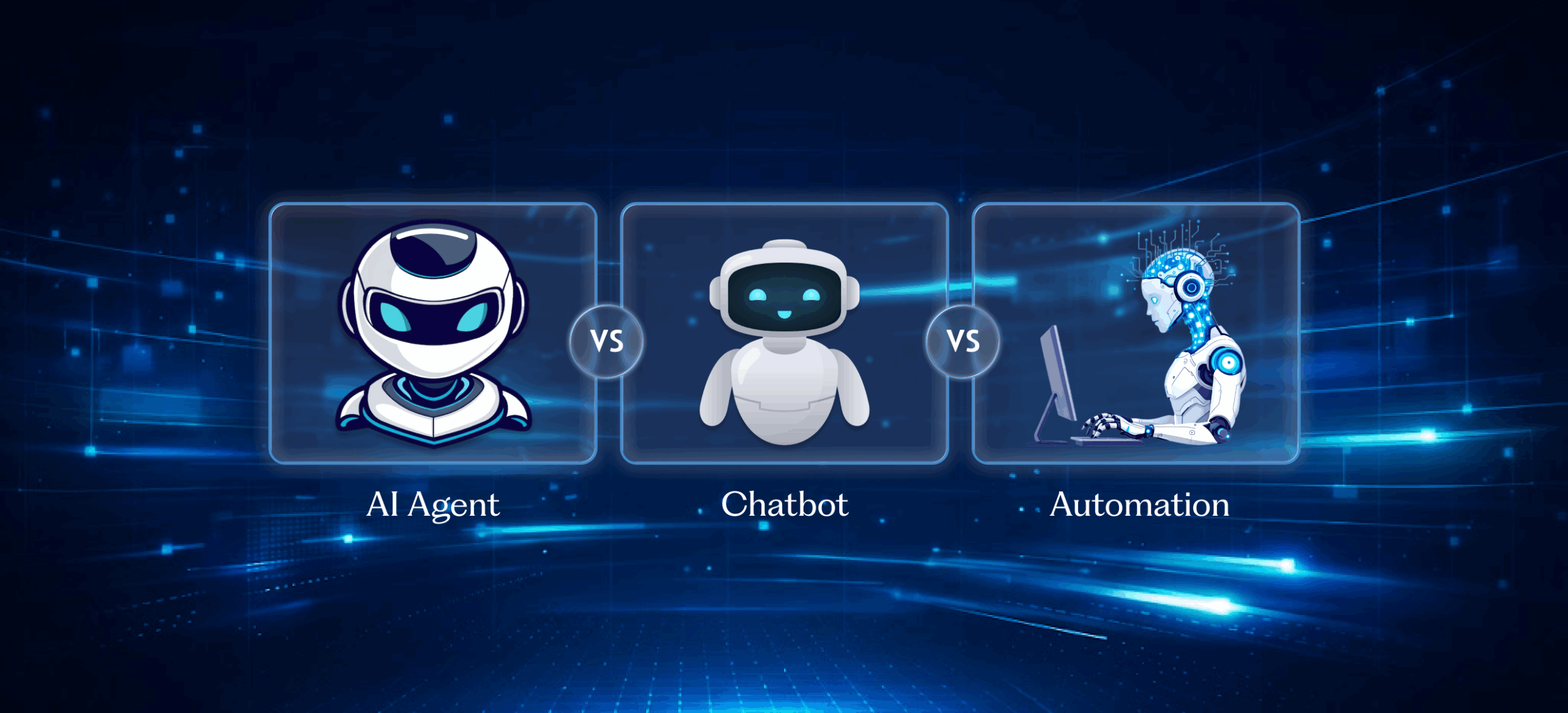
Chatbot: A conversational AI interface that answers customer queries and guides users through simple flows—usually limited in actions and relying on scripted responses.
Automation: Rule-based systems that execute repeatable steps reliably through triggers, conditions, and approvals, streamlining workflows and repetitive tasks.
AI Agent: A goal-driven autonomous system that can plan and complete multi-step tasks across tools and data sources—best with guardrails and human intervention, especially when implemented through specialized enterprise AI agent development services.
The simplest way to decide
- Need to talk and guide users in natural language? → Chatbot
- Need to execute predictable steps with intelligent automation? → Automation
- Need to decide + act across multiple systems using AI systems? → AI Agent (with strict controls)
Comparison table (fast decision)
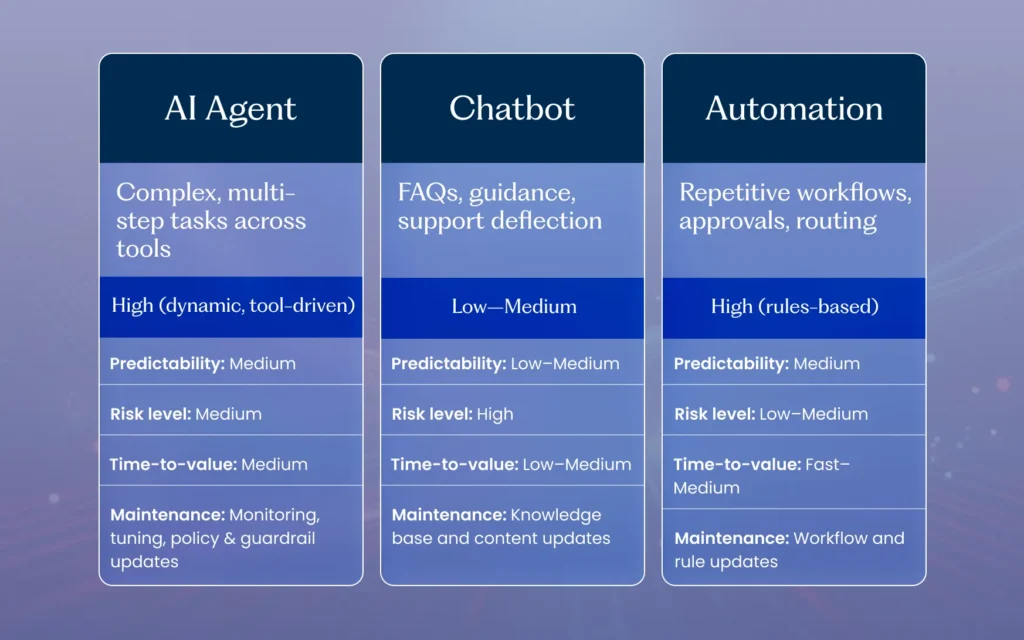
| Criteria | Chatbot | Automation | AI Agent |
|---|---|---|---|
| Best for | FAQs, guidance, support deflection | Repetitive workflows, approvals, routing | Complex multi-step tasks across tools |
| Action-taking | Low–Medium | High (rules-based) | High (dynamic, tool-driven) |
| Predictability | Medium | High | Medium (depends on guardrails + evaluation) |
| Risk level | Low–Medium | Low–Medium | Medium–High |
| Time-to-value | Fast | Fast–Medium | Medium |
| Maintenance | Knowledge/content updates | Rule updates, exception handling, periodic audits | Monitoring, tuning, policy/guardrail updates |
| Data sensitivity tolerance | Medium | High (when governed) | Requires strict controls |
| Best oversight | Escalation to human agent | Exception handling | Human-in-the-loop for high-impact actions |
Quick call
- Want safe, repeatable outcomes → Automation
- Want fast answers and guided flows → Chatbot
- Want end-to-end task completion across systems → AI Agent (with proper governance)
Decision framework (5 steps)
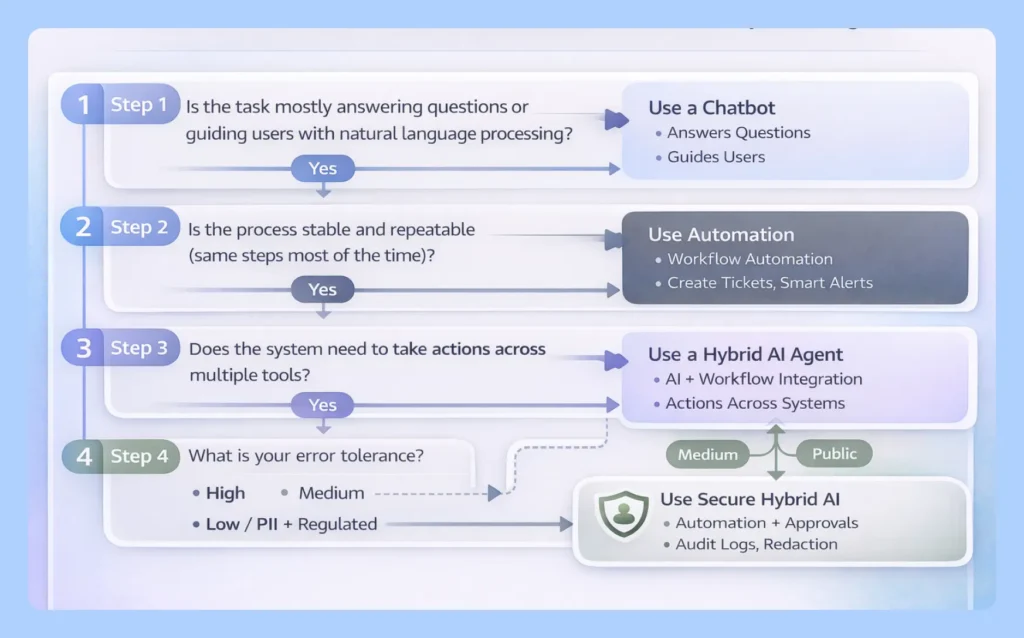
Step 1: Is the task mostly answering questions or guiding users with natural language processing?
- Yes → Chatbot
- No → go to Step 2
Step 2: Is the process stable and repeatable (same steps most of the time)?
- Yes → Automation
- No → go to Step 3
Step 3: Does the system need to take actions across multiple tools?
Examples: CRM, ERP, helpdesk, email, scheduling, inventory, billing, HR systems.
- Yes → AI Agent or Hybrid
- No → Chatbot (knowledge) or Automation (rules)
Step 4: What is your error tolerance?
- Low (money, compliance, refunds, access, account changes): Automation or AI Agent with approvals
- Medium (internal drafts, summaries, recommendations): AI Agent can work with monitoring
- High (research, ideation, first drafts): AI Agent is suitable
Step 5: How sensitive is the data?
- PII / regulated / confidential: Automation first, or AI Agent with RBAC, audit logs, redaction, approvals
- Public / non-sensitive: Chatbot or AI Agent
Expert note: If your workflow changes frequently (weekly/monthly), pure automation can become brittle. Use automation for stable steps and an AI agent for exceptions—but require approvals for risky actions.
Use-case playbooks (all industries)
1) Customer support: FAQs + order/status + ticketing
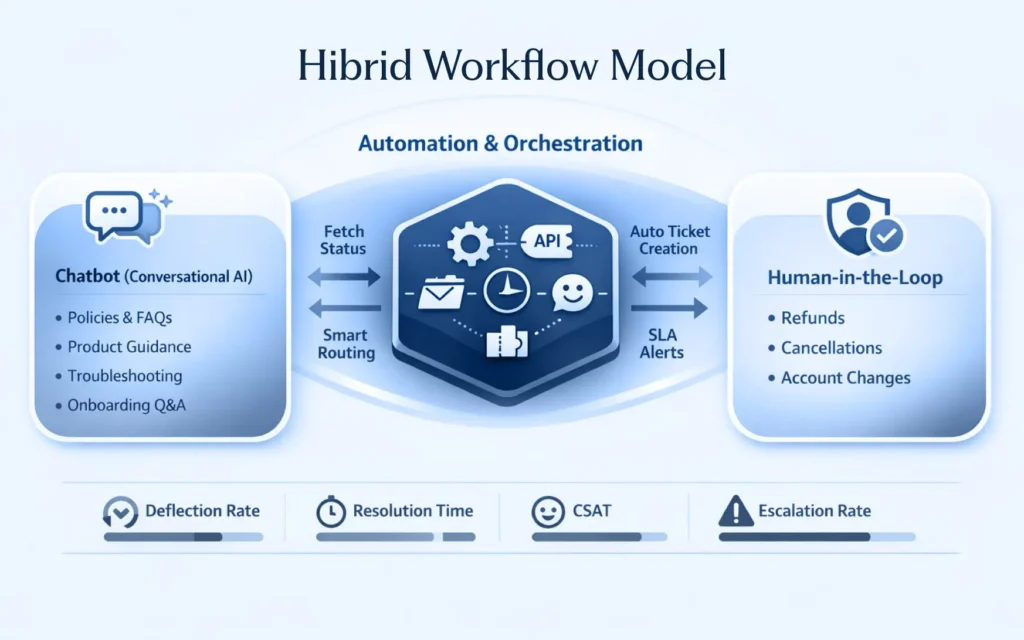
Best choice: Chatbot + Automation (hybrid) for teams that may later extend to fully managed enterprise AI chatbot development services
- Chatbot: policies, product guidance, troubleshooting, onboarding Q&A using conversational AI
- Automation: fetch status, create tickets, route issues, SLA alerts
- Human approval: refunds, cancellations, account changes
KPIs: deflection rate, resolution time, CSAT, escalation rate
2) Sales lead qualification + routing
Best choice: AI Agent (guardrails) + Automation
- Agent: ask dynamic questions, summarize customer intent, draft follow-ups, recommend next steps using large language models
- Automation: CRM updates, owner assignment, meeting booking, follow-up tasks
- Human approval: outbound emails for enterprise / regulated industries
KPIs: speed-to-lead, qualified rate, meetings booked, pipeline quality
3) Appointment scheduling + reminders
Best choice: Automation (chatbot optional)
- Automation: availability checks → booking → confirmations → reminders → rescheduling rules
- Optional chatbot: capture constraints and preferences using natural language processing
KPIs: booking completion, no-show rate, reschedule success rate
4) HR / Internal IT requests (policies + access requests)
Best choice: Chatbot + AI Agent (controlled)
- Chatbot: HR/IT policy Q&A, onboarding steps, self-serve guidance
- Agent: draft checklists, summarize tickets, propose resolutions, guide multi-step requests
- Automation: approval routing and ticket creation
- Human approval: any access provisioning or permission changes
KPIs: time-to-resolution, ticket deflection, first-contact resolution
5) Finance operations: invoices + approvals + exceptions
Best choice: Automation first; AI Agent as “proposal-only assistant”
- Automation: intake → validation rules → approvals → posting
- Agent: anomaly suggestions, categorization proposals, draft communications
- Human approval: payments, credits, write-offs
KPIs: processing time, error rate, audit readiness, exception rate
6) Operations & procurement: vendor requests + approvals
Best choice: Automation + AI Agent (suggest → approve → execute)
- Agent: summarize vendor options, extract requirements, draft purchase requests
- Automation: approval routing, PO creation, vendor notifications
- Human approval: final purchase authorization
KPIs: cycle time, compliance rate, cost control, rework reduction
7) Marketing & content ops: production at scale
Best choice: AI Agent + Human review + Automation
- Agent: outlines, drafts, repurposing, variant creation using generative AI
- Human: factual checks, brand tone, final edits
- Automation: approvals, publishing workflow, distribution tasks
KPIs: content throughput, quality score, organic growth, revision cycles
8) Customer success: renewals + account health
Best choice: AI Agent + Automation
- Agent: summarize account signals, risks, next-best-actions
- Automation: tasks, reminders, QBR scheduling, CRM updates
Human: strategy, negotiation, relationship management
KPIs: retention, expansion, response time, renewal cycle time
When NOT to use an AI agent
Avoid letting an autonomous AI agent execute end-to-end when:
- the workflow is stable and high-risk (payments, access changes, legal actions) → prefer automation + approvals
- you can’t provide audit logs, strong permissions, and monitoring
- your knowledge base and internal data are messy, outdated, or unmanaged
- the agent would need broad access you aren’t ready to govern (over-permissioning is a common failure mode)
Risk, governance & safety in 2026
For organizations adopting AI agents at scale, it’s important to pair technical controls with an operational framework that defines safe AI agent use cases, risks, and governance controls across teams.
Key risks
- Wrong actions: incorrect updates, wrong customer record, wrong transaction
- Hallucinations: invented facts leading to bad decisions
- Prompt injection: users try to bypass policy or extract data
- Over-permissioning: agent has access beyond what’s necessary
- Silent failures: tool calls fail but the system reports success
Guardrails for safe deployment
- Least privilege access: minimum permissions required
- Tool confirmation: verify tool outcomes (no “assumed done”)
- Human-in-the-loop: approvals for high-impact actions (money, access, contracts)
- Audit logs: trace every action and tool call
- Monitoring: detect anomalies, failure spikes, risky prompt patterns
- Evaluation metrics: task success rate, tool success rate, escalation rate, safe completion rate, user satisfaction
- Kill switch (break-glass): ability to instantly disable the agent and revert to humans/automation
Rule of thumb: If a mistake can cost money, compliance, or trust—use automation, or an agent with approvals.
Implementation roadmap (pilot → scale)
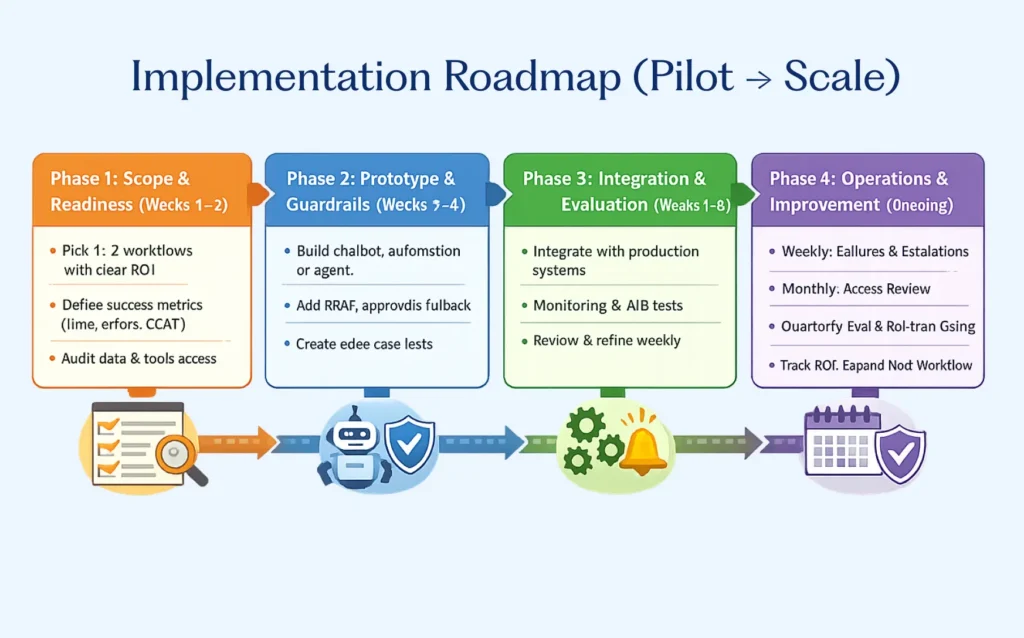
Phase 1: Scope & readiness (Weeks 1–2)
- Pick 1–2 workflows with clear ROI and manageable risk
- Define success metrics (time saved, error reduction, CSAT, conversion, cycle time)
- Audit data sources and sensitivity; confirm what tools the system will access
Phase 2: Prototype & guardrails (Weeks 3–4)
- Build: chatbot KB OR automation workflow OR agent in sandbox
- Add: RBAC, approval steps, fallback to humans, logging
- Create test cases for edge scenarios (exceptions, missing data, adversarial prompts)
Phase 3: Integration & evaluation (Weeks 5–8)
- Integrate with production systems carefully
- Add monitoring + alerting + error handling
- Run evaluation (and A/B tests if customer-facing)
- Review failures weekly and refine prompts/tools/rules
Phase 4: Operations & improvement (ongoing)
- Weekly: review failures + escalations (Owner: Ops/Support lead)
- Monthly: access review + policy refresh (Owner: Security/IT)
- Quarterly: evaluation refresh + red-team testing (Owner: Product/AI lead)
- Track ROI and expand to the next workflow only after the first is stable
FAQs
What’s the difference between an AI agent and a chatbot?
A chatbot primarily answers and guides using predefined rules and scripted responses. An AI agent can plan and take multi-step actions across tools—so it needs stronger controls and can understand context and customer intent.
Do I need an AI agent or just automation?
If the process is stable and repeatable, choose automation. Use an agent when tasks require judgment, autonomous decision making, or cross-system actions.
Are AI agents safe for customer support teams?
Yes—when scoped properly. Use a chatbot for FAQs, automation for predictable actions, and agents for complex cases with escalation/approval.
What’s the safest approach to start with in 2026?
Start with automation for execution + chatbot for self-service. Add AI agents only when you need multi-step decisions and dynamic environments.
Can a chatbot trigger automation?
Yes. This is a common and effective hybrid: chatbot handles conversation; automation handles execution.
What controls should I require before deploying AI agents?
Least privilege access, audit logs, tool-result verification, monitoring, evaluation metrics, and human approval for high-impact actions.
Written by / reviewed by / evaluation
Written by: AI Solutions Architect (8+ years in web and automation systems)
Reviewed by: Security & Compliance Lead
How we evaluated: We compared chatbots, automation, and AI agents across eight criteria: action-taking ability, predictability, cost, integration effort, risk exposure, maintenance needs, time-to-value, and data sensitivity.